Showing posts with label encoding. Show all posts

Sunday, November 25, 2018

TUCTF 2018 - Reversing

Table of Contents

Danger Zone (112)

Description:
Difficulty: easy

Legend says, this program was written by Kenny Loggins himself.

In the first challenge we're given a dangerzone.pyc file.

First we can extract the original python file using uncompyle6:

$ uncompyle6 dangerzone.pyc > dangerzone.py

This gives us the original source:

import base64

def reverse(s):
    return s[::-1]


def b32decode(s):
    return base64.b32decode(s)


def reversePigLatin(s):
    return s[-1] + s[:-1]


def rot13(s):
    return s.decode('rot13')


def main():
    print 'Something Something Danger Zone'
    return '=YR2XYRGQJ6KWZENQZXGTQFGZ3XCXZUM33UOEIBJ'


if __name__ == '__main__':
    s = main()
    print s

Looks like we have a lot of unused dead code functions and a return value (s) which is is shown when running the pyc normally:

Something Something Danger Zone
=YR2XYRGQJ6KWZENQZXGTQFGZ3XCXZUM33UOEIBJ

We probably didn't need to recover the python file to solve it, but we'll use the given functions to make our lives easier.

First this looks like base64, so we can use the provided b32decode after reverse, because = always goes at the end of a base64 encoded string:

print b32decode(reverse(s))

This gives us:

Something Something Danger Zone
HPGS{e3q_y1a3_0i3ey04q}G

Looks very close to a flag! : )

Now we have reversePigLatin (rotates misplaced end character to the front) & rot13 remaining:

print rot13(reversePigLatin(b32decode(reverse(s))))

And that was it!

TUCTF{r3d_l1n3_0v3rl04d}

yeahright (149):

Description:
Difficulty: very easy

What an insensitive little program.
Show it who's boss!

nc 18.224.3.130 12345

This challenge went quickly after looking at the strings:

$ r2 yeahright

[0x00000810]> iz
[Strings]
Num Paddr      Vaddr      Len Size Section  Type  String
000 0x00000a98 0x00000a98  40  41 (.rodata) ascii 7h3_m057_53cr37357_p455w0rd_y0u_3v3r_54w
001 0x00000ac1 0x00000ac1  20  21 (.rodata) ascii *Ahem*... password?
002 0x00000ad6 0x00000ad6  10  11 (.rodata) ascii yeahright!
003 0x00000ae1 0x00000ae1  15  16 (.rodata) ascii /bin/cat ./flag

Looks like it checks a password (hard-coded) and cats the flag if it's correct, trying it locally we get the dummy flag with that 'secret' string:

$ ./yeahright
*Ahem*... password? 7h3_m057_53cr37357_p455w0rd_y0u_3v3r_54w
flag{test-flag-here}

Trying it remotely we get the real flag:

$ echo '7h3_m057_53cr37357_p455w0rd_y0u_3v3r_54w' | nc 18.224.3.130 12345
TUCTF{n07_my_fl46_n07_my_pr0bl3m}

Shoop (370):

Description:
Difficulty: easy

Black Hole Sun, won't you come
and put sunshine in my bag
I'm useless, but not for long
so whatcha whatcha whatcha want?

nc 18.220.56.147 12345

This challenge also had a cat ./flag function with an interesting secret value:

$ rabin2 -z shoop
vaddr=0x00000c24 paddr=0x00000c24 ordinal=000 sz=24 len=23 section=.rodata type=ascii string=Gimme that good stuff:
vaddr=0x00000c3c paddr=0x00000c3c ordinal=001 sz=17 len=16 section=.rodata type=ascii string=Survey Says! %s\n
vaddr=0x00000c4d paddr=0x00000c4d ordinal=002 sz=22 len=21 section=.rodata type=ascii string=jmt_j]tm`q`t_j]mpjtf^   <-
vaddr=0x00000c63 paddr=0x00000c63 ordinal=003 sz=14 len=13 section=.rodata type=ascii string=That's right!
vaddr=0x00000c71 paddr=0x00000c71 ordinal=004 sz=16 len=15 section=.rodata type=ascii string=/bin/cat ./flag
vaddr=0x00000c81 paddr=0x00000c81 ordinal=005 sz=18 len=17 section=.rodata type=ascii string=Close... probably

If we look at an ltrace run of the binary, we can see the expected input buffer size:

$ ltrace -fi ./shoop

[pid 5129] [0x7f2ed20759b6] setvbuf(0x7f2ed1e4a400, 0, 2, 20)                                    = 0
[pid 5129] [0x7f2ed20759d4] setvbuf(0x7f2ed1e4a640, 0, 2, 20)                                    = 0
[pid 5129] [0x7f2ed20759eb] malloc(22)                                                           = 0x7f2ed2516010
[pid 5129] [0x7f2ed2075a09] memset(0x7f2ed2516010, '\0', 22)                                     = 0x7f2ed2516010
[pid 5129] [0x7f2ed2075a1a] printf("Gimme that good stuff: "Gimme that good stuff: )             = 23
[pid 5129] [0x7f2ed2075a31] read(0AAAAAAAAAAAAAAAAAAAAAAAAAAAAAA , "AAAAAAAAAAAAAAAAAAAAA", 21)  = 21
[pid 5129] [0x7f2ed2075a3e] malloc(21)                                                           = 0x7f2ed2516030
[pid 5129] [0x7f2ed2075a95] memcpy(0x7f2ed2516010, "AAAAAAAAAAAAAAAAAAAAA", 21)                  = 0x7f2ed2516010
[pid 5129] [0x7f2ed2075b34] memcpy(0x7f2ed2516010, "<<<<<<<<<<<<<<<<<<<<<", 21)                  = 0x7f2ed2516010
[pid 5129] [0x7f2ed2075b4c] printf("Survey Says! %s\n", "<<<<<<<<<<<<<<<<<<<<<"Survey Says! <<<<<<<<<<<<<<<<<<<<<)  = 35
[pid 5129] [0x7f2ed2075b65] memcmp(0x7f2ed2516010, 0x7f2ed2075c4d, 21, -1)                       = 0xffffffd2
[pid 5129] [0x7f2ed2075b8f] puts("Close... probably"Close... probably)                           = 18
[pid 5129] [0xffffffffffffffff] +++ exited (status 0) +++

It reads 21 bytes using read(...) and malloc's the same length.

If we look at the secret string from the strings output, it's also 21 bytes:

jmt_j]tm`q`t_j]mpjtf^

Seems like it transformed the input character 'A' into '<', this would be a shift of 5 if it's that simple:

>>> print ord('A') - ord('<')
5

Trying a couple other values it seems to keep the pattern:

$ ./shoop
Gimme that good stuff: AAAABBBBCCCCDDDDEEEE
Survey Says! >>>====<<<<@@@@????>
Close... probably

We can verify this with a small python list comprehension:

>>> ''.join([chr(ord(x) + 5) for x in '>>>====<<<<@@@@????>'])
'CCCBBBBAAAAEEEEDDDDC'

Hmmmmm, why is it out of order? Seems like it's a shift and order modification.

Let's see if we can map both at once:

$ python -c 'import string; print string.uppercase[:21]' | ./shoop
Gimme that good stuff: Survey Says! FEDCBA@?>=<PONMLKJIHG
Close... probably

$ python
>>> encoded = ''.join([chr(ord(x) + 5) for x in 'FEDCBA@?>=<PONMLKJIHG'])
>>> encoded # inspect encoding placement
'KJIHGFEDCBAUTSRQPONML'
>>> ''.join(sorted(encoded)) # check for data loss
'ABCDEFGHIJKLMNOPQRSTU'

Looks like we don't lose any characters during the encoding, so we could map each value from the encoded to the plaintext:

dest = 'KJIHGFEDCBAUTSRQPONML'
source = 'ABCDEFGHIJKLMNOPQRSTU'

# dest -> source
mapping = map(lambda ch: source.find(ch), dest)

print mapping

This gives us the index transposition map:

[10, 9, 8, 7, 6, 5, 4, 3, 2, 1, 0, 20, 19, 18, 17, 16, 15, 14, 13, 12, 11]

Next up is to convert the secret string we found using the two transformations above -- shift & order.

Starting with the shift, it gives us something clean:

>>> ''.join([chr(ord(x) + 5) for x in 'jmt_j]tm`q`t_j]mpjtf^'])
'orydobyreveydobruoykc'

Now we can modify our script to get the correct order:

dest = 'KJIHGFEDCBAUTSRQPONML'
source = 'ABCDEFGHIJKLMNOPQRSTU'
target = 'orydobyreveydobruoykc'

# dest -> source
mapping = map(lambda ch: source.find(ch), dest)
result = ''.join(map(lambda m: target[m], mapping))

print result

The Result:

everybodyrockyourbody

Attempting this as the password locally drops the fake flag:

$ ./shoop

Gimme that good stuff: everybodyrockyourbody
Survey Says! jmt_j]tm`q`t_j]mpjtf^
That's right!
flag{test-flag-here}

Trying the remote, we get the flag!

$ echo 'everybodyrockyourbody' | nc 18.220.56.147 12345

Gimme that good stuff: everybodyrockyourbody
Survey Says! jmt_j]tm`q`t_j]mpjtf^
That's right!
TUCTF{5w337_dr34m5_4r3_m4d3_0f_7h353}

Sunday, May 1, 2016

Google CTF 2016 - Magic Codes (250)


Google's opened up their first CTF out there this year and it was a very fun one!
This particular challenge was Stego, found in the Forensics category.
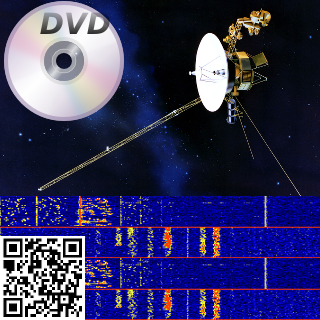
In the description it gave you "Can you recover the magic code?" with a link to an image:


Initial thoughts are... Okay, we have this image that's very retro with a DVD, a Satelite, a QR code & something that looks like a frequency visualization of some sort...

What could this possibly be, maybe QR Code mixed with the result of the frequency visualization turned into audio ? (I may be this sinister if I ever start designing challenges)

I first tried the QR code, and it seemed to be some trolling or self-advertising (or both), that linked to the CTF page. (https://capturetheflag.withgoogle.com/)


This wasn't it so I moved on to my usual routine with stego images.
Fired up StegSolve and looked at the bit planes of the image.

For anyone interested in the full process, I've included a step-by-step instruction below, you can find the link to the StegSolve on this list - https://github.com/apsdehal/awesome-ctf#stegano


First open up the StegSolve program:


You should see StegSolve pop up:


 Now open the file you would like to analyze:


You'll see the image, and at the bottom there is a left and right arrow used to cycle through common image manipulation operations that could help with identifying hidden data:


Ended up stopping at Alpha Plane 0, this seemed like a very clear chunk of data hidden in the lowest alpha plane:


Go ahead and save the image somewhere, I saved it using the default name (solved.bmp):


Now was the tricky part... what do we do with this data?

I started by reading the bits in with python, unfortunately nothing too useful looking came out of that..

Looking at the image I reconsidered the possibility of the visual frequency image being part of the challenge, but didn't know how.  Eventually googled all the items on the image together to see if they had any relationship.  I searched for:  "dvd satellite qr code" - http://lmgtfy.com/?q=dvd+satellite+qr+code

And one of the first results was a page on Reed-Solomon error correction codes.  It mentioned on that page, that all of these mediums shown in the image used Reed-Solomon error correction.... that couldn't just be a coincidence.


So looking around for a python library to handle this I found one quickly on PyPi - https://pypi.python.org/pypi/reedsolo


Started to write a few examples up pulling in the alpha image that was extracted, but found nothing.  I wasn't really sure which Codec to use at first.  Even started writing a brute-forcer to check each Codec available up to 100.


After a while (giving up and looking at other challenges) -- I saw an update on the Magic Code challenge, mentioning the metadata was updated.  Running exiftool again now gave this interesting result:

» exiftool MagicCode.png
ExifTool Version Number         : 10.08
File Name                       : MagicCode.png
Directory                       : .
File Size                       : 187 kB
File Modification Date/Time     : 2016:05:01 11:22:52-07:00
File Access Date/Time           : 2016:05:01 11:31:48-07:00
File Inode Change Date/Time     : 2016:05:01 11:22:52-07:00
File Permissions                : rw-r--r--
File Type                       : PNG
File Type Extension             : png
MIME Type                       : image/png
Image Width                     : 320
Image Height                    : 320
Bit Depth                       : 8
Color Type                      : RGB with Alpha
Compression                     : Deflate/Inflate
Filter                          : Adaptive
Interlace                       : Noninterlaced
Comment                         : (40,8) bytes
Image Size                      : 320x320
Megapixels                      : 0.102


Interesting! There was now a new Comment!  This also looks like it may be the Codec I was looking for, but why were there two values?  Had to look more into how reed solomon correction codes worked....


Comment                         : (40,8) bytes


I immediately noticed 40 * 8 = 320 (size of the image width/height) -- so it must have to do with how the image was formed, and maybe the developer went with that for convenience.


Also started looking at the constructor for this python reedsolo lib, because it showed only one value being passed into the codec constructor in the examples.
The constructor can be found here - https://github.com/tomerfiliba/reedsolomon/blob/master/reedsolo.py#L746


    def __init__(self, nsym=10, nsize=255, fcr=0, prim=0x11d, generator=2, c_exp=8):
        '''Initialize the Reed-Solomon codec. Note that different parameters change the internal values (the ecc symbols, look-up table values, etc) but not the output result (whether your message can be repaired or not, there is no influence of the parameters).'''
        self.nsym = nsym # number of ecc symbols (ie, the repairing rate will be r=(nsym/2)/nsize, so for example if you have nsym=5 and nsize=10, you have a rate r=0.25, so you can correct up to 0.25% errors (or exactly 2 symbols out of 10), and 0.5% erasures (5 symbols out of 10).
        self.nsize = nsize # maximum length of one chunk (ie, message + ecc symbols after encoding, for the message alone it's nsize-nsym)
        self.fcr = fcr # first consecutive root, can be any value between 0 and (2**c_exp)-1
        self.prim = prim # prime irreducible polynomial, use find_prime_polys() to find a prime poly
        self.generator = generator # generator integer, must be prime
        self.c_exp = c_exp # exponent of the field's characteristic. This both defines the maximum value per symbol and the maximum length of one chunk. By default it's GF(2^8), do not change if you're not sure what it means.


So it looks like the first argument they show in the examples is nsym...
In the comment they're showing two values (40, 8) -- in conventional reed solomon this will be (nsize, ndata) but in this library they're using (nsym, nsize).  The nysm value is just (nsize-ndata).  More information can be found on that here - http://iris.elf.stuba.sk/JEEEC/data/pdf/11-12_103-05.pdf

So now we know the second argument (nsize) is 40, and the first argument is (nsize-ndata) or 32.
The codec portion of this took me the longest to figure out, but with all of that in place, we have the final decoder! (I had noticed this when anything came out of the decoder that wasn't \x00 or an empty string...)


#!/usr/bin/env python
import sys
import reedsolo
from PIL import Image

if (len(sys.argv) > 1):
  IMG_FILE = sys.argv[1]
else:
  print "Usage: $ readImg "
  exit(1)

img = Image.open(IMG_FILE).convert('1')
data = img.getdata()
pixels = img.load()

bits = []

for x in range(img.size[0]):
  for y in range(img.size[1]):
    pixel = pixels[y,x]
    if pixel == 0:
      bits.append("0")
    else:
      bits.append("1")

b = "".join([str(x) for x in bits])
bytes = bytearray(int(b[x:x+8], 2) for x in range(0, len(b), 8)).rstrip("\xff")

rs = reedsolo.RSCodec(32, 40)
print repr(rs.decode(bytes))

f = open("SomeBytez", "w")
f.write(rs.decode(bytes))
f.close()


This dropped a gzip file from the looks of it using file:

» file SomeBytez
SomeBytez: gzip compressed data, last modified: Wed Apr 27 14:43:24 2016, max compression


We have to move it to a .gz file to uncompress it as gunzip requires this.

» mv SomeBytez someBytez.gz
» gunzip someBytez.gz
» file someBytez
someBytez: ASCII text, with no line terminators
» cat someBytez
Congratulations, Voyager!  Your flag is: CTF{who_knew_math_helped_with_anything_but_crypto}%


We've got the Flag!!! Never thought this one was going to work, but it did!
Learned a lot about erasure codes during this process! Good Ol' Information Theory :D

CTF{who_knew_math_helped_with_anything_but_crypto}


Tuesday, September 22, 2015

CSAW 2015 - Recon & Trivia


The Recon on this CTF was very involved, and I love whenever challenges like these are designed and presented.

It felt like the point count vs. effort was a little off overall in this CTF, but I still enjoyed solving each of these!

Julian Cohen (100)


The "Julian Cohen" challenge was one of the easiest out of all the Recon ones.  You search for "CTF Julian Cohen" and you find the twitter handle HockeyInJune, which was recognizable as one of the admins on the CSAW CTF.  The note read:
Enough cocks, cabs, hockey, laser beams, and dates.  This year's recon challenge is going to be easy:
flag{f7da7636727524d8681ab0d2a072d663}
Source: https://twitter.com/HockeyInJune/status/641716034068684800

And just like the tweet says.. that one was easy! : )


Alexander Taylor (100)


This challenge was definitely the most involved.  It felt like it could've been 150-200 pts instead of 100.  There were multiple steps, starting from this point:
http://fuzyll.com/csaw2015/start

This link responds with some text:
CSAW 2015 FUZYLL RECON PART 1 OF ?: Oh, good, you can use HTTP! The next part is at /csaw2015/<the acronym for my university's hacking club>.

So the first clue tells us to look for his university's hacking club.
Searching for this yields the following article:
Google Query: "Alexander Taylor" + club hacking security
http://www.usforacle.com/news/view.php/688459/Students-hacked-their-way-into-national-
Whitehatters (WCSC) is the club's name mentioned in the article.

Now trying http://fuzyll.com/csaw2015/wcsc, we get a response with the next clue:
CSAW 2015 FUZYLL RECON PART 2 OF ?: TmljZSB3b3JrISBUaGUgbmV4dCBwYXJ0IGlzIGF0IC9jc2F3MjAxNS88bXkgc3VwZXIgc21hc2ggYnJvdGhlcnMgbWFpbj4uCg==
Okay, base64 decode that, and we get:
$ echo 'TmljZSB3b3JrISBUaGUgbmV4dCBwYXJ0IGlzIGF0IC9jc2F3MjAxNS88bXkgc3VwZXIgc21hc2ggYnJvdGhlcnMgbWFpbj4uCg==' | base64 -D

Nice work! The next part is at /csaw2015/<my super smash brothers main>.

Now we need to find the Super Smash main character he uses. Earlier I had found his twitter handle after searching his name, recognized it just like HocketInJune: https://twitter.com/fuzyll

Looking at his Tweets & Replies I found this message - https://twitter.com/fuzyll/status/629388270791581697
@who_is_KDB: I analyzed a game of yours in a SmashBoards thread (http://smashboards.com/threads/unpopular-opinion-yoshi-is-not-high-tier-evidence-inside.412944/page-2#post-19852453 …). Thoughts?

Following that link, I found his Super Smash forum user profile.  Hovering over the icons under his avatar you see one says main.  Going into his profile you see a clear listing of this with the names displayed: http://smashboards.com/members/fuzyll.300464/#info
...
Smash 64 Main: Ness
Melee Main: Ness
Brawl Main: Random
Smash WiiU Main: Yoshi

I tried Ness / ness at first, but that didn't work... Then I tried Yoshi (my favorite character) and that was it!

http://fuzyll.com/csaw2015/yoshi


This cute image of Yoshi was the only thing on the page.  When saving the file it saved with the .txt extension.

Now if we strings that (because it still is a PNG) -- we'll get this:

$ strings ~/Downloads/yoshi.txt | head

IHDR
bKGD
pHYs
tIME
tEXtComment
CSAW 2015 FUZYLL RECON PART 3 OF ?: Isn't Yoshi the best?! The next egg in your hunt can be found at /csaw2015/.
IDATx
smBl
$h;!|
yYp19dn

The next part is the cryptosystem he had to break during his first Defcon Quals CTF.

This admittedly took me a long time to figure out,  after looking again at his CTF group in college - "Whitehatters (WCSC)" -- I found a listing of their competition history:
http://www.wcsc.usf.edu/scoreboard

Looking at that page, we can find the Defcon Quals they participated in. After looking around for a while, trying to find any writeups they may have created for this challenge, I couldn't find any and decided to find others who may have posted one.

On one Defcon 18 Quals writeup I noticed the mention of a crypto challenges with the enigma featured in it:
http://www.vnsecurity.net/ctf%20-%20clgt%20crew/2010/05/25/defcon-18-quals-writeups-collection.html

And trying that produced the next Clue: http://fuzyll.com/csaw2015/enigma
CSAW 2015 FUZYLL RECON PART 4 OF 5: Okay, okay. This isn't Engima, but the next location was "encrypted" with the JavaScript below: Pla$ja|p$wpkt$kj$}kqv$uqawp$mw>$+gwes6451+pla}[waa[ia[vkhhmj

var s = "THIS IS THE INPUT"
var c = ""
for (i = 0; i < s.length; i++) {
    c += String.fromCharCode((s[i]).charCodeAt(0) ^ 0x4);
}
console.log(c);

Okay, at this point I'm thinking .... yess, only 1 more after this, that question mark had me worried earlier.
This one was cake, just xor the value. Decided to use python for this instead of javascript because it looks a little cleaner:
$ python
>>> ''.join([chr(ord(x) ^ 0x4)  for x in "Pla$ja|p$wpkt$kj$}kqv$uqawp$mw>$+gwes6451+pla}[waa[ia[vkhhmj"])

'The next stop on your quest is: /csaw2015/they_see_me_rollin'

Visiting: http://fuzyll.com/csaw2015/they_see_me_rollin ...

BOOM Flag! :D
CSAW 2015 FUZYLL RECON PART 5 OF 5: Congratulations! Here's your flag{I_S3ARCH3D_HI6H_4ND_L0W_4ND_4LL_I_F0UND_W4S_TH1S_L0USY_FL4G}!


Eric Liang (100)


Just like Notesy (write-up can be found here),  "Eric Liang" was one was filling the IRC chat for this CTF.  Everyone was looking for Eric Liang, where was he, where was ... Eric Liang ?

The description read:
Eric played ctfs with some friends a while ago.

Hint: I remember playing with them around 2014... err maybe 2013?
This one probably harvested the most frustration, but was also the closest to the CTF as it could possibly be.

After finding his Facebook, Twitter, IRC nick, LinkedIn, Email, Github, etc. ( All of which were irrelevant to the challenge, unless social engineering counts ) ... I gave up for a little while.

Finally looked at the top right of the page for the challenge, saw the "Archive" drop-down.  Looking in this there was 2014 & 2013 dates as mentioned in the hint.

Looking all over 2014, there seemed to be nothing. Then went onto year 2013, after a few seconds, it popped out from the Quals > Competitors page. After such a long search, it was just in our CTF backyard, hanging out in the Archive section. Just like other challenges such as "Notesy", and "Throwback", the web 600 challenge, this was another in the category of easy but unusual.


Trivia (10's)


These were fairly fast for us to solve through-out the CTF, but was a nice break between high point challenges.  Below are some quick summaries of each trivia challenge, including some extra links if you want to look into each one more!

Question: This family of malware has gained notoriety after anti-virus and threat intelligence companies claimed that it was being used by several Chinese military groups.

Solution: This was PlugX, could've been a few different solutions, but this was the most popular result.  More Information: https://www.blackhat.com/docs/asia-14/materials/Haruyama/Asia-14-Haruyama-I-Know-You-Want-Me-Unplugging-PlugX.pdf

Question: No More Free __!

Solution: No More Free Bugs Meme starting at CanSecWest, more details can be found here - http://blog.trailofbits.com/2009/03/22/no-more-free-bugs/

Question: This mode on x86 is generally referred to as ring -2.

Solution: System Management Mode, more reading material can be found here - http://invisiblethingslab.com/resources/misc09/smm_cache_fun.pdf

Question: This vulnerability occurs when the incorrect timing/sequence of events may cause a bug.

Solution: This was either Timing Attack or Race Condition, turned out to be Race Condition.  This is a common one, so, wikipedia: https://en.wikipedia.org/wiki/Race_condition

Question: On Windows, loading a library and having it's code run in another process is called _ .

Solution: DLL Injection, here's a tutorial : ) - http://resources.infosecinstitute.com/api-hooking-and-dll-injection-on-windows/

Question: This Pentesting expert supplied HBO's Silicon Valley with technical advice in season 2. 
The flag is his twitter handle.

Solution: Searched for the pentesting expert on Silicon Valley, and found the one and only Rob Fuller aka Mubix!  - https://twitter.com/mubix

Thoroughly enjoyed this CTF, can't wait for next years !