Showing posts with label google. Show all posts

Sunday, May 1, 2016

Google CTF 2016 - A Cute Stegosaurus (100)


Description for this challenge was:

Admire our cutest Stegosaurus ever!


They give you a pcap file called stego.pcap, sooooo let's fire up Wireshark and see if a shark can find a dinosaur.


Initially saw a /message.png route being hit, so I decided to see if I could extract that out of the pcap.


In Wireshark, this is really simple, just follow the TCP stream / File > Export Objects > HTTP, and you'll see it pop up with the file seen in the traffic.


Save and open the file and we get:


YESSSSSSs! A Fr'cken Stegosaurus!!!!

Something about this pun in this makes me tear up a bit....
(Also Pro-Tip for trolling stego solvers in the future, add some random artifacts into the image like they mean something, after staring at that dino leg on the right with the seam, I almost thought it could be hidden there... Not sure if it was the caffeine or sleep-deprivation, either way it'll work on someone)


Anyways, down to business.

Running this image through the standard stego tools & photo editing tools got nothing.  Tried a quick sweep through the threshold, bitplanes, alpha, stereograph, etc.  Nothing too interesting was in the exif data either.


So after taking a break on this one and coming back I looked in the packets again to see if anything else was there for carving.

Started to look for any patterns in any part of the packets (being only 2k of them & fairly regular).
Then I stumbled upon this little gem:


What... is this Urgent pointer thing all about ?  Why so Urgent ?

This must be the Nova Microdash of TCP packets.....


So let's see if we can find out what's so urgent.


After going through a few, it looks like they may actually be in the printable character range.  This one was 70, let's convert that, write it down and go to the next one.  The next was 123, these two combined make the characters 'F{' ... going backwards we'll also see 67 & 84 as 'CT'... All of this together is 'CTF{' -- Looks like we're on the right track.


Now I could've probably done this by hand, but I didn't want to, felt a little lazy and also thought it was a good time to explore tshark more.  So in a new terminal I went ahead and executed this command (kinda luckily guessed this one, I'm not very experienced with tshark):

> tshark -r stego.pcap -T fields -e tcp.urgent_pointer

0
0
0
0
0
0
67
0
84
0
70
0
123
0
65
0
110
0
100
0
...


(Cut the output down for brevity) -- The problem with this output is there are all these 0 bytes that are sneaking in to our nice characters we want to extract. We could just grep these out to make life easier:

> tshark -r stego.pcap -T fields -e tcp.urgent_pointer | egrep -vi "^0$"

67
84
70
123
65
110
100
...


There's probably a really cool hacky way to turn these all to chars on the command-line (leave a comment if you know one), but I just threw it in a python script, did some normal vim/sed magic for converting it to a list, and printed out the result:

arr = [
        67,
        84,
        70,
        123,
        65,
        110,
        100,
        95,
        89,
        111,
        117,
        95,
        84,
        104,
        111,
        117,
        103,
        104,
        116,
        95,
        73,
        116,
        95,
        87,
        97,
        115,
        95,
        73,
        110,
        95,
        84,
        104,
        101,
        95,
        80,
        105,
        99,
        116,
        117,
        114,
        101,
        125,
]

print "".join([chr(x) for x in arr])


After running this we get the answer:

CTF{And_You_Thought_It_Was_In_The_Picture}

Learned a lot in this challenge including urgent flags, how evil a stego creator can get (including imagined scenarios that could've been worse), and how to spell Stegosaurus.

Google CTF 2016 - Magic Codes (250)


Google's opened up their first CTF out there this year and it was a very fun one!
This particular challenge was Stego, found in the Forensics category.
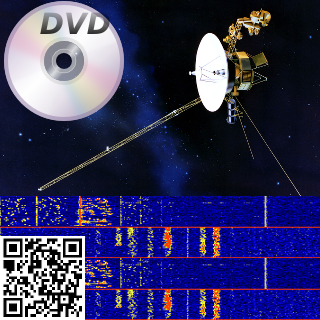
In the description it gave you "Can you recover the magic code?" with a link to an image:


Initial thoughts are... Okay, we have this image that's very retro with a DVD, a Satelite, a QR code & something that looks like a frequency visualization of some sort...

What could this possibly be, maybe QR Code mixed with the result of the frequency visualization turned into audio ? (I may be this sinister if I ever start designing challenges)

I first tried the QR code, and it seemed to be some trolling or self-advertising (or both), that linked to the CTF page. (https://capturetheflag.withgoogle.com/)


This wasn't it so I moved on to my usual routine with stego images.
Fired up StegSolve and looked at the bit planes of the image.

For anyone interested in the full process, I've included a step-by-step instruction below, you can find the link to the StegSolve on this list - https://github.com/apsdehal/awesome-ctf#stegano


First open up the StegSolve program:


You should see StegSolve pop up:


 Now open the file you would like to analyze:


You'll see the image, and at the bottom there is a left and right arrow used to cycle through common image manipulation operations that could help with identifying hidden data:


Ended up stopping at Alpha Plane 0, this seemed like a very clear chunk of data hidden in the lowest alpha plane:


Go ahead and save the image somewhere, I saved it using the default name (solved.bmp):


Now was the tricky part... what do we do with this data?

I started by reading the bits in with python, unfortunately nothing too useful looking came out of that..

Looking at the image I reconsidered the possibility of the visual frequency image being part of the challenge, but didn't know how.  Eventually googled all the items on the image together to see if they had any relationship.  I searched for:  "dvd satellite qr code" - http://lmgtfy.com/?q=dvd+satellite+qr+code

And one of the first results was a page on Reed-Solomon error correction codes.  It mentioned on that page, that all of these mediums shown in the image used Reed-Solomon error correction.... that couldn't just be a coincidence.


So looking around for a python library to handle this I found one quickly on PyPi - https://pypi.python.org/pypi/reedsolo


Started to write a few examples up pulling in the alpha image that was extracted, but found nothing.  I wasn't really sure which Codec to use at first.  Even started writing a brute-forcer to check each Codec available up to 100.


After a while (giving up and looking at other challenges) -- I saw an update on the Magic Code challenge, mentioning the metadata was updated.  Running exiftool again now gave this interesting result:

» exiftool MagicCode.png
ExifTool Version Number         : 10.08
File Name                       : MagicCode.png
Directory                       : .
File Size                       : 187 kB
File Modification Date/Time     : 2016:05:01 11:22:52-07:00
File Access Date/Time           : 2016:05:01 11:31:48-07:00
File Inode Change Date/Time     : 2016:05:01 11:22:52-07:00
File Permissions                : rw-r--r--
File Type                       : PNG
File Type Extension             : png
MIME Type                       : image/png
Image Width                     : 320
Image Height                    : 320
Bit Depth                       : 8
Color Type                      : RGB with Alpha
Compression                     : Deflate/Inflate
Filter                          : Adaptive
Interlace                       : Noninterlaced
Comment                         : (40,8) bytes
Image Size                      : 320x320
Megapixels                      : 0.102


Interesting! There was now a new Comment!  This also looks like it may be the Codec I was looking for, but why were there two values?  Had to look more into how reed solomon correction codes worked....


Comment                         : (40,8) bytes


I immediately noticed 40 * 8 = 320 (size of the image width/height) -- so it must have to do with how the image was formed, and maybe the developer went with that for convenience.


Also started looking at the constructor for this python reedsolo lib, because it showed only one value being passed into the codec constructor in the examples.
The constructor can be found here - https://github.com/tomerfiliba/reedsolomon/blob/master/reedsolo.py#L746


    def __init__(self, nsym=10, nsize=255, fcr=0, prim=0x11d, generator=2, c_exp=8):
        '''Initialize the Reed-Solomon codec. Note that different parameters change the internal values (the ecc symbols, look-up table values, etc) but not the output result (whether your message can be repaired or not, there is no influence of the parameters).'''
        self.nsym = nsym # number of ecc symbols (ie, the repairing rate will be r=(nsym/2)/nsize, so for example if you have nsym=5 and nsize=10, you have a rate r=0.25, so you can correct up to 0.25% errors (or exactly 2 symbols out of 10), and 0.5% erasures (5 symbols out of 10).
        self.nsize = nsize # maximum length of one chunk (ie, message + ecc symbols after encoding, for the message alone it's nsize-nsym)
        self.fcr = fcr # first consecutive root, can be any value between 0 and (2**c_exp)-1
        self.prim = prim # prime irreducible polynomial, use find_prime_polys() to find a prime poly
        self.generator = generator # generator integer, must be prime
        self.c_exp = c_exp # exponent of the field's characteristic. This both defines the maximum value per symbol and the maximum length of one chunk. By default it's GF(2^8), do not change if you're not sure what it means.


So it looks like the first argument they show in the examples is nsym...
In the comment they're showing two values (40, 8) -- in conventional reed solomon this will be (nsize, ndata) but in this library they're using (nsym, nsize).  The nysm value is just (nsize-ndata).  More information can be found on that here - http://iris.elf.stuba.sk/JEEEC/data/pdf/11-12_103-05.pdf

So now we know the second argument (nsize) is 40, and the first argument is (nsize-ndata) or 32.
The codec portion of this took me the longest to figure out, but with all of that in place, we have the final decoder! (I had noticed this when anything came out of the decoder that wasn't \x00 or an empty string...)


#!/usr/bin/env python
import sys
import reedsolo
from PIL import Image

if (len(sys.argv) > 1):
  IMG_FILE = sys.argv[1]
else:
  print "Usage: $ readImg "
  exit(1)

img = Image.open(IMG_FILE).convert('1')
data = img.getdata()
pixels = img.load()

bits = []

for x in range(img.size[0]):
  for y in range(img.size[1]):
    pixel = pixels[y,x]
    if pixel == 0:
      bits.append("0")
    else:
      bits.append("1")

b = "".join([str(x) for x in bits])
bytes = bytearray(int(b[x:x+8], 2) for x in range(0, len(b), 8)).rstrip("\xff")

rs = reedsolo.RSCodec(32, 40)
print repr(rs.decode(bytes))

f = open("SomeBytez", "w")
f.write(rs.decode(bytes))
f.close()


This dropped a gzip file from the looks of it using file:

» file SomeBytez
SomeBytez: gzip compressed data, last modified: Wed Apr 27 14:43:24 2016, max compression


We have to move it to a .gz file to uncompress it as gunzip requires this.

» mv SomeBytez someBytez.gz
» gunzip someBytez.gz
» file someBytez
someBytez: ASCII text, with no line terminators
» cat someBytez
Congratulations, Voyager!  Your flag is: CTF{who_knew_math_helped_with_anything_but_crypto}%


We've got the Flag!!! Never thought this one was going to work, but it did!
Learned a lot about erasure codes during this process! Good Ol' Information Theory :D

CTF{who_knew_math_helped_with_anything_but_crypto}


Sunday, August 16, 2015

Defcon 23 :: OpenCTF 2015 - Absence (200)


I loved this challenge, it exactly my cup of tea in the lands of obscurity.

Here's the code provided in the challenge:

#include           
 
void one(char k)          
{ 
  unsigned int i, bytes[]={0x0a,0x5d,0x2c,0x0b,0x37,0x38,0x04,0x05,0x1f,0x4c,0x05,0x1f,0x4c,0x02,0x03,0x18,0x4c,0x18,0x04,0x09,0x4c,0x0f,0x03,0x08,0x09,0x4c,0x15,0x03,0x19,0x4b,0x1e,0x09,0x4c};       
 
  for(i=0; i<32; i++)       
 printf("%c",(char)bytes[i]^k);
  printf("\n");          
} 
            
 
char two(char c)          
{ 
  return (c^0x32)-7;        
} 
            
 
void main(int argc, char** argv)         
{ 
  // lo0kin-fo
  one(two('A'));          
} 


First I tried compiling it and looking at the output. When doing this we get the following:
f1@g[This is not the code you're 

Cool, starts with a lead! That's nice!
After trying to change the 'A' value on line 22, to see if it changed the output, I got nothing and moved on to look for other clues.
Playing around in vim, one act I occasionally play with is pressing $ to go to the end of the line and skimming through the code by hitting each end point. In this case, there were a few spaces after one of the lines. With a past in heavy code reviews, this made me a little uneasy inside, so I decided to do another quick check:
/\t
With that we get wayy too many tab characters in irregular places:


This immediately redirects my thoughts to Whitespace, the programming language. If you're unfamiliar with whitespace, you can check out an example program here - http://www.99-bottles-of-beer.net/language-whitespace-154.html
The gist is that it's a language completely comprised of spaces, tabs, and linefeeds.

Because it's whitespace, and not the most supported in the world, I decided to do something I rarely find myself doing - finding an online compiler. In this case, there was a great one with a gomod example of whitespace found here - http://www.tutorialspoint.com/execute_whitespace_online.php (If anyone knows of good offline *nix whitespace compilers, please leave them in the comments section below!)
 lo0kin-fo]

This resulted in the full flag:
f1@g[This is not the code you're lo0kin-fo]

Sunday, May 3, 2015

Volga CTF 2015 - Find Him (Recon) 250

Volga was a fun CTF, with many Recon and Stego challenges as well as challenging pwnables and reversing.  One of the challenges I helped with the most was the "Find Him" recon assignment.  You were given one hint to start with: "Find Greg Medichi he is from Sydney, his code contains a valuable data"

Simple enough, let's search google for an exact match of his name "Greg Medichi"
Cool, only 3 results!  And one of them is the Sydney G+ page, let's check it out.
Search on the page for his name again, hmmmmm no dice, but it was crawled returning his name so it must be in a comment or in the cache.  Cache didn't show a readable page so the next choice was to look through the source.  After pulling up the Chrome's element inspector and searching again for his name, it showed up in a few places.  Now is the point of preference, but I thought it may be a lot easier to search through this on the terminal, so I curled the G+ Sydney page to find a link to his profile image and personal G+ page.

Next after curling his G+ page I grepped for 'code' which returned a post to his github account.

After checking out his github page, he only had one repo with no other contributions.  The flag must be close....
Looking through the repo it looked like .gitignore could be interesting, but then there was also another branch.  After checking out the branch, the flag was found in a previous commit.

Simple Example Workflow:

curl https://plus.google.com/+Sydney | grep -i "greg medichi" | tr '"' '\n' | egrep -i "greg|http" | tail -n 3

G+ Profile Image: https://lh3.googleusercontent.com/-M-UOwrBR81s/AAAAAAAAAAI/AAAAAAAAABM/LA55YSwP-Bg/photo.jpg
G+ Profile Page: https://plus.google.com/100247380806038877359
curl https://plus.google.com/100247380806038877359 | grep -i code | tr '"' '\n' | grep -i greg | tail -n 3

Check out the github account... Only one repo....
git clone https://github.com/gregmedichi/todoapp
cd todoapp
git branch -a

Find the other branch "front_end"
git checkout origin/front_end
git log

Found a log entry mentioning "unfinished" changes
git checkout 6b5334844a19413124605b77507437924d233f27
git diff master

String Found in Diff:
+          <!-- TODO Add a logic Fl@g={LURK1NG_G1T_1S_PHUN} -->