Showing posts with label fix. Show all posts

Monday, March 5, 2018

Pragyan CTF 2018 - Pictorial mess (300)


This was an annoying but very rewarding challenge in the end once the idea came together.
We start off with a file called files.zip which contains seven png's from 0-6.png:


Source files: https://github.com/vitapluvia/Pragyan-CTF-2018/tree/master/stego/pictoral-mess

Looking at these we have the following images filled with color:


First we could see if any of these images have hidden values in the RGB values, they seem like a good candidate for this. Opening them in stegsolve and cycling through the channel filters, we start to see letters appear:


This seems to spell out 'MakeMeTall', attempting to submit this as the flag failed though.  It was just a clue towards the next step.

After some procrastination, it was time to try what must have been the right path. Edit the PNG in a hex editor and change the height value.

For this we'll source the amazing corkami binary references - https://github.com/corkami/pics, in particular the PNG reference:
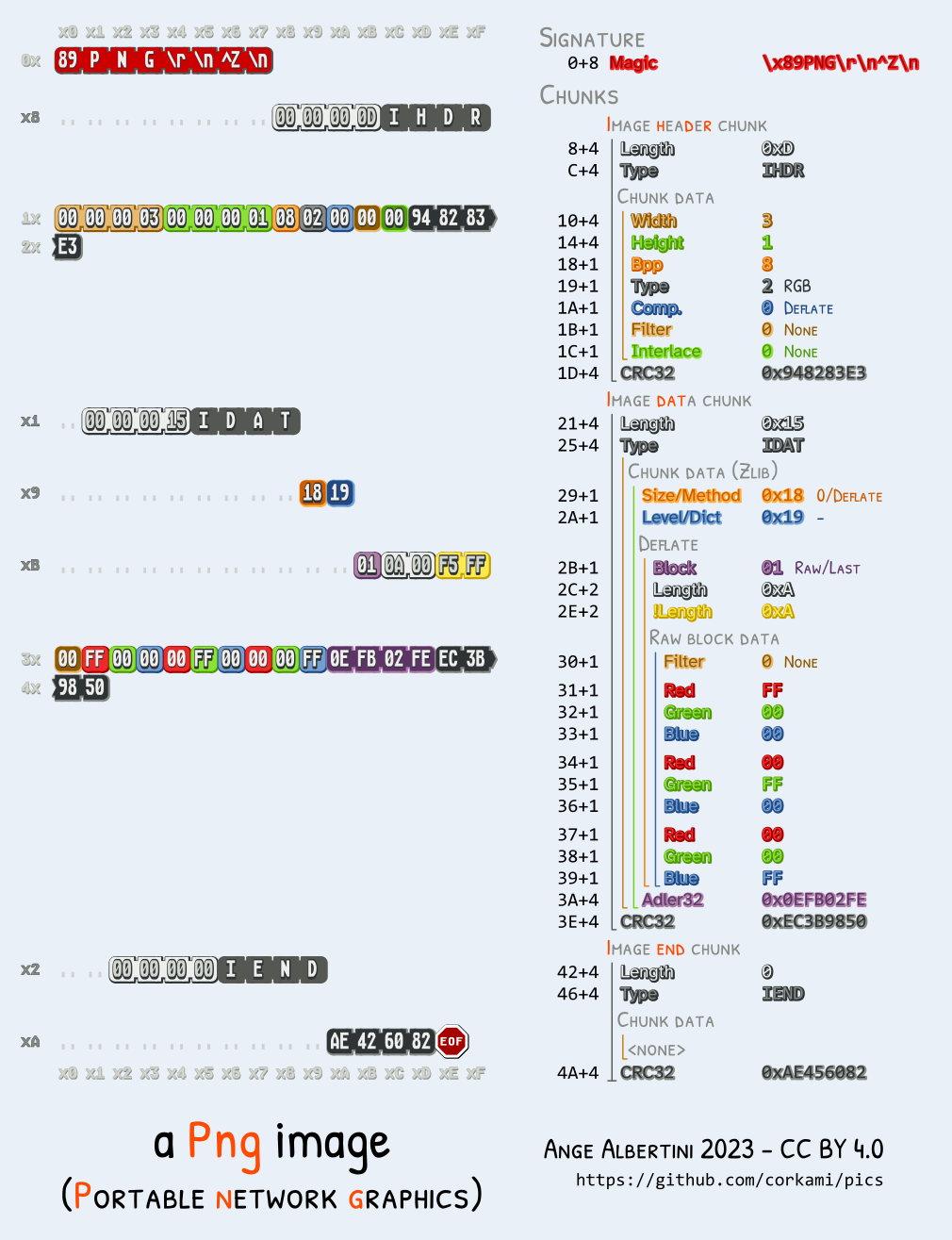

There are many great hex editors out there, feel free to use your favorite if you're following along.

We want to look for IHDR and then skip past the next 4 bytes for the width to get to the height.
For each image, this value is set to 0x0000017C.

To make the image taller, let's increase that height value to 0x0000047C.
After we save the new copy of this image, we'll notice a CRC error when checking it using pngcheck.

zlib warning:  different version (expected 1.2.5, using 1.2.11)

0.png  CRC error in chunk IHDR (computed b301c292, expected e139ed35)
ERROR: 0.png

If we run pngcheck again, we get no errors, and if we look at the image it seems to have some extra information on the bottom!


Now we can repeat this process for the other images and check out the collection we get back:


Now this looks a lot like the bottom strips may be bits which could decode to character values. There are 20 'bits' per image and 7 images total. If we stack these bits, we get the header of this writeup:


If we attempt to concatenate these rows of bits together, we don't get anything too useful at all.
If we go from top to bottom, left to right, we're able to find a message. Trying the first column we can see what it decodes to:

$ python
>>> chr(0b1110000)
'p'

This is the beginning of the expected flag format 'pctf{', looks good!

Let's throw this in a small python script to decode it all:

#!/usr/bin/env python
from pwn import unbits

b = [
  '11111101111110101111',
  '11111011111111111111',
  '10101011000101110011',
  '00001001110010000101',
  '00110000111100001011',
  '01011110110001101000',
  '01001011100001111001',
]

flag = ''

for x in range(0, 20):
  bits = [0]
  for y in range(0, 7):
    bits += b[y][x]
  flag += unbits(bits)

print flag

This results in:

pctf{B3yondth3s1ght}


Monday, April 24, 2017

PlaidCTF 2017 - zipper (50)


In this challenge we're given a corrupted zip we must repair.

Description:

Something doesn't seem quite right with this zip file. 

Can you fix it and get the flag?

We can see the corruption by attempting to unzip the file:

$ unzip zipper.zip
Archive:  zipper.zip
warning:  filename too long--truncating.
[  ]
:  bad extra field length (central)

To inspect this further we can use zipdetails:

$ zipdetails zipper.zip

0000 LOCAL HEADER #1       04034B50
0004 Extract Zip Spec      14 '2.0'
0005 Extract OS            00 'MS-DOS'
0006 General Purpose Flag  0002
     [Bits 1-2]            2 'Fast Compression'
0008 Compression Method    0008 'Deflated'
000A Last Mod Time         4A9299FC 'Tue Apr 18 19:15:56 2017'
000E CRC                   532EA93E
0012 Compressed Length     00000046
0016 Uncompressed Length   000000F6
001A Filename Length       2329
001C Extra Length          001C
Truncated file (got 206, wanted 9001):

This reflects a similar message showing the "Filename Length" is very large and there's some truncation because of the calculated size. The "wanted" value of 9001 equals the same value seen in "Filename Length" in hex 0x2329.

Next let's create a normal zip file to compare the binary structure.

$ echo '1234' > abc && zip abc.zip abc
  adding: abc (stored 0%)

$ xxd abc.zip
00000000: 504b 0304 0a00 0000 0000 ad79 984a 2117  PK.........y.J!.
00000010: 937d 0500 0000 0500 0000 0300 1c00 6162  .}............ab
00000020: 6355 5409 0003 8678 fe58 8078 fe58 7578  cUT....x.X.x.Xux
00000030: 0b00 0104 f501 0000 0414 0000 0031 3233  .............123
00000040: 340a 504b 0102 1e03 0a00 0000 0000 ad79  4.PK...........y
00000050: 984a 2117 937d 0500 0000 0500 0000 0300  .J!..}..........
00000060: 1800 0000 0000 0100 0000 a481 0000 0000  ................
00000070: 6162 6355 5405 0003 8678 fe58 7578 0b00  abcUT....x.Xux..
00000080: 0104 f501 0000 0414 0000 0050 4b05 0600  ...........PK...
00000090: 0000 0001 0001 0049 0000 0042 0000 0000  .......I...B....
000000a0: 00                                       .

$ xxd zipper.zip
00000000: 504b 0304 1400 0200 0800 fc99 924a 3ea9  PK...........J>.
00000010: 2e53 4600 0000 f600 0000 2923 1c00 0000  .SF.......)#....
00000020: 0000 0000 0000 5554 0900 035b c8f6 585b  ......UT...[..X[
00000030: c8f6 5875 780b 0001 04e8 0300 0004 e803  ..Xux...........
00000040: 0000 5350 2004 b814 082b f128 adaa 4acc  ..SP ....+.(..J.
00000050: d051 a8cc 2f55 c848 2c4b 5548 4e2c 2829  .Q../U.H,KUHN,()
00000060: 2d4a 4d51 28c9 4855 48cb 494c b7e2 0a70  -JMQ(.HUH.IL...p
00000070: 0e71 ab4e 3328 4acd 2b36 4c2e 8eaf 4cac  .q.N3(J.+6L...L.
00000080: ac25 c326 ea28 0100 504b 0102 1e03 1400  .%.&.(..PK......
00000090: 0200 0800 fc99 924a 3ea9 2e53 4600 0000  .......J>..SF...
000000a0: f600 0000 2923 1800 0000 0000 0100 0000  ....)#..........
000000b0: b481 0000 0000 0000 0000 0000 0000 5554  ..............UT
000000c0: 0500 035b c8f6 5875 780b 0001 04e8 0300  ...[..Xux.......
000000d0: 0004 e803 0000 504b 0506 0000 0000 0100  ......PK........
000000e0: 0100 4e00 0000 8800 0000 0000            ..N.........

First we can see the name show up twice within the first hex dump of abc.zip.
We may be interested to find the same part in zipper.zip since the first corruption seems to be a filename issue.

Highlighting the header / footer patterns found within the dumps above, we can see zipper.zip most likely has an 8 byte filename:

# first chunk:
abc.zip    : (1c00) 6162 63(55 54..)
zipper.zip : (1c00) 0000 0000 0000 0000 (5554 09)

# second chunk:
abc.zip    : (0000 0000) 6162 63(55 54..)
zipper.zip : (0000 0000) 0000 0000 0000 0000 (5554)

If we patch both size values to 8 and set the name to something valid, we should have something a little better.

So we edit the values accordingly:

Size_1: 29 23 => 08 00
Size_2: 29 23 => 08 00
Name_1: (1C 00) 00 00 00 00 00 00 00 00 (55 54)     => (1C 00) 41 41 41 41 42 42 42 42 (55 54)
Name_2: (00 00 00 00) 00 00 00 00 00 00 00 00 55 54 => (00 00 00 00) 41 41 41 41 42 42 42 42 (55 54)

Now if we look at this again using 7z we can see the file!

$ 7z l zipper.zip

Scanning the drive for archives:
1 file, 236 bytes (1 KiB)

Listing archive: zipper.zip

--
Path = zipper.zip
Type = zip
Physical Size = 236

   Date      Time    Attr         Size   Compressed  Name
------------------- ----- ------------ ------------  ------------------------
2017-04-18 19:15:55 .....          246           70  AAAABBBB
------------------- ----- ------------ ------------  ------------------------
2017-04-18 19:15:55                246           70  1 files


$ 7z e zipper.zip

Scanning the drive for archives:
1 file, 236 bytes (1 KiB)

Extracting archive: zipper.zip
--
Path = zipper.zip
Type = zip
Physical Size = 236

Everything is Ok

Size:       246
Compressed: 236

Then catting the output, we get:

$ cat AAAABBBB

Huzzah, you have captured the flag:
PCTF{f0rens1cs_yay}